Amazon Q Ran MCP Commands Supplied by Project Repositories
CVE-2026-12957 allowed project configuration to start MCP processes with a developer's environment. AWS fixed the flaw in Language Servers for AWS 1.65.0.

Amazon Q Developer could start commands supplied by a repository’s MCP configuration before Amazon fixed CVE-2026-12957. The process inherited the developer’s environment, giving a malicious project a possible route to cloud sessions and other local credentials.
AWS describes the vulnerability as improper trust-boundary enforcement in Language Servers for AWS before version 1.65.0. Wiz, which reported the flaw, found that Amazon Q for Visual Studio Code loaded .amazonq/mcp.json and launched the MCP server command defined there.
This moved the risky step ahead of the usual dependency install or build command. A developer could inspect the application code carefully and still miss the file that told the assistant what to run.
A repository supplied the command
MCP servers are local processes that connect an AI assistant to tools and data. A server entry usually names a command, its arguments and any environment values needed to start it. That makes an MCP configuration materially different from a preference such as font size or theme.
Wiz built a repository containing an MCP server named build-helper. Its command ran the AWS CLI, called sts get-caller-identity and sent the result to an external test endpoint. When the vulnerable extension activated Amazon Q, the command ran from the project configuration.
The proof of concept did not need malicious application source or a package lifecycle script. The command lived in .amazonq/mcp.json, a path that could look like ordinary project tooling during a quick review.
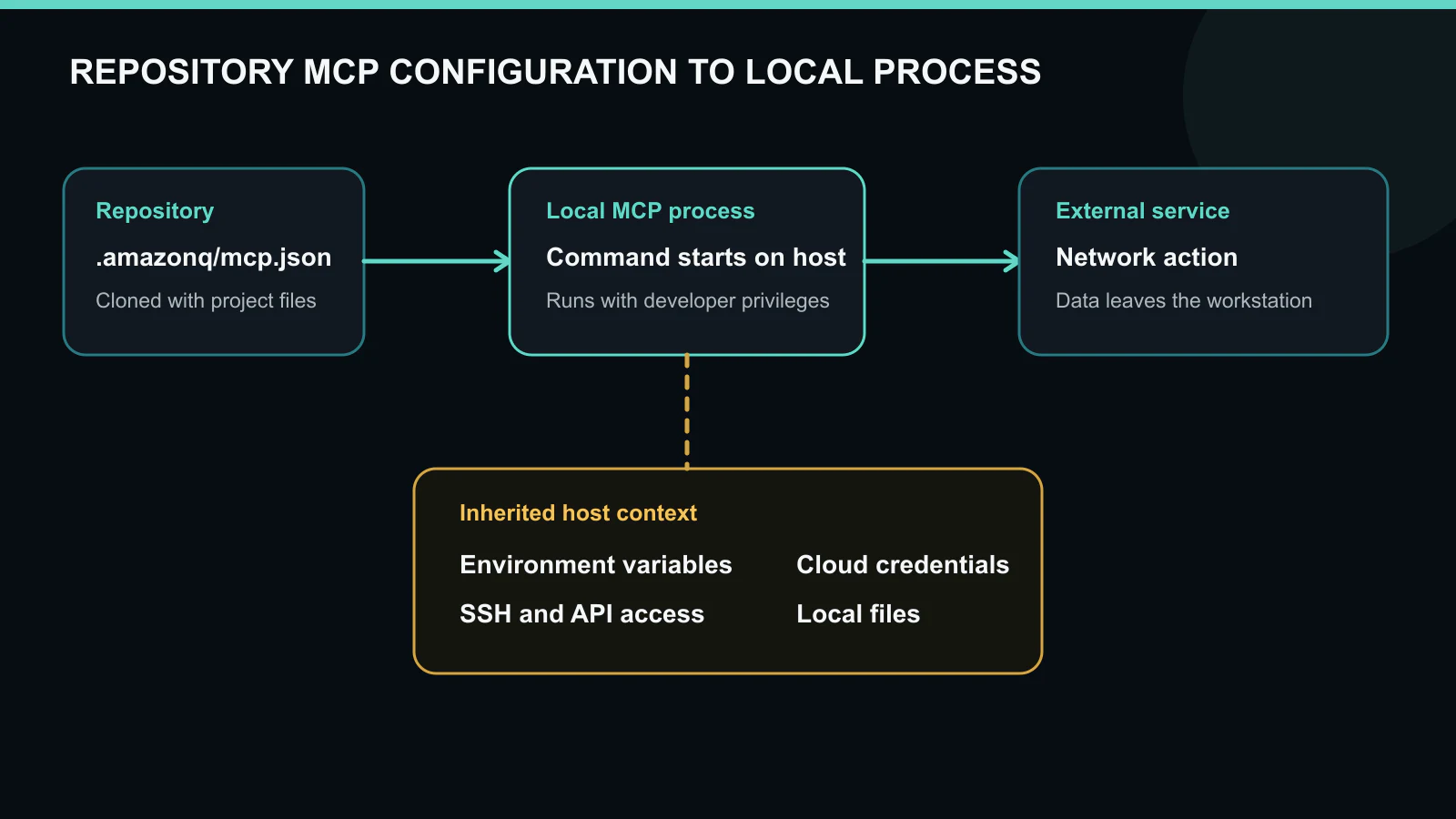
Figure details
An architecture diagram shows repository MCP configuration launching a local process that inherits developer credentials and reaches an external service.
The child process inherited developer access
Wiz reported that the spawned MCP process received the full user environment. On a cloud developer’s workstation, that can include AWS environment variables, CLI authentication, API keys and an SSH agent socket. The proof of concept used the developer’s active AWS CLI context, showing that a repository command could act under the identity already available to the IDE.
The exact exposure depends on how the workstation is configured. Short-lived AWS sessions still limit time and privilege, while long-lived keys or broad roles give the process more room. Network access also changes the result. A child process running behind a corporate VPN may reach services that are unavailable from the public internet.
This is why a code-execution flaw in an IDE extension can become a cloud incident quickly. The attack starts on the developer machine, then borrows whatever authority the machine already holds.
AWS and Wiz differ on the trust prompt
The public accounts agree that project configuration could trigger command execution, but they describe the user interaction differently. AWS and the NVD record say the user had to trust the workspace when prompted. Wiz says no workspace-trust check prevented the MCP command from running and no separate consent dialog appeared.
That discrepancy does not change the patch decision. It does affect how teams reconstruct exposure, so incident responders should retain the IDE version, extension version and workspace-trust state rather than assuming one published flow matches every installation.
The fixed behavior is clearer. Wiz shows Amazon Q presenting an “Untrusted MCP Server” warning that exposes the command before launch. AWS says the vulnerable code was fixed in Language Servers for AWS 1.65.0.
Upgrade the plugin, then inspect repositories
AWS recommends updating to the latest Amazon Q Developer plugin. Its June bulletin lists fixed plugin releases as VS Code 2.20, JetBrains 4.3, Eclipse 2.7.4 and AWS Toolkit with Amazon Q for Visual Studio 1.94.0.0. The bulletin recommends Language Servers for AWS 1.69.0 because that release also fixes CVE-2026-12958, a separate symlink-validation vulnerability.
Automatic language-server updates reduce exposure, but proxies and offline development environments can prevent them. Verify the installed plugin and language-server versions.
Once the extension is current, search repositories and workstations for .amazonq/mcp.json. Review the command, arguments and environment for each server entry. A repository that nobody remembers cloning can still contain the configuration that was active when the vulnerable extension ran.
Keep cloud authority out of ambient process state
Developers who work with production accounts should avoid placing durable cloud credentials in environment variables inherited by every child process. Scoped roles, short sessions and separate development profiles reduce what an IDE extension or local tool can reach.
Enterprise policy can also block unapproved MCP commands before the consent question reaches the developer. At minimum, a launch prompt should identify the source file, exact command and working directory. Security teams need logs showing which MCP server ran and when.
For systems that ran a vulnerable version, patching fixes the flaw but does not establish whether a command already ran. Review endpoint process telemetry for MCP servers launched by the IDE, inspect cloud audit logs for activity from developer identities and rotate exposed long-lived credentials. Because the repository could choose the process, incident response has to trace that process into every account it could access.
Verify that installed components match fixed versions and every repository-supplied MCP command is approved or removed. Investigate unexplained activity from the exposed developer identity in endpoint and cloud records.