NadMesh Scans Exposed AI Services for Cloud Credentials
The botnet gives AI workbenches priority in its scan queue, then searches compromised hosts for cloud credentials, service-account tokens, and callable tools.

QiAnXin XLab disclosed NadMesh on July 17 after analyzing a Go-based botnet that gives exposed AI services priority in its scan queue. Its targets include ComfyUI, Ollama, n8n, Open WebUI, Langflow, and Gradio.
Once NadMesh compromises a host, it searches beyond the service that provided entry. XLab found code for collecting AWS credentials, Kubernetes service-account tokens, Docker configuration, environment files, SSH sessions, model inventories, and exposed Model Context Protocol tools. Any team running an internet-facing AI workbench should assume the process’s local privileges and credentials are part of the exposure.
AI services receive priority in the scan queue
NadMesh uses Shodan queries to find common AI and automation services. The controller adds those results as individual high-priority scan targets. XLab’s analysis lists ports associated with ComfyUI, Ollama, n8n, and Gradio alongside infrastructure targets such as Kubernetes, Docker, Redis, Jenkins, and Elasticsearch.
The controller supports more than 20 exploitation paths. One MCP path sends a JSON-RPC tools/call request to a tool named execute_command. Other paths attempt pod creation through the Kubernetes API, container creation through an exposed Docker API, Redis configuration abuse, weak SSH credentials, and access to a Jenkins script console.
Support for an exploit in the controller does not establish that every path succeeded in the wild. XLab did observe the botnet operating at scale in early July and documented the code, task scheduling, reporting, and deployment machinery that makes those attempts possible. The researchers did not publish a victim count.
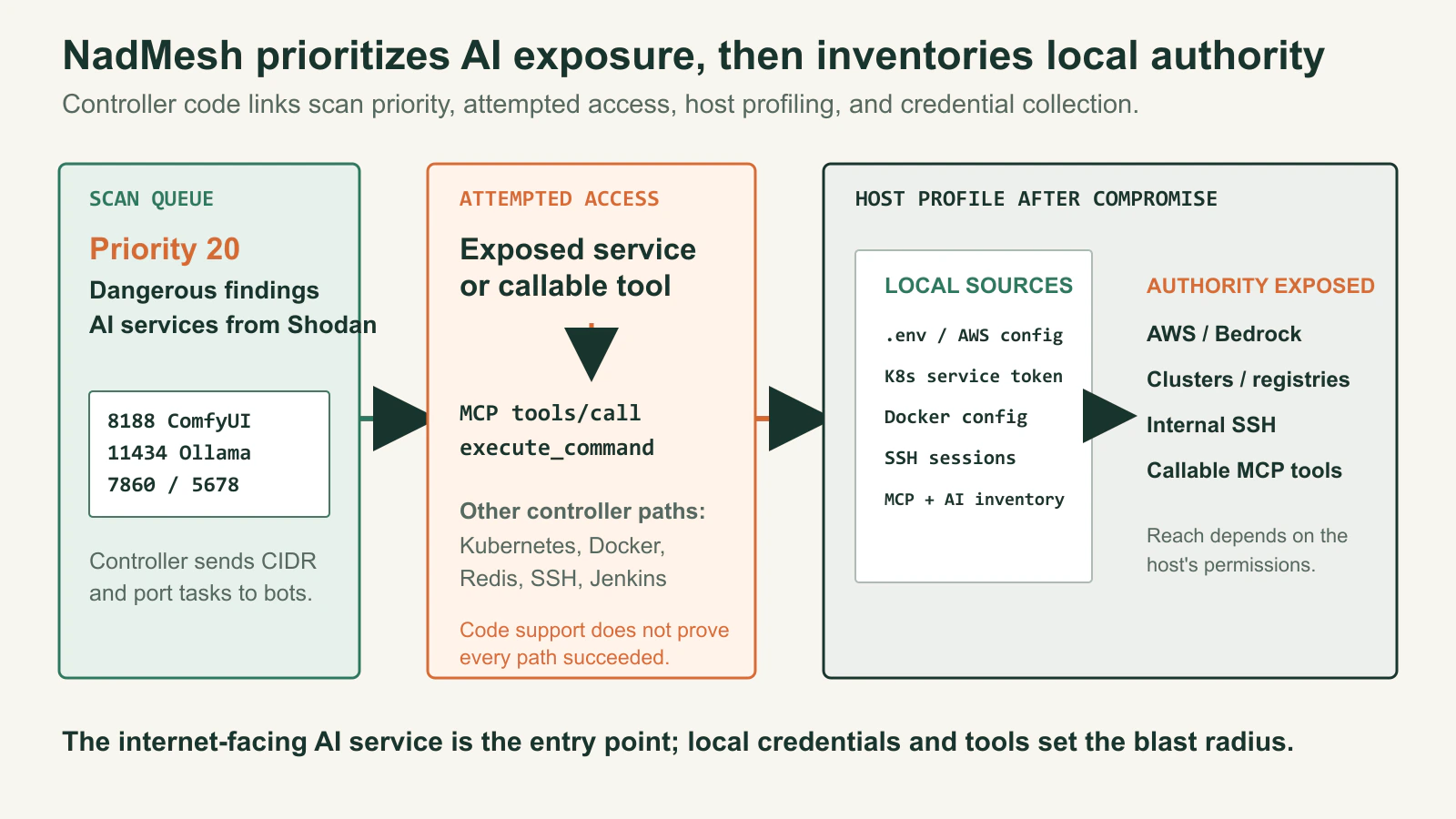
Figure details
NadMesh assigns high priority to dangerous findings and AI services discovered through Shodan, including ComfyUI, Ollama, Gradio, and n8n ports. Controller code supports attempted access through exposed services and an MCP tools/call request to execute_command, along with Kubernetes, Docker, Redis, SSH, and Jenkins paths. After compromise, the bot profiles local sources such as environment files, AWS configuration, Kubernetes service-account tokens, Docker configuration, SSH sessions, and MCP or AI inventories. The authority available in those sources can expose AWS or Bedrock access, clusters, registries, internal SSH targets, and callable MCP tools. The diagram describes controller capabilities; it does not assert that every supported path succeeded in the wild.
The credential search starts after compromise
The bot agent reports a detailed host profile to its controller. Fields documented by XLab include environment credentials, AWS access keys, Amazon Bedrock credentials, Kubernetes service-account data, Docker state, SSH sessions, internal network ranges, installed AI models, and MCP services. It also looks for files such as ~/.aws/config, .env, and ~/.docker/config.json.
This collection explains why a lightly governed AI host can have an outsized blast radius. A notebook or model interface may have started as a temporary experiment, then accumulated access to buckets, registries, clusters, databases, and third-party APIs. The internet-facing service is the entry point. The credentials available to its process determine how far the intrusion can travel.
XLab also found three persistence mechanisms on infected hosts: an SSH key added to authorized_keys, hidden agent files in temporary directories, and cron jobs that restart the malware. Removing the visible process leaves the other mechanisms available to restore it.
MCP tools can extend the intrusion
The MCP code uses callable tools as an exploitation route. A server exposing shell or SQL execution can hand the botnet an action path without another memory-corruption bug or software install.
That risk depends on the deployed tool and its permissions. An MCP server limited to a narrow, authenticated operation presents a different exposure from one offering shell access to anonymous clients. Asset inventories should therefore record the tools a server exposes, the identity each tool uses, and the systems reachable under that identity.
The same review applies to AI workflow products that can deploy code, fetch secrets, send messages, or modify tickets. Their web interface may look like a development aid, but their effective privilege comes from the actions configured behind it.
Verify exposure from outside the trusted network
Start with an inventory built from the public side of the network. Include approved cloud accounts, research environments, developer systems, lab ranges, and old demonstration hosts. Check for the service ports and titles your teams actually use.
For every reachable service, identify its owner and test the unauthenticated path. The expected result is a denial before the product UI, API, model endpoint, or MCP tool becomes available. Put remote access behind an authenticated gateway or a private network and restrict inbound traffic at the host or cloud firewall as well.
Next, inspect the service account and host:
- Record environment variables and mounted secrets available to the process.
- Review
.env, AWS, Docker, Kubernetes, SSH, model-provider, and registry credentials on disk. - Enumerate MCP tools, plugin actions, workflow credentials, and outbound network destinations.
- Remove production credentials from demonstrations and research systems unless their use is documented and scoped.
- Alert on newly exposed service ports and on configuration changes that broaden a tool’s permissions.
If compromise is suspected, preserve evidence before cleanup. Check authorized_keys, /etc/cron.d, /dev/shm, /var/tmp, and /tmp for the persistence paths documented by XLab. Isolate the host, remove every persistence mechanism, and then revoke credentials the service account or process could read. Issuing replacement keys before removing persistence gives the attacker another chance to collect them.
XLab published 209.99.186[.]235 and cdnorigin[.]net as campaign indicators. They can support a historical hunt, but they are not a complete detection strategy. The controller’s polymorphic build process creates varying agent hashes, and infrastructure can change.
An exposure review is complete only when the owner can name the credentials and tools available to the service, then demonstrate that unauthenticated network access is denied.