XCSSET v40 Infects Every Xcode Project on a Compromised Mac
A poisoned build can start a memory-resident loader, re-arm through macOS preferences, and seed more projects, Git hooks, and archives.
Unit 42 says attackers have used XCSSET v40 since early April 2026 to hide malicious run-script phases in Xcode projects and vulnerable Git repositories. A developer triggers the malware by building a poisoned project. The new version can then infect every Xcode project it finds on the Mac, alter Git pre-commit hooks, and insert its loader into project archives.
The researchers observed infected Xcode projects associated with dozens of legitimate applications and thousands of active users, with a higher volume of attacks targeting developers in South Asia. The report does not identify the affected applications, repositories, or organizations. It also does not establish how many downstream builds shipped code from a contaminated project.
One poisoned build starts a four-stage loader
XCSSET begins inside the project files. Unit 42 found a downloader embedded in benign Xcode content. When Xcode runs the malicious build phase, layers of hexadecimal and Base64 encoding resolve into a request to the attacker’s command infrastructure.
The first stages collect the operating-system type, current user, hardware details, and serial number. An approved host receives an obfuscated Bash script that writes a loader to /tmp/r and compiles an AppleScript wrapper at /tmp/p.app. The wrapper runs through osascript, retrieves the main orchestrator, and deletes both staging files after execution.
The orchestrator, internally named boot, pulls task-specific modules and decrypts them in memory. Unit 42 identified 17 modules in v40, including components for project infection, Git-hook infection, browser hijacking, data theft, clipboard manipulation, and a Telegram Desktop replacement. The researchers saw the loader binary recompiled repeatedly and received eight distinct hashes on one endpoint in 24 hours, which limits the value of a single file hash.
Project infectors turn one workstation into another delivery point
Three v40 modules spread malware to local project copies. replicator_finder searches for Xcode projects and injects the malware. git_finder places the payload in Git pre-commit hooks. zip_infect_finder recursively searches user directories for ZIP archives containing Xcode projects and modifies those copies.
After the Mac is compromised, existing projects, local repositories, and archived project copies can carry a new malicious build phase even after the original staging files are gone. A developer can later commit, share, or build one of those modified artifacts through a normal workflow.
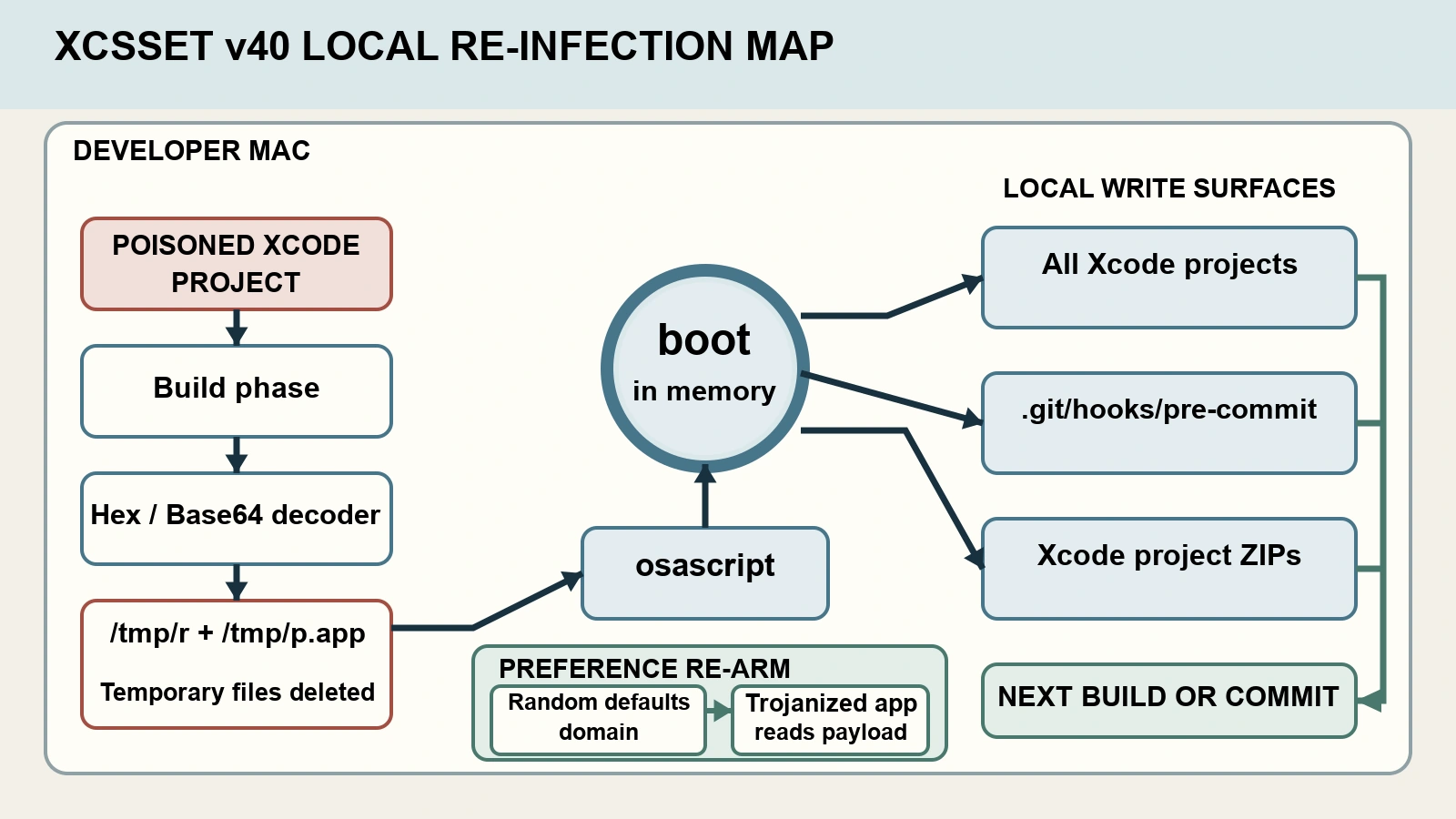
Figure details
Inside one developer Mac, a poisoned Xcode project runs a malicious build phase. A Hex or Base64 decoder produces temporary loader files, which run through osascript and start the memory-resident boot orchestrator. Boot can dispatch local infectors that modify Xcode projects, Git pre-commit hooks, and Xcode projects inside ZIP archives. A separate re-infection mechanism stores a staging payload in a randomly named macOS defaults domain for a trojanized application to read. The temporary loader files are deleted after execution, while the modified projects, hooks, archives, and preference data can remain and support a later build, commit, or host re-infection.
Microsoft’s earlier XCSSET inventory analysis documents the same family-level pattern: infected Xcode projects execute during builds, Git hooks provide persistence, and suspicious decoding commands can originate beneath Xcode’s DerivedData path. Its published hunting logic looks for echo combined with xxd -p -r or base64 -d, piped to a shell from that build context.
macOS preferences can re-arm the malware
XCSSET v40 added a re-infection loop that stores a Base64-encoded staging payload in a randomly named macOS defaults preference domain. A trojanized or hijacked application reads and decodes that value, then re-arms the host. The payload records which vector launched it, such as an infected Xcode project or hijacked browser.
The malware also tries to weaken recovery. Unit 42 observed commands that disable the Software Update configuration channel, a loop that terminates CloudTelemetryService, a Perl process holding an exclusive lock on the XProtect signature database, and repeated resets of AppleEvents consent decisions after a user denies access.
These behaviors can leave evidence after the short-lived /tmp files disappear. Defenders can look for unusual defaults domains and writes, abnormal osascript process chains, Xcode build phases that decode text into a shell, unexpected ad hoc application signatures, and changes to automatic security-update settings. Unit 42 also published the campaign’s observed domains, IP addresses, URI patterns, and shared SSL thumbprint. Those indicators can support scoping. The rotating payloads and staged infrastructure make a clean indicator search insufficient.
Rebuild Hosts and Check Project Copies
Disconnect a suspected developer Mac before building another project or synchronizing repositories. Preserve the altered project files, shell configuration, LaunchAgent or LaunchDaemon entries, Git hooks, relevant preference domains, process history, and network records before cleanup. Microsoft’s XCSSET threat description specifically calls for preserving infected Xcode projects, inspecting unauthorized build phases, removing malicious pre-commit hooks, and retaining shell and launch persistence for analysis.
Inventory every Xcode project, local Git repository, and project ZIP that the account could modify. Inspect .pbxproj build phases, hidden .xcassets content, .git/hooks/pre-commit, and unexpected archives. Compare each item with a trusted commit or release source. Review remote repository history and build output for changes made during the likely infection window, then replace contaminated working copies from known-clean sources.
Treat credentials used on the Mac as exposed because XCSSET includes browser and data-stealing modules. From a clean system, invalidate browser sessions and rotate developer-platform credentials, SSH keys, and API tokens. Re-enable automatic security configuration updates and Rapid Security Response, verify the XProtect database can update, and confirm that no unauthorized defaults payload or launch persistence remains.
Verify the workstation’s clean state and compare all reachable projects and archives with trusted source. Investigate unexplained repository or release changes, replace affected credentials, and test that macOS security updates work. Missing endpoint history, short repository-audit retention, or untracked ZIP and project copies prevents a confident finding that propagation stopped at the first Mac.