One C2Looper backdoor sample used a direct server for command execution, then downloaded a newer build that moved its entire command channel into GitHub. The Rust-based malware can run shell commands, inspect a Windows host and its domain, fetch more payloads, inject shellcode, and return results to its operator.
Zscaler ThreatLabz disclosed C2Looper on August 17 after identifying the malware in July. Its researchers observed the older variant fetching the newer one through an upload command. That handoff joins two useful detection surfaces: an unusual DLL beside OneDrive and a GitHub repository acting as a control plane.
This is vendor research from Zscaler, which also promotes its own detection coverage in the report. ThreatLabz assesses with low-to-medium confidence that ClickFix campaigns delivered C2Looper and says the malware is likely tied to a ransomware-related actor. The analysis establishes the samples’ capabilities, but it does not quantify victims, affected organizations, sectors, or geography. It does not show which supported commands operators executed on victim systems.
Two channels expose one backdoor
The older C2Looper variant sends a plaintext HTTP POST to /api/beacon every second. Its JSON body contains the Windows username, DNS hostname, process ID, and a bot ID built from the username and hostname. Commands arrive with arg, cmd, ok, and seq keys. Results go to /api/result/BOT_ID/task_ID.
That version supports ping, run, shell, upload, and download. The run operation starts a command through cmd.exe and ignores its output. The shell operation captures output in c2_out.txt, reads the file, and returns the contents. The source says the download command saves pld.exe under %LocalAppData%, but its intended purpose remains unknown.
ThreatLabz found a task-ID parsing error in this build: the server supplied an integer for seq, while C2Looper expected a string and reported results under task ID 0. That combination of one-second beacons, host-derived bot IDs, and repeated result paths gives network defenders more than an address to match.
OneDrive stages the upgrade
The older upload command downloads a PE file and writes it as %LocalAppData%\Microsoft\OneDrive\wtsapi32.dll. C2Looper terminates the OneDrive process, then relies on a legitimate OneDrive executable to load the malicious DLL from that user-writable directory. ThreatLabz assesses that the command is an update mechanism as well as a way to hide execution behind DLL sideloading.
The vivid transition came when researchers observed the older build use that command to retrieve the latest C2Looper variant. OneDrive is an abused legitimate application here; the report does not describe a Microsoft vulnerability. Recognition depends on the surrounding sequence: an unexpected wtsapi32.dll in the local OneDrive directory, termination and restart of OneDrive, and execution followed by a new outbound command pattern.
Keep staged and executed artifacts separate during review. The presence of wtsapi32.dll proves that a file reached the sideload location. OneDrive loading that DLL, process-creation telemetry, or subsequent C2 activity proves execution.
GitHub becomes the control plane
C2Looper version 2 replaces the direct HTTP endpoints with a GitHub repository. It creates a directory for each bot and uses three JSON files: cmd.json stores commands, result.json stores command output, and beacon.json stores the bot ID and last-successful timestamp. GitHub is a legitimate shared service abused for command-and-control, so defenders should keep github.com resolvable and inspect the account, repository, path, process, and cadence rather than defanging or broadly blocking the hostname.
The newer command set adds ls, recon, drives, and inject. Its reconnaissance runs these commands:
ipconfig /allwhoami /allnltest /dclistnet group /domain "domain computers"net group /domain "domain admins"wmic product get name, version
The inject operation loads the legitimate winspool.drv, copies downloaded shellcode into its text section, and starts a thread there. The newer upload downloads a file from a dedicated repository folder into the Windows temporary directory. Its run operation executes a file with ShellExecuteW and deletes the file after successful execution, while shell captures command output through pipes.
ThreatLabz wrote that “C2Looper appears to be under active development.” The newer build fixes the earlier seq parsing bug and includes the marker !!! v2 !!! pongv2 from, which the malware returns for a ping command.
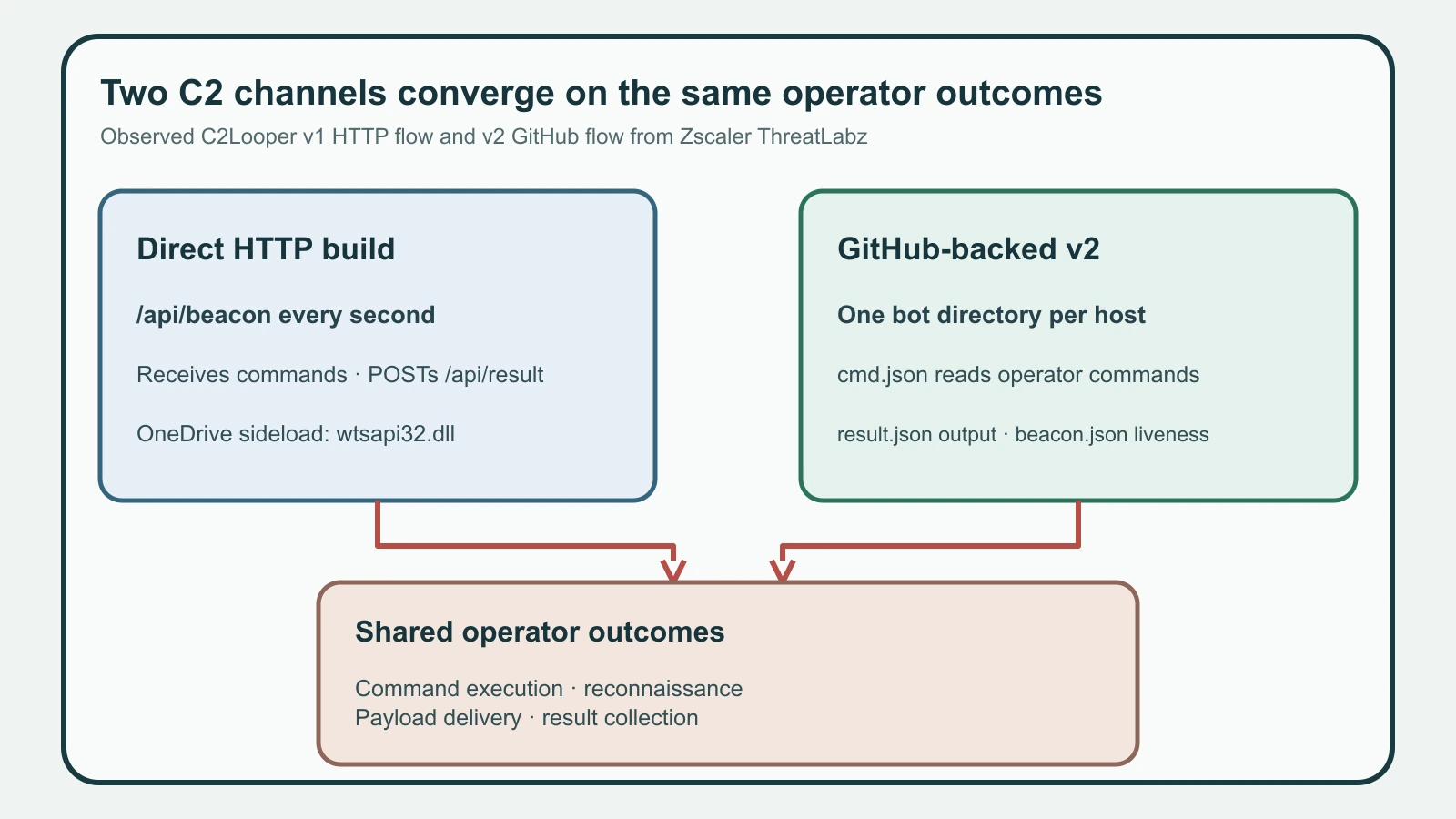
Figure details
The comparison begins with two observed C2Looper variants. The older variant sends host identity to a direct HTTP server every second through /api/beacon, receives commands, and returns output through /api/result. Its upload command places wtsapi32.dll in the local OneDrive directory and uses OneDrive to load it. The newer variant creates a per-bot directory in an abused GitHub repository, reads commands from cmd.json, writes output to result.json, and updates beacon.json. Both paths converge on shell execution, reconnaissance, payload delivery, and result collection.
Hunt host and repository signals
Start with the three published SHA-256 values:
f96ff2f3abbff7f382ace509b90e54853b4b61c402ecde27d82f1c17b414867b: latest C2Looper variant20675a659c338f7267fd09bacb431f4491f061d3acf42d07aca2dec3d25fa549: debug buildf59f32c9af4fa8a5dbd4668df8893593bc0c4324816cbf9b956acedcbfb8cdb6: older variant
ThreatLabz also lists two attacker-controlled C2 endpoints: 45[.]158[.]196[.]23:8888 and 45[.]158[.]196[.]184:8888. Search DNS, proxy, firewall, and EDR network telemetry for either address, then widen around the same process tree and time window. The public list may be incomplete.
On endpoints, search for %LocalAppData%\Microsoft\OneDrive\wtsapi32.dll, %LocalAppData%\pld.exe, c2_out.txt, the debug marker, and OneDrive termination followed by a DLL load from its user-writable directory. Correlate those artifacts with cmd.exe, ShellExecuteW, the six reconnaissance commands, access to winspool.drv, executable content in unusual memory regions, and short-lived files in the Windows temporary directory.
For GitHub traffic, identify non-development Windows processes that repeatedly read or write cmd.json, result.json, or beacon.json in a consistent per-host path. Preserve repository owner, repository name, object path, authentication identity, HTTP method, response size, and process lineage. Routine GitHub access is common. A non-browser process polling bot-specific JSON before discovery commands or payload execution is much stronger evidence.
Verify both command paths
Run the organization’s normal EDR and network searches across the suspected window for the three hashes, two IP:port values, OneDrive DLL path, pld.exe, c2_out.txt, the version marker, direct beacon endpoints, GitHub JSON filenames, and the published reconnaissance commands. For every hit, build a timeline that distinguishes file creation, DLL load, command execution, repository access, result upload, and deletion.
The expected clean result is no hash match, no contact with either published C2 address, no unexplained DLL load from the local OneDrive directory, and no bot-like GitHub JSON exchange from a non-development process. A staged file without execution evidence still requires scoping. Any confirmed DLL load, command result, or bot-specific repository exchange warrants host isolation, credential review, and investigation of payloads the operator may have delivered.
The channel change is the defender’s advantage: the first build leaves a regular direct beacon and OneDrive sideload path, while version 2 leaves structured repository operations. Search both surfaces, because finding only the newer GitHub traffic can miss the mechanism that installed it.