
An initial access broker tied to Payouts King ransomware is using Microsoft Teams messages and a fake Outlook update page to install a hidden Edge extension. The extension receives commands from attacker infrastructure, then passes host-level work to a Python backdoor through Chrome Native Messaging.
Zscaler ThreatLabz named the malware Edgecution in research published June 23. The campaign is useful to defenders because it joins browser telemetry and endpoint execution in a way that many monitoring programs still handle separately.
There was no browser vulnerability in the chain Zscaler described. The installer registered a native messaging host, supplied an extension that was authorized to call it and launched Edge with an attacker-controlled profile. The browser then used a supported integration feature exactly as configured.
The installer built both sides of the bridge
The lure arrived in Teams as an IT-themed request for a spam-filter update. Its fake Microsoft page offered several delivery routes, including an AutoHotKey script and clipboard instructions for batch or PowerShell commands. It also presented a credential form for Microsoft 365 or Outlook passwords.
When a victim ran the setup path, the scripts repaired an archive with altered ZIP headers and unpacked an embedded Python 3.13.3 runtime. They created a malicious extension directory under the user’s local application data, wrote a batch file to start the Python backdoor and registered a native messaging manifest. A scheduled task launched Edge with a separate user-data directory, the unpacked extension and these switches:
--load-extension, --no-first-run, --disable-sync and --headless=new.
The headless instance kept the extension out of the victim’s normal browser window. Its purpose was to maintain the command channel.
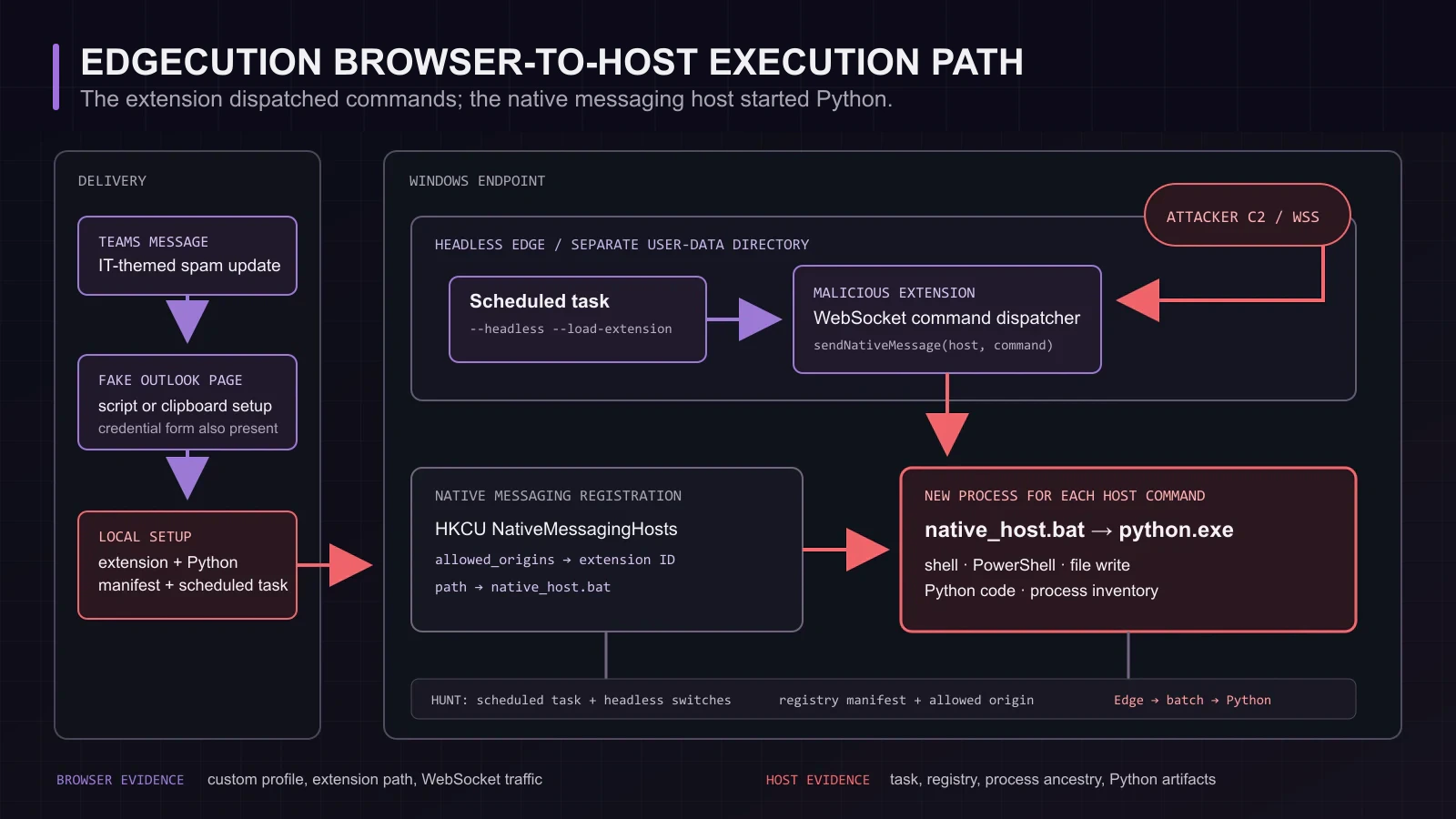
Figure details
An attack-path diagram follows the Teams lure through the scheduled headless Edge profile, WebSocket command channel, native messaging manifest and Python process on the Windows host.
Native messaging started the local process
Microsoft’s Edge documentation describes native messaging as a way for an extension to exchange JSON messages with a Win32 application over standard input and output. The host manifest names the executable path and lists the extension origins allowed to call it. Edge reads that manifest but does not install or manage the native program.
Edgecution’s setup created a manifest whose path pointed to native_host.bat and whose allowed origin matched the malicious extension. When the extension called chrome.runtime.sendNativeMessage, Edge started the batch file, which launched the Python backdoor. Zscaler found that a new Python process was created for each supported host command.
The extension communicated with command-and-control servers over WebSockets. It handled browser-level tasks itself, then relayed privileged requests to Python. The native component could collect system information, execute shell or PowerShell commands, write files, run Python code and enumerate processes.
The extension was the dispatcher. Host execution came from the native process Edge launched after consulting a locally registered manifest.
A normal extension inventory will miss it
Zscaler noted that the extension was loaded into a separate headless profile and was not installed in the browser profile a victim normally opened. A console that inventories managed-store extensions may therefore show nothing unusual while the scheduled task continues to start the attacker’s profile.
Endpoint evidence carries more weight here. Hunt for scheduled tasks and process command lines that combine msedge.exe with --headless, --load-extension or an unexpected --user-data-dir. Review the referenced extension directory, its manifest and the process tree beneath the browser. A browser spawning a batch file and an embedded Python runtime deserves immediate explanation.
Windows stores Edge native messaging registrations under HKCU or HKLM registry paths. Collect the registered host name, manifest location, executable path and allowed_origins value. User-writable paths, unknown extension IDs and batch wrappers are strong leads, particularly when the same endpoint contains Zscaler’s Edgecution hashes or scheduled-task artifacts.
Policy can remove the user-level route
Microsoft documents that Edge can use native messaging hosts installed at the user level when the relevant policy is enabled or left unset. Organizations that do not need that capability can disable it, limiting Edge to system-level hosts. Environments with legitimate native integrations can deny hosts by default and maintain a small allowlist.
That policy change should follow an inventory. Password managers and enterprise desktop tools may rely on native messaging, so an unexplained blanket block can disrupt users without telling the security team which bridges existed. Record the expected host name, executable, installation path and allowed extension IDs for each approved integration.
For an affected endpoint, disabling the extension or deleting its profile is incomplete containment. The setup also placed executable components on the host and established scheduled persistence. Isolate the device, preserve the task, registry, extension and Python artifacts, then investigate the commands that may have crossed the native channel. Credential response should follow the access the backdoor obtained, including any passwords entered into the lure.
Edgecution succeeds in the gap between browser administration and endpoint detection. Map every extension permitted to reach native code to an approved manifest, an expected executable, and an accountable owner.
Remove unexpected native hosts and scheduled tasks. Verify that each retained bridge matches its approved extension and executable, investigate follow-on commands, and replace credentials exposed on the endpoint.