
Attackers used a compromised maintainer GitHub account to publish credential-stealing releases across the Keyv package family on August 4. Application-security and CI teams should treat any workstation or runner that executed an install of a named malicious version as a potential secret-exposure incident, even when the package shows valid provenance.
The first confirmed set covered eleven packages, including keyv 6.0.0, flat-cache 6.1.24, file-entry-cache 11.1.6, cacheable-request 13.0.20, and cacheable 2.5.1. The attack was not confined to that maintainer. At 13:37 CEST, Aikido reported at least 434 packages across 1,381 versions in the wider worm-driven spread, representing more than two billion combined monthly installs. Those figures are a timestamped floor from an incident that was still moving, not a final victim count.
Removal from the registry limits fresh retrieval but does not erase tarballs from caches, lockfiles from branches, built images, or execution that already occurred. The npm registry record for Keyv had moved the latest tag back to 5.6.0 by this reporting window. That is useful containment evidence; it is not evidence that a previous install was harmless.
Valid provenance signed the path the attacker controlled
The attacker added two files, setup.mjs and Math_Symbol.js, to each affected repository and inserted "preinstall": "node setup.mjs" into package.json. A release followed immediately. Because GitHub Actions built and published the changed source, npm displayed valid provenance for the poisoned versions.
Provenance can connect a published package to its repository and build workflow. It cannot prove that a maintainer account, branch, workflow, or source tree was trustworthy at release time. Here, the signature accurately described an attacker-controlled publishing path.
When a developer or build runner installed an affected version, npm invoked the lifecycle hook before completing the install. The obfuscated setup.mjs downloaded the Bun JavaScript runtime from its legitimate GitHub release location, then used Bun to execute the 728 KB Math_Symbol.js payload. A policy that trusts signed artifacts but allows unrestricted install scripts and broad runner credentials leaves the last, most consequential step unbounded.
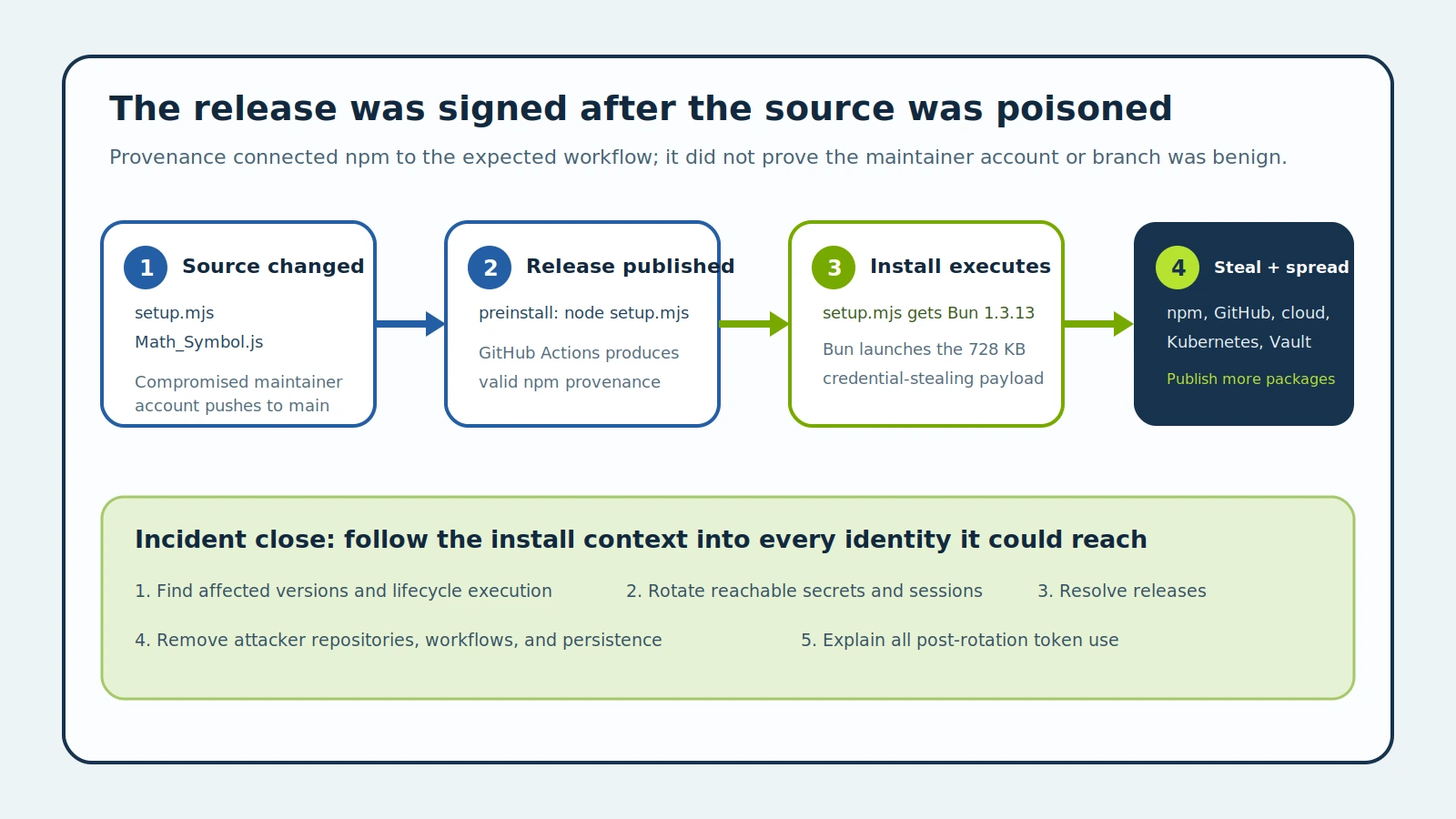
Figure details
An attacker changes the main branch through a compromised maintainer account and publishes through GitHub Actions. npm records valid provenance because the expected workflow produced the release. During installation, the package's preinstall hook runs setup.mjs, which downloads Bun and launches Math_Symbol.js. The payload collects secrets, exfiltrates an encrypted bundle, and can use stolen npm and GitHub access to publish more malicious packages.
One install context can expose several control planes
The payload did not stop at an .npmrc. It searched for npm authentication tokens and several GitHub token formats, including personal, OAuth, GitHub App, and OIDC material. On GitHub Actions runners, Aikido says it attempted to read runner process memory to recover the secret store and publishing identity.
Its cloud reach included AWS configuration and environment variables, EC2 and ECS metadata endpoints, and Secrets Manager enumeration. It read Kubernetes service-account material and kubeconfigs, then attempted to query namespace secrets. It looked for Vault tokens and could try Kubernetes or AWS authentication when a token was not already present.
The filesystem scan covered .env files, private keys, SSH material, Terraform state, Docker credentials, KeePass databases, VPN configurations, and selected IDE configuration. Separate patterns targeted Stripe and Slack tokens. What was actually exposed therefore depends on the identity, files, environment, metadata routes, and permissions present when the install ran. A low-privilege developer laptop and a release runner need different rotation scopes.
The stealer encrypted its collected bundle before uploading it to public GitHub repositories whose description contained Shai-Hulud: Here We Go Again. Aikido counted roughly 1,300 such repositories at the time of analysis. If GitHub upload failed, the payload could fall back to npm-cache[.]com:443/router. The encrypted public files are still exfiltration evidence; the inability of a defender to decrypt them does not make the event benign.
Separate dependency scope from execution scope
Start with package manifests, lockfiles, SBOMs, artifact inventories, dependency caches, container layers, and build logs. Search for the full Aikido version list, not only [email protected]. A matching version identifies a repository or artifact that requires investigation. It does not by itself prove that npm fetched the tarball or ran the lifecycle script on a given host.
The stronger threshold is evidence that an affected package install executed. Look for setup.mjs, Math_Symbol.js, or the community-spread name math_init.js; Bun 1.3.13 downloaded beneath a dependency install; Node launching the setup script; Bun launching the large payload; and package-manager logs that place the version on a specific workstation or runner. Aikido published SHA-256 values for both observed setup files and the shared payload, which should be used alongside filenames because the worm had more than one setup hash.
Then correlate that execution window with access to .npmrc, GitHub CLI configuration, AWS files or metadata, Kubernetes service-account paths, kubeconfigs, Vault material, .env files, SSH keys, Terraform state, and other reachable stores. Search network and GitHub audit evidence for npm-cache[.]com, new public repositories carrying the campaign description, unexpected repository or workflow creation, token use from new locations, and package publications outside the normal release process.
If endpoint or runner telemetry cannot establish whether the lifecycle hook ran, record the gap and handle the relevant credentials as exposed. Reinstalling a clean dependency tree does not revoke a copied token.
Revoke Credentials and Review Package Releases
Remove the named versions from lockfiles, caches, images, mirrors, and build inputs. Disable lifecycle scripts by default where the workflow permits it, and isolate any required install scripts from release credentials and cloud control-plane access. Pinning and provenance remain useful, but neither should grant an install script ambient authority.
For every confirmed or unresolved execution context, revoke active sessions and rotate reachable npm, GitHub, cloud, Kubernetes, Vault, Stripe, Slack, SSH, database, and deployment credentials according to actual exposure. Review repositories, branches, tags, releases, packages, Actions workflows, deploy keys, applications, and cloud resources created or changed with those identities. Remove malicious public repositories and workflows only after preserving the evidence needed to understand propagation.
Verify that affected versions are absent from reachable build paths and account for every execution context. Revoke exposed identities and sessions, remove attacker-created repositories and persistence, and investigate releases made with stolen publishing access. Check post-rotation audit logs for unexplained token use before completing the incident assessment.