
Microsoft’s August security updates close LegacyHive, a publicly disclosed Windows User Profile Service flaw that can give a local attacker administrator privileges without user interaction. The unusual prerequisite is central to the risk: the attacker must be authenticated and already possess credentials for a second local account.
Microsoft’s CVE-2026-62832 record rates the flaw Important at CVSS 7.8, marks exploitation “More Likely,” and says customers must act. It also says exploitation has not been detected. A public proof of concept raises urgency, but it does not establish malicious use or victims.
LegacyHive crosses account boundaries
Microsoft attributes the vulnerability to improper link resolution before file access in Windows User Profile Service. The attack starts from one authenticated local context and uses a specially crafted application to load another user’s registry hive.
The vendor describes the consequence directly: “Successful exploitation could allow the attacker to access or modify another user’s data and gain administrator privileges.” The CVSS vector is local, low complexity, low privilege, and no user interaction.
Registry hives hold per-user configuration and shell paths. LegacyHive turns the profile-loading boundary into a privilege path by redirecting how Windows reaches another account’s hive and related locations. Microsoft has not published a complete exploit walkthrough in its advisory, so that mechanism should not be expanded beyond the vendor record and observable behavior.
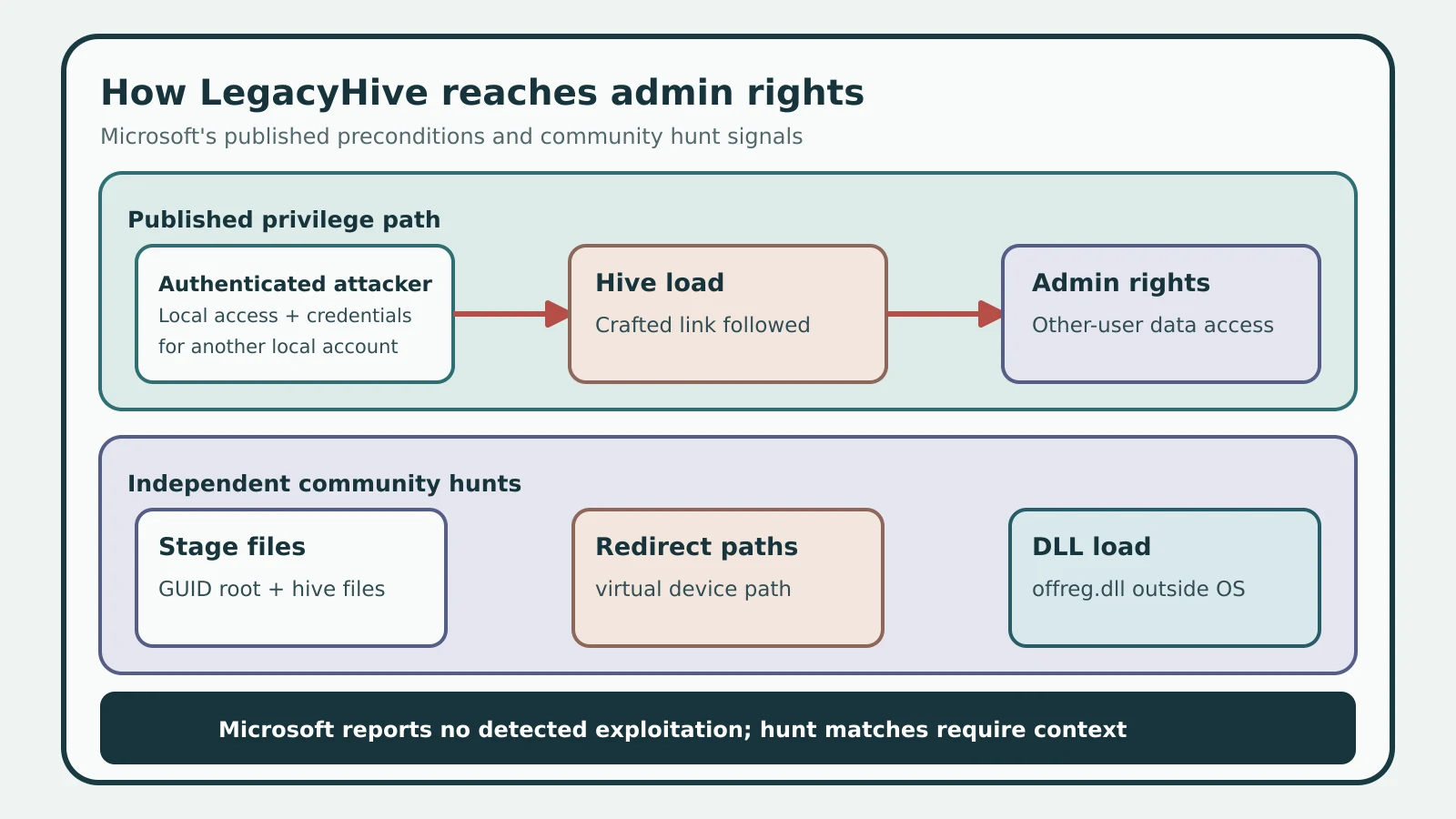
Figure details
An authenticated local attacker who also has credentials for a second local account runs a crafted application. Windows User Profile Service follows the crafted link and loads the second user's registry hive, leading to administrator privileges and access to the other user's data. Three unconnected cards list independent community hunts: GUID-root hive files, virtual-device path redirection, and offreg.dll loaded outside normal operating-system paths. A final bar states that Microsoft reports no detected exploitation and that hunt matches require context.
Preconditions narrow the attack
This is a post-access escalation path. Microsoft says the attacker needs credentials for another local account in addition to an authenticated foothold, which separates LegacyHive from a one-click remote compromise. The advisory reports no observed exploitation and gives no victim or deployment count.
Shared Windows systems deserve particular attention because they are more likely to contain several local profiles and credential contexts. That includes jump hosts, lab machines, kiosks, shared workstations, and multi-user servers. This is a risk-based prioritization from the stated prerequisite; Microsoft does not identify those settings as observed targets.
Microsoft lists 18 affected product-and-architecture rows spanning Windows 10 21H2 and 22H2, Windows 11 23H2 through 26H1, Windows Server 2022, and Windows Server 2025. Architecture and Server Core entries account for several rows, so the number does not represent 18 distinct Windows releases.
Three signals reveal staging
Kevin Beaumont published three Microsoft Defender hunting queries for the proof-of-concept behavior. They are community detections and need local validation, but they give defenders concrete artifacts to test.
The first query finds ntuser.dat or usrclass.dat inside GUID-named directories created at the system-drive root:
DeviceFileEvents
| where FolderPath matches regex @"^[a-zA-Z]:\\[0-9a-fA-F]{8}-[0-9a-fA-F]{4}-[0-9a-fA-F]{4}-[0-9a-fA-F]{4}-[0-9a-fA-F]{12}$"
| where FileName in~ ("ntuser.dat", "usrclass.dat")
| project TimeGenerated, DeviceName, ActionType, FolderPath, FileName, InitiatingProcessFileName, InitiatingProcessCommandLine
The second finds User Shell Folders values for Local AppData, AppData, Cache, Cookies, or History redirected to paths containing \\.\globalroot or \BaseNamedObjects:
DeviceRegistryEvents
| where RegistryKey has @"Software\Microsoft\Windows\CurrentVersion\Explorer\User Shell Folders"
| where RegistryValueName in~ ("Local AppData", "AppData", "Cache", "Cookies", "History")
| where RegistryValueData has @"\\.\globalroot" or RegistryValueData has @"\BaseNamedObjects"
| project TimeGenerated, DeviceName, RegistryKey, RegistryValueName, RegistryValueData, InitiatingProcessFileName, InitiatingProcessAccountName
The third finds offreg.dll loaded outside \System32\, \SysWOW64\, \WinSxS\, and the Microsoft Defender program-data path:
DeviceImageLoadEvents
| where FileName =~ "offreg.dll"
| where not(InitiatingProcessFolderPath has_any(@"\System32\", @"\SysWOW64\", @"\WinSxS\"))
| where not(InitiatingProcessFolderPath startswith "c:\\programdata\\microsoft\\windows defender")
| project TimeGenerated, DeviceName, InitiatingProcessFileName, InitiatingProcessFolderPath, InitiatingProcessCommandLine
A match is an investigative lead. Deployment and configuration tools can legitimately work with offline registry hives, while the public record does not establish that every exploit variant must reproduce all three signals.
Install the exact Windows build
Microsoft’s affected-product record lists these fixed cumulative-update boundaries:
| Windows release | Security update | Fixed build | Supersedes |
|---|---|---|---|
| Windows 10 21H2 | KB5120249 | 19044.7663 | KB5087544 |
| Windows 10 22H2 | KB5120249 | 19045.7663 | KB5087544 |
| Windows 11 23H2 | KB5120240 | 22631.7517 | KB5099414 |
| Windows 11 24H2 | KB5121003 | 26100.9168 | KB5101650 |
| Windows 11 25H2 | KB5121003 | 26200.9168 | KB5101650 |
| Windows 11 26H1 | KB5121000 | 28000.2704 | KB5101649 |
| Windows Server 2022 | KB5120242 | 20348.5499 | KB5082142 |
| Windows Server 2025 | KB5120233 | 26100.33296 | KB5099536 |
Microsoft also lists hotpatch boundaries: KB5120994 at build 26100.9106 for Windows 11 24H2 and 26200.9106 for 25H2; KB5120229 at build 20348.5440 for Server 2022; and KB5120228 at build 26100.33222 for Server 2025. Those hotpatch entries do not name a superseded KB. Every affected-product row says a reboot is required.
Later cumulative updates supersede the listed August cumulative packages. The durable acceptance condition is the listed fixed build or a later supported build for the same release, rather than the mere presence of an older superseded KB.
Verify patch and hunt results
Inventory the operating-system release, architecture, and build on every supported Windows endpoint and server, prioritizing shared systems with multiple local profiles. Deploy the matching August cumulative update or supported hotpatch path, reboot as Microsoft requires, then rerun the three hunts across the vulnerable interval.
The expected patch result is a build at or above the applicable fixed boundary after reboot. The expected hunting result is no unexplained GUID-root hive staging, virtual-device redirection in User Shell Folders, or non-system offreg.dll load. Any match needs process, account, and deployment context before disposition; a clean version check establishes remediation, while the telemetry review addresses whether the public technique appeared before the fix.