A read-only LiteLLM account can rewrite an AI gateway’s live configuration, retrieve local files and replace dashboard credentials. Zenity also saw file-read requests matching CVE-2026-35029 in honeypot traffic. LiteLLM’s security advisory designates version 1.83.0 as fixed.
The gateway can hold model-provider API keys, database credentials, user and spending records, and its own master key. That concentration turns one broken authorization decision into a route toward several trust boundaries. The researchers reproduced the full sequence on LiteLLM 1.74.0 with Postgres, a mounted .env file and a collector they controlled.
Probes followed disclosure by one day
Zenity recorded about 3,900 requests from 73 source IP addresses against LiteLLM administrative routes between February and June 2026. Roughly 1,000 reached /config/update. The first configuration probes arrived on April 7, one day after CVE-2026-35029 became public. File-read bodies matching the disclosed technique appeared from May 5 through May 12.
“The traffic wasn’t one undifferentiated scan,” the researchers wrote. Some senders concentrated on configuration-based file reads. Others tried example master keys, created keys or users, enumerated the deployment, touched SCIM routes, or attempted destructive model deletion.
Those observations need a careful boundary. Zenity said the traffic overwhelmingly carried no bearer value or used documentation-style keys such as sk-1234 and sk-litellm-master-key. It did not see low-privilege credentials in the captured traffic. The telemetry therefore establishes active requests using the file-read shape; it does not establish that those operators began with a legitimate viewer account or successfully compromised a production victim.
The source also did not quantify the number of exposed LiteLLM servers, successful compromises or affected organizations. Its 73 addresses describe the sensor window, not an attacker or victim count.
Configuration rewrites become file reads
LiteLLM’s /config/update route changes the gateway’s live settings, including environment variables. Before 1.83.0, the route checked that the caller was authenticated but failed to require the proxy_admin role. A proxy_admin_viewer could therefore write settings reserved for an administrator.
One setting, UI_LOGO_PATH, tells LiteLLM which local file to serve as the dashboard logo. An attacker can point it at a sensitive file and request /get_image, which the vulnerable design exposes without authentication. Zenity observed bodies targeting /proc/self/environ, /app/.env, /home/litellm/.env, /app/config.yaml, /app/proxy_server_config.yaml, /app/litellm/proxy/config.yaml, and /app/litellm_config.yaml.
The same write primitive reaches other outcomes. LiteLLM resolves os.environ/VAR references inside configuration, so a malicious pass-through endpoint can send substituted secrets outward. Changes to UI_USERNAME and UI_PASSWORD can replace dashboard credentials and create an administrator session. The vendor advisory linked from Zenity’s report also describes custom pass-through handlers pointing at attacker-controlled Python code as a route to remote code execution.
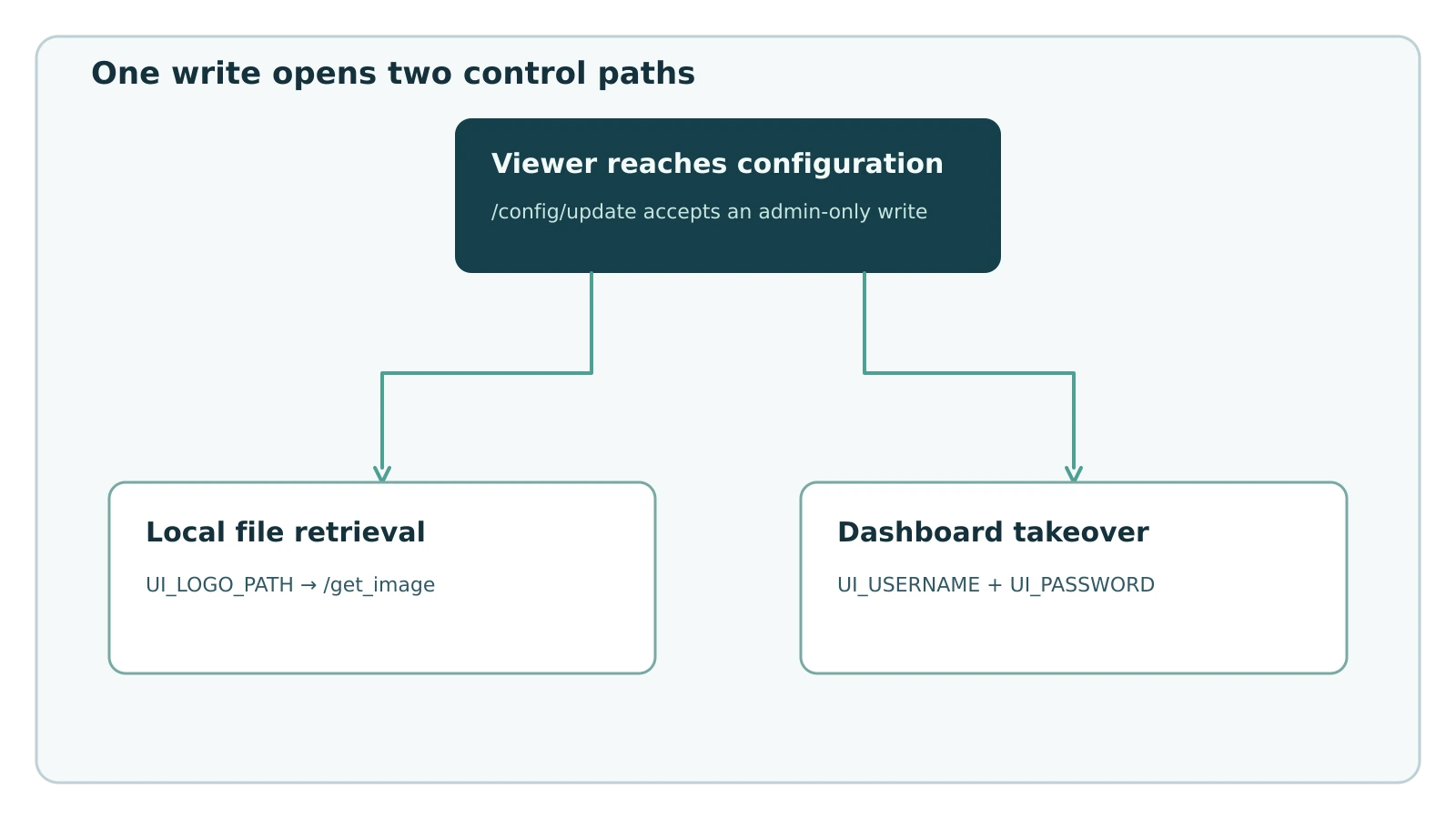
Figure details
A caller with the proxy_admin_viewer role sends a configuration change to /config/update. The vulnerable route accepts the write without requiring proxy_admin. One branch assigns UI_LOGO_PATH to a local secret file and retrieves it through the unauthenticated /get_image route. The other branch replaces UI_USERNAME and UI_PASSWORD.
The vendor advisory says the flaw is fixed in 1.83.0 and recommends that release or later. Zenity separately says its test already returned HTTP 403 on 1.81.0, so the available sources do not establish 1.83.0 as the first build that rejected the bypass. The advisory says no configuration-level workaround closes the authorization flaw. Restricting API-key distribution reduces who can reach an authenticated path, while gateways without a master key may accept the request without authentication.
Hunt the two-request sequence
Start with requests to /config/update that assign UI_LOGO_PATH to an absolute path. Correlate them with later /get_image requests from the same source, session or short time window. A successful configuration response followed by image retrieval deserves incident handling because the first request selects the file and the second can return its contents.
Expand the search around /key/generate, /key/block, /user/new, /model/delete, /key/info, /key/list, /global/spend, /team/info, /user/info, and the /scim/ prefix, including /scim/v2/ServiceProviderConfig and /scim/v2/Groups/1. Zenity saw probes for key and user enumeration, plus an attempted administrator creation for [email protected]. It also recorded the JavaScript-style prototype-pollution bodies {"__proto__":{"admin":true,"isAdmin":true}} and {"constructor":{"prototype":{"admin":true}}}; Zenity says they were inert against LiteLLM’s Python proxy. Review changes involving UI_USERNAME, UI_PASSWORD, pass-through endpoints, and os.environ/ references. Preserve request bodies, authentication decisions, response codes, actor identity, configuration history and outbound connections before changing the gateway.
Search authentication records for the example master keys sk-1234, sk-litellm-master-key, and sk-admin. Review configuration values that expose LITELLM_MASTER_KEY, DATABASE_URL, or OPENAI_API_KEY; those named variables represent the master key, database connection string, and one model-provider credential that the published technique could retrieve or substitute.
Zenity published these source addresses as contextual hunting pivots:
104[.]64[.]209[.]153,172[.]237[.]6[.]54,216[.]26[.]226[.]182154[.]219[.]123[.]193,173[.]249[.]198[.]201,108[.]78[.]4[.]10164[.]52[.]192[.]134,89[.]117[.]53[.]228,95[.]164[.]235[.]177144[.]31[.]186[.]157,107[.]148[.]181[.]88,125[.]81[.]162[.]148193[.]34[.]72[.]43,141[.]148[.]228[.]249,52[.]195[.]13[.]67
Several were associated with the file-read group or flagged by other security services, but an address match alone does not prove compromise or operator identity. Use them only to prioritize corroborated events. Prioritize the request sequence, accepted authorization result and configuration values over an IP-only match.
Upgrade and prove the boundary
Upgrade every LiteLLM proxy to the vendor-recommended 1.83.0 or later. Remove the Admin UI and management API from public reach, require a strong unique master key, and limit administrative routes to trusted networks or an authenticated reverse proxy. Inventory every secret the gateway could read: model-provider keys, the LiteLLM master key, database URLs, cloud credentials and observability tokens all fall inside the possible exposure set.
Treat evidence of the file-read sequence as a possible credential disclosure. Contain the gateway, preserve logs and configuration state, then rotate reachable secrets and invalidate substituted dashboard credentials. Look for newly created users and keys, changed models, pass-through handlers, SCIM activity and unexpected outbound requests before restoring service.
Verify the repaired boundary with a dedicated viewer account in a controlled environment. A request from that role to /config/update must return an authorization denial and leave UI_LOGO_PATH, UI_USERNAME, and UI_PASSWORD unchanged. Confirm that /get_image cannot return any path outside the intended image asset and that production logs contain no accepted configuration write followed by a sensitive-file retrieval.
The decisive control sits at the configuration route: a reader must remain unable to write. Exposure filtering and strong keys reduce opportunities, while the role check determines whether a limited account can turn gateway access into control of the secrets behind it.