
Attackers bought search ads that led people to pages on the real chatgpt.com domain, then used those pages to steer visitors toward a fake desktop-app download. Push Security calls the technique LLMShare.
The campaign described by Push Security on May 29 used ChatGPT’s shared-content feature to render a bogus service-disruption notice. The notice claimed the web service was overloaded and offered a desktop app as the way to continue. Its download button left ChatGPT and opened an attacker-controlled site that imitated the official download page.
Because the first hostname belonged to ChatGPT, the fraud emerged in the page’s content and the redirect that followed.
A real host carried the fake notice
Push saw people reach the shared ChatGPT page after searches such as “chatgpt,” “chatgpt free” and several common misspellings. The researchers captured a paid result pointing to the shared page, although they said the ads were difficult to reproduce and were probably limited by geography or time.
The page sat under a chatgpt.com/s/ address and used ChatGPT’s code-rendering feature to display custom HTML and CSS. It looked like a service notice rather than a shared conversation. The platform’s “Show code” and remix controls were clues, but they were peripheral to the fake message and download button.
Clicking the button opened openew[.]app, which copied the appearance of ChatGPT’s desktop download page and offered Windows and macOS options. Push reported that the downloaded executable posed as “ChatGPT for Desktop” and was detected on VirusTotal.
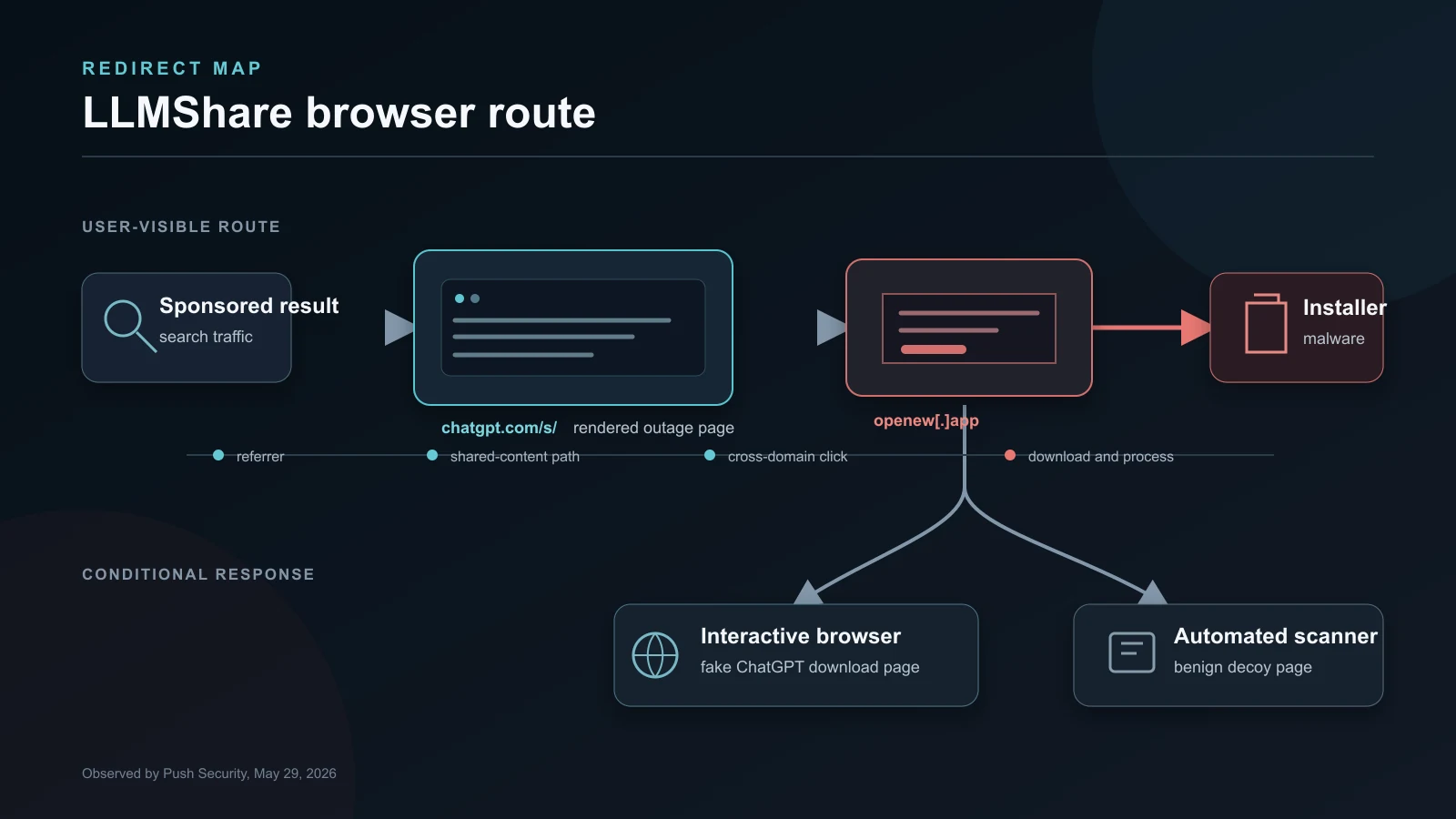
Figure details
Redirect and evasion map showing a paid search result, a shared ChatGPT page, the external download site and different responses for users and scanners.
Figure description
Redirect and evasion map showing a sponsored search result, a shared ChatGPT page, the external download site and different responses for users and scanners.
The external site also changed its response according to the visitor. Push found that an interactive browser saw the fake download page while URLScan was redirected to a generic augmented-reality company page. Conditional rendering is common in malvertising because it can keep automated analysis away from the payload path that a person sees.
Claude pages used a different lure
Push also found shared Claude conversations that presented themselves as installation guidance. Those pages instructed macOS users to run a curl command that downloaded and executed malware. Similar activity had been reported before the rendered ChatGPT page appeared.
The researchers said the ChatGPT and Claude examples suggested one campaign or a shared playbook. They did not claim proof that every page came from the same operator. Detect the handoff from shared AI content to an installation step; the source does not establish who created each page.
The two versions also demand different controls. A terminal command can be inspected before execution and may generate shell telemetry. A rendered outage page removes that obvious warning and relies on a familiar download workflow. Both use the platform’s genuine sharing address to establish the first measure of trust.
Host reputation stops at the handoff
A domain reputation system can correctly identify chatgpt.com or claude.ai as legitimate and still miss the attack. The hostname answers who operates the platform. It does not establish who wrote a particular shared page or whether its links belong to the platform owner.
Shared AI pages now deserve the same treatment as public documents, code snippets and file-sharing links. The host may be reputable while the user-supplied content remains untrusted. Security products that flatten those two judgments into a single domain verdict lose the detail needed to catch the redirect.
The useful evidence appears across the session. It includes the sponsored-search referrer, the shared-content path, the message asking for software installation, the cross-domain click, the file download and any process launched afterward. A single URL check sees only one piece.
Detection starts with the browser route
Security teams can search browser, DNS and proxy records for shared ChatGPT or Claude pages that lead directly to unrelated domains. Sessions arriving from search results deserve closer attention when they end in an executable, disk image, package, browser extension or pasted terminal command.
Endpoint data fills in the rest. Review recent installations branded as AI desktop clients, coding assistants or browser extensions when the source was a search ad or shared conversation. Capture the download URL, file hash and signing information before removing the file. If a user ran a command from a shared page, preserve shell history and investigate the child processes and network connections it created.
Official installation paths should be easy to verify. Software catalogs, managed deployment and concise internal guidance reduce the chance that an employee will search for an installer and choose an advertisement. Developer and administrator workstations need stricter rules for commands copied from public shared content because those systems often hold credentials and access that malware can use immediately.
Blocking all AI tools would miss the mechanism and disrupt legitimate work. The campaign used a public publishing feature and a browser handoff. Controls should focus on shared-content routes, external redirects and installation behavior.
LLMShare is a practical warning about user-generated pages on trusted services. The address bar can identify the platform while saying very little about the person behind the page. Follow the click past the trusted hostname.
Related reporting
Nulltap’s FakeAgent report follows a paid search ad through a public Claude artifact to a malicious installer.