Attackers are taking control of MikroTik routers through internet-exposed SSH, CERT Polska reports. The MikroTrick chain combines SSH authentication and privilege-handling flaws. MikroTik has released fixed RouterOS builds across its release channels, together with a compromise check that flags devices needing investigation.
MikroTik’s September 3 advisory names four first-fixed builds: RouterOS 7.25 beta 3, 7.24.2, 7.23.4 and 6.49.21. Its updated guidance says, “Make sure SSH is not open to any untrusted networks.” Default configurations block internet access to SSH; administrators who opened it should restrict access to trusted addresses or use a VPN such as WireGuard for management.
Two SSH flaws enable takeover
CERT Polska’s vulnerability records identify CVE-2026-67276 as incomplete comparison of an authorized RSA public key during SSH authentication. An attacker who knows the account’s username and public modulus can authenticate without its private key. CVE-2026-86060 concerns usernames with a prohibited leading character and manipulation of the resulting session’s privileges.
CERT Polska confirms exploitation of the two-flaw chain; the published patches prevent the observed attacks.
The vendor also highlights CVE-2026-67277, an unauthenticated bandwidth-test flaw involving memory disclosure and possible restart. CERT Polska’s complete disclosure covers six vulnerabilities, including additional SSH, certificate-validation and WebFig issues. The sources do not identify a threat actor or quantify compromised routers. SSH exposure is the observed entry point. Patching covers the broader release.
Flagged routers need investigation
RouterOS inspects configuration at startup, disables recognized suspicious entries and sets Flagged status. Check the Log section for a critical Flagged entry and inspect flagged in /system/device-mode/print. The marker requires investigation; it does not identify which vulnerability was used.
An unflagged result provides less assurance than it may appear to. MikroTik directs administrators to inspect the configuration for unknown scripts, users and anything else they do not recognize even when RouterOS does not flag the device. The automatic check therefore supplies one useful alert, while the manual review remains part of the vendor’s required response.
CERT Polska reports these attack log patterns:
login failure for user -2 from <ip> via ssh
user <name> added by ssh:-2@<ip>
It links successful attacks since at least September 2 and creation of a privileged ops account to 82.192.72[.]4; 103.102.31[.]18 was associated with attempts. Investigate these traces promptly. Their absence cannot exclude compromise, and the complete set of Flagged detection rules remains undisclosed.
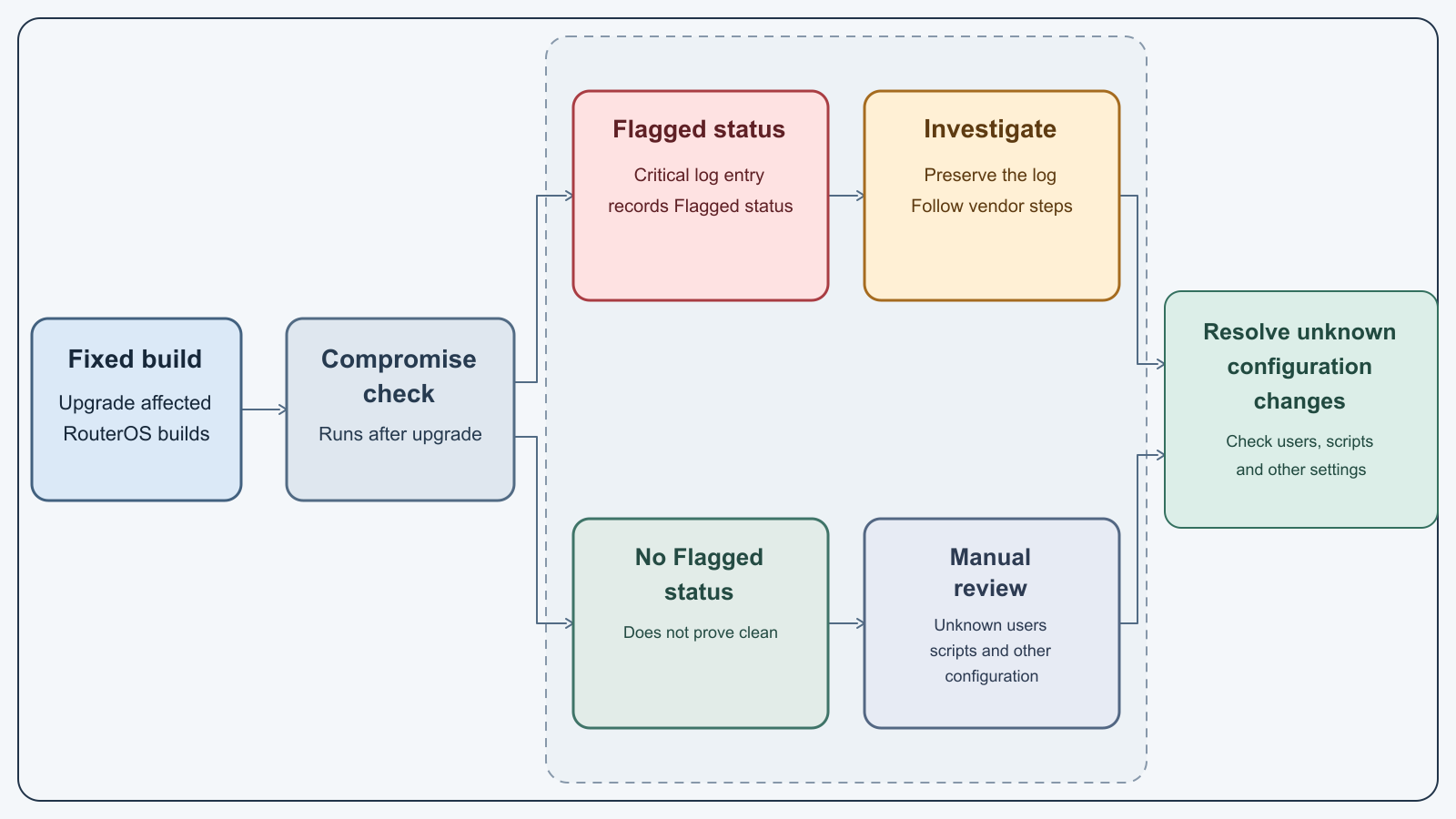
Figure details
Upgrade affected RouterOS builds before checking Flagged status. A flagged device produces a critical log entry and follows the vendor's investigation guidance. An unflagged device still needs checks for unknown users, scripts and other settings. Both paths lead to resolving unexplained configuration changes; an unflagged result alone does not prove the router is clean.
Four builds contain the fix
The correct build depends on the release channel. MikroTik lists 7.25 beta 3 for the beta channel, 7.24.2 for stable, 7.23.4 for the RouterOS 7 long-term line and 6.49.21 for the RouterOS 6 long-term line. These are the specific builds the vendor identifies as containing the fix.
The breadth of that list matters operationally because one fleet may contain current stable routers and long-lived devices on older branches. Inventory the installed version and channel before scheduling the change, then compare each router with the corresponding fixed build. A generic “RouterOS 7” result is insufficient when 7.23 long-term and 7.24 stable have different first-fixed versions.
MikroTik says the device should offer the update through Check for updates. If patching must wait, CERT Polska advises disabling exposed services or restricting SSH, WWW/WWW-SSL and bandwidth-test to trusted management networks. Avoid initiating TLS connections or using the built-in /system ssh and /system ssh-exec clients on an unpatched router. These temporary restrictions do not replace upgrading.
Verify the configuration state
After the reboot, confirm the installed RouterOS version meets the fixed floor for that device’s channel and that untrusted networks cannot reach its management services. Check the critical log, Flagged state and published SSH patterns. Inspect unknown users, scripts and settings, including scheduler tasks, proxies and tunnels, on unflagged routers too.
If evidence suggests compromise, isolate the router and preserve logs and configuration before a reset. CERT Polska recommends rebuilding from a trusted configuration and rotating passwords, keys and other secrets; avoid blindly restoring a suspect backup. Retain Flagged status until analysis and evidence preservation are complete.
Before returning a router to service, verify the fixed build and restricted management access, and resolve unexplained users, scripts or settings. A Flagged event or suspicious configuration change calls for incident investigation even after patching. The software update prevents the reported attacks; it does not remove the need to investigate an earlier compromise.