
A WordPress administrator session appeared from outside DigitalOcean’s trusted network even though the installed miniOrange SAML plugin reported itself fully up to date. The network restriction blocked the session, but DigitalOcean’s security team found that the attacker had already forged authentication and obtained an administrator cookie.
The investigation uncovered a wider remediation gap. Two unauthenticated flaws in the miniOrange SAML 2.0 Single Sign On plugin affect seven independently versioned editions under one WordPress slug. The six paid lines had no public security advisory or changelog, so vulnerability databases could report them as safe and the WordPress dashboard could show no update while attacks were underway.
Patchstack’s August 21 joint disclosure publishes DigitalOcean’s detection and root-cause work along with Patchstack’s vendor follow-up. Patchstack sells vulnerability mitigation and is describing research that can support its service; no sponsored placement is involved. Its article says, “The attacker had already used the bypass to obtain a WordPress admin session cookie.”
DigitalOcean detected and blocked the activity on August 16, reproduced both bypasses against Standard edition 16.1.9, and shared the affected code paths. The sources report attempted exploitation and opportunistic scanning. They do not report a completed site takeover, identify victims beyond DigitalOcean, or quantify vulnerable or compromised sites.
Two checks accept forged assertions
The official WordPress plugin directory describes the plugin as a SAML service provider. An identity provider such as Microsoft Entra ID, Okta, Google Workspace, or OneLogin signs an assertion describing the authenticated user. The plugin verifies that signature, maps the assertion to a WordPress account, and starts a session with that account’s role.
CVE-2026-61979 breaks the algorithm boundary. The incoming SAML response can select HMAC-SHA1 as its signature method. The plugin then recasts the trusted identity provider’s RSA public-key PEM as an HMAC secret. A public key is available from the identity provider’s metadata, so an attacker can use that public material to sign a forged assertion that the plugin accepts as genuine.
Patchstack’s CVE-2026-15981 advisory rates the flaw CVSS 9.8 and unauthenticated. CVE-2026-15981 breaks result handling. PHP’s openssl_verify() returns 1 for a valid signature, 0 for an invalid signature, and -1 for an internal error. The affected code checks the result as a boolean. Because -1 is truthy in PHP, a deliberately malformed signature that triggers an OpenSSL error reaches the valid branch.
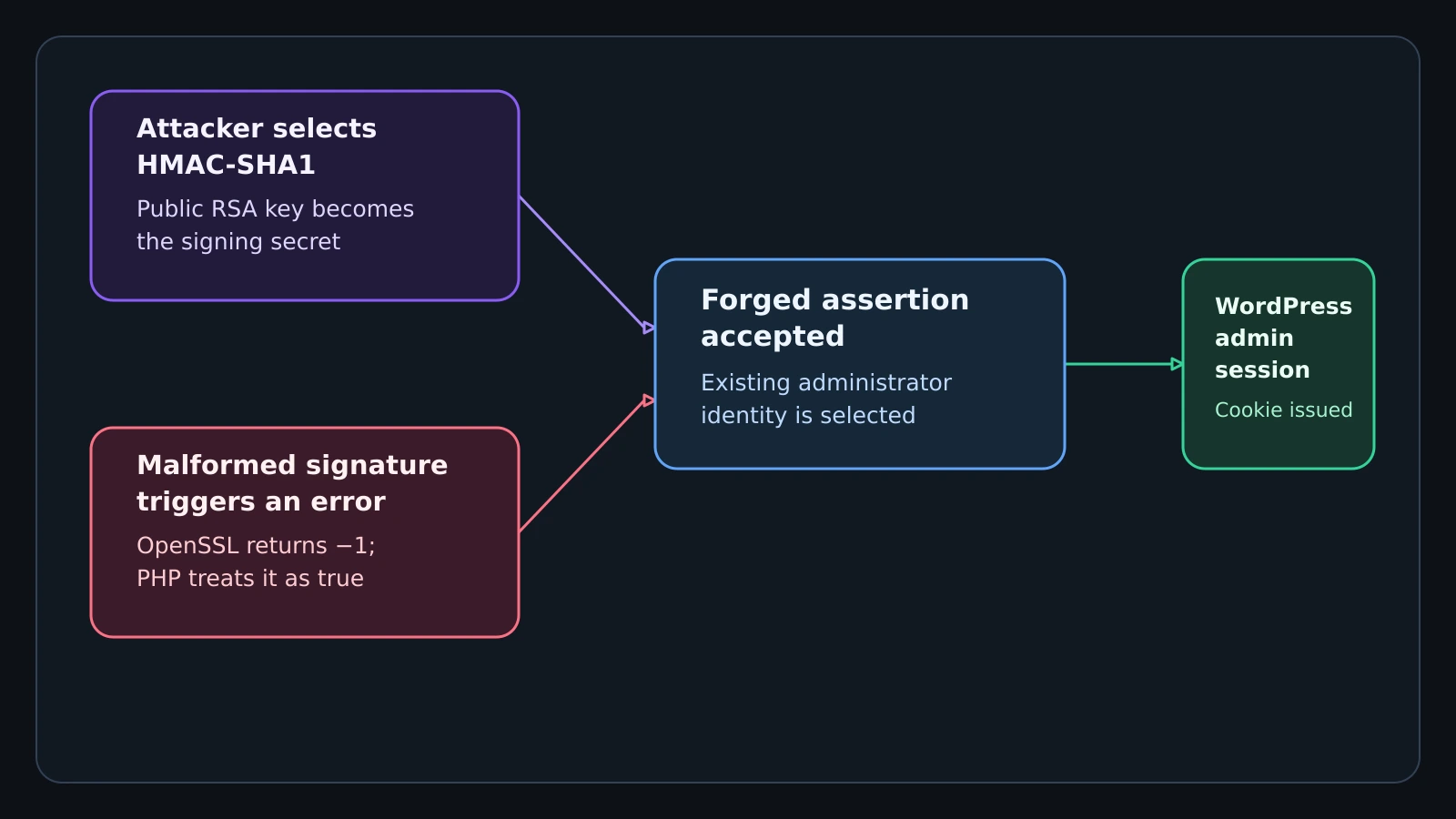
Figure details
The diagram starts with an attacker-controlled SAML response and splits into two branches. In the first, the response selects HMAC-SHA1 and the plugin misuses the identity provider's public RSA key as an HMAC secret. In the second, a malformed signature makes OpenSSL return minus one and the plugin treats that error value as true. The branches converge when the plugin accepts the forged assertion, maps it to an existing administrator, and issues a WordPress administrator session cookie.
Both paths let an unauthenticated attacker present a forged assertion for an existing user, including an administrator. The demonstrated outcome is authentication bypass and session creation. The research does not say that either flaw creates a new account by itself.
Seven editions hide the fix
The directory slug miniorange-saml-20-single-sign-on contains seven product editions whose version numbers move independently. A scanner that sees only the slug and one affected range cannot model them correctly. Marking every release above the free edition’s fixed 5.4.5 as safe misses vulnerable paid releases such as Standard 16.1.9; widening one range would falsely flag fixed free installations.
miniOrange gave Patchstack the full matrix on August 18. These are the minimum releases that close both CVEs:
| Edition | Vulnerable through | Fixed in |
|---|---|---|
| Free, single site | 5.4.4 | 5.4.5 |
| Premium, single site | 13.0.3 | 13.0.4 |
| Standard, single site | 17.0.5 | 17.0.6 |
| Premium, Enterprise, or All-Inclusive, multisite | 20.2.7 | 20.2.8 |
| Enterprise or All-Inclusive, single site | 26.0.2 | 26.0.3 |
| VIP, single site | 32.0.7 | 32.0.8 |
| VIP, multisite | 35.0.6 | 35.0.7 |
Every later release in the same edition supersedes its listed fixed minimum. Free edition 5.4.5 and Standard 17.0.6 close both flaws even though their two fixes landed one release apart. A Standard 16.x installation must cross into the 17.x line, and the disclosure says that jump may require manually uploading the plugin because the dashboard does not offer it.
Patchstack also published two narrow hotfixes for operators who cannot upgrade immediately. One rejects HMAC-SHA1 at Utilities.php after the affected algorithm selection. The other changes includes/lib/SAML2Core/XMLSecurityKey.php so openssl_verify() succeeds only when its return value is exactly 1. Patchstack says these edits buy time; they do not supersede the vendor’s fixed releases.
Blocked admin session reveals attacks
DigitalOcean’s version and update signals looked clean. Its separate restriction on WordPress administration exposed the problem when a session arrived from outside the trusted network. That control stopped the observed session from proceeding, showing why identity telemetry must be evaluated independently of plugin inventory.
The researchers associated opportunistic scanning with these six addresses: 207[.]211[.]214[.]41, 79[.]127[.]224[.]14, 102[.]91[.]71[.]83, 162[.]243[.]116[.]148, 84[.]201[.]6[.]54, and 64[.]225[.]25[.]188. They are defanged detection indicators. A match establishes a lead, while an authenticated administrator session, an unexpected source range, and activity in /wp-admin provide stronger evidence on the affected site.
Preserve the installed directory path /wp-content/plugins/miniorange-saml-20-single-sign-on/, the commercial edition name, the complete version, plugin file hashes, web access logs, authentication logs, administrator-session records, source addresses, and the identity provider involved. The attacker does not need an identity-provider password for either published path, so an apparently normal SAML-backed session from an unusual network deserves investigation even when the identity provider shows no corresponding successful login.
The research disclosed a public proof of concept but deliberately withheld its path, and Nulltap does the same. The primary report contains the defensive root cause, fixed-version matrix, hotfixes, and indicators without adding another acquisition route for exploit code.
Verify edition, version, and sessions
Inventory every site using the slug and record its edition beside its version. Compare that pair with the seven-row fixed-version matrix, then upgrade to the listed minimum or a newer release in the same edition. Treat a green WordPress update screen or a generic vulnerability-scanner result as supporting evidence because neither represented the affected paid lines reliably.
Review administrator sessions from August 16 onward, or for the longest period retained, and correlate each source address and timestamp with web access logs and an identity-provider authentication event. Investigate sessions from unexpected ranges, the six published addresses, requests that reach the plugin’s SAML response handling, or administrator activity without a corresponding identity-provider success. Expire suspicious WordPress sessions and rotate credentials or signing material according to the evidence found; patching ends the bypass path but does not invalidate a cookie already issued.
Run the verification test on every edition-and-version combination. Record the plugin’s edition and full version from the installed files, confirm it meets or supersedes the matching fixed release, submit a valid test assertion through the configured identity provider, and send an invalid-signature test through an isolated staging copy. The expected result is a successful legitimate login, rejection of the invalid assertion, no administrator session cookie for that request, and no unexplained administrator sessions in the production review window.
The security boundary is the assertion decision and the session it creates. Defenders can accept the remediation only when the deployed edition is specifically identified, its code meets the correct fixed line, and session history shows no unexplained administrator access.