Kaspersky says Mirage Kitten has deployed a previously undocumented Windows backdoor and two custom WebSocket tunnelers during cyber-espionage activity across the Middle East and Africa. The July 28 analysis names the backdoor NightLedger and the tunnelers BridgeHead and ArcBridge.
Kaspersky observed BridgeHead after compromise in an Egyptian environment and at a Pakistan-based aerospace and aviation organization. Its telemetry also identified victims in Jordan, Tanzania, Ethiopia and Burkina Faso. The researchers could not establish the initial access vector for most of the malware samples, so the report does not prove how each affected system was entered.
NightLedger waits behind a legitimate Windows binary
NightLedger masquerades as SspiCli.dll and is designed to exploit DLL search order. A legitimate AppVShNotify.exe does not import that library directly, but its RPCRT4.dll dependency can delay-load SspiCli.dll when an RPC call needs authentication. A malicious copy placed beside the executable can load first while forwarding expected exports to the legitimate library.
The backdoor then polls an HTTPS command server. Its command set covers host and network discovery, process and directory listing, program execution, file transfer, DLL loading, screenshots and collection of C:\Windows\debug\NetSetup.log. That log records domain and workgroup join activity, giving an operator useful context about the host and its network membership.
Kaspersky attributes NightLedger to Mirage Kitten from code and behavior shared with the group’s earlier implants. That is a research assessment. The public report does not include evidence that independently proves who operated every observed sample.
BridgeHead reuses the current user’s proxy authentication
BridgeHead adds a more operationally useful capability. The samples checked the lowercase Windows username for a hardcoded substring and exited when it was absent. Kaspersky assesses that behavior as a per-target execution gate and a possible way to avoid analysis systems.
After the check passes, the malware sends an HTTPS WebSocket request to /connect. If the corporate proxy returns 407 Proxy Authentication Required, BridgeHead queries the available authentication schemes, tries Negotiate before NTLM, and retries with the current user’s Windows SSO context. A successful server response upgrades the connection with HTTP 101. The implant then sends a binary message containing the literal string token.
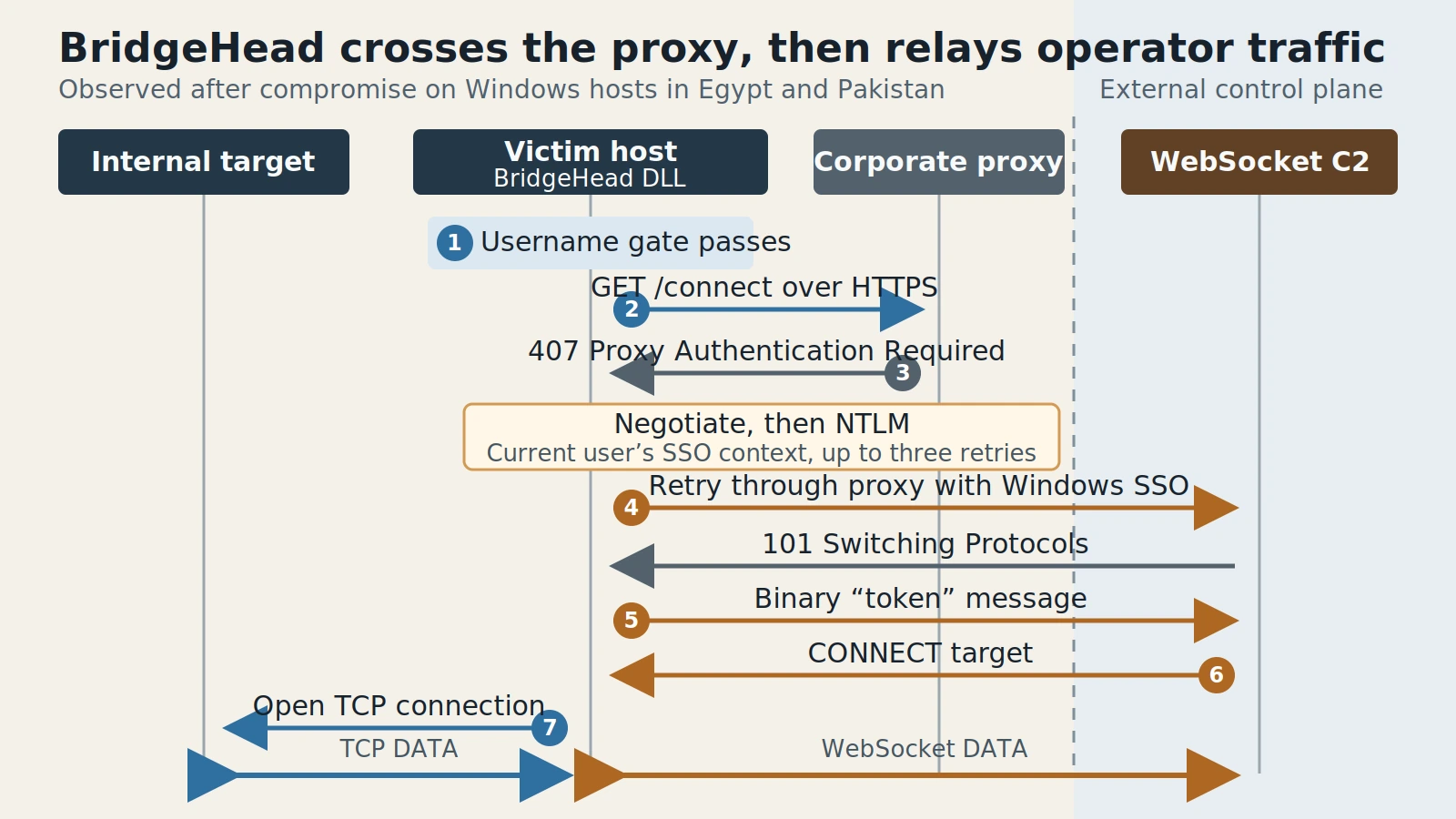
Figure details
BridgeHead activates only when its embedded username substring matches the current Windows user. It sends an HTTPS WebSocket request through the corporate proxy. A 407 response causes it to select Negotiate before NTLM and retry with the user's SSO context. After the external server returns HTTP 101, BridgeHead sends a binary token. The server can then issue a CONNECT message naming an IPv4 address, IPv6 address or domain and port. The victim host opens that TCP connection and relays data in both directions over the WebSocket channel. Kaspersky observed this tunneler after compromise, so the figure does not describe initial access.
BridgeHead can cross an explicit corporate proxy by reusing the proxy path available to an authorized Windows user.
Server-selected connections originate inside the victim network
Once authenticated, BridgeHead acts as a SOCKS5 relay. The command server sends a CONNECT message with an IPv4 address, IPv6 address or domain plus a destination port. The victim host opens the requested TCP connection and carries bidirectional data between that target and the WebSocket channel.
The operator’s tools stay on the server side. Traffic toward the selected target emerges from the compromised computer, which can place it behind perimeter controls and near services that are unreachable from the public internet. The public report documents the relay mechanism but does not say which internal services operators reached through it.
Kaspersky found one BridgeHead sample in %LocalAppData%\Microsoft\VisualStudio\unbcl.dll and another at C:\program files (x86)\univpn\promote\libwinpthread-1.dll. One variant connected to smartconnect.azurewebsites.net; another used businessmixture.com/blog over WSS. The report also lists five BridgeHead MD5 hashes and separate NightLedger and ArcBridge indicators.
Check proxy upgrades, DLL placement and relay behavior
Start with the supplied hashes and domains, then test for the behavior that survives an infrastructure change:
- Search endpoint telemetry for
unbcl.dll,libwinpthread-1.dlland unsigned or unexpectedSspiCli.dllfiles placed besideAppVShNotify.exe. Confirm the file signature, hash, parent process and load path before treating a same-named Windows library as malicious. - Review proxy and TLS inspection logs for WebSocket upgrades from Windows endpoints that do not normally use them. Where decrypted metadata is available, look for
/connect, an HTTP 407 followed by authenticated retry and HTTP 101, or the reported Edge 86 user agent. - Correlate those sessions with repeated reconnects, 30-second keepalives and new outbound or east-west TCP connections from the same host. BridgeHead caps its connection retry delay at 60 seconds.
- Isolate a matching endpoint, preserve the DLL and process evidence, and block the reported command infrastructure. Resetting a user’s credentials alone does not remove a process that is already running in that user’s context.
The verification point is concrete: the suspicious DLL no longer loads, the WebSocket session stops, and the host no longer opens target connections paired with that session. Domain-only blocking is a weaker stopping point because Kaspersky observed the group’s tooling moving between Azure-hosted names and other domains.