A crafted USB identity can make a fully updated Windows 11 machine fetch signed vendor software and execute its installer code as NT AUTHORITY\SYSTEM. Security researchers Alejandro Hernando and Borja Martínez demonstrated the path with no administrator, no logged-on user and, in a second chain, no physical device connected to the target.
The remote version starts with an ordinary account that can open an RDP session. It also depends on the server permitting Plug and Play or USB redirection. The Plug and Pwn release kit documents reproducible research, not criminal exploitation; it names no victims and gives no count of exposed systems.
This differs from Nulltap’s recent Windows AFD driver coverage.
Signed packages cross the boundary
Windows Plug and Play matches a device’s hardware identifiers to a driver package. When the package is absent, Windows may obtain the signed package from Windows Update. Co-installers and services supplied with that package can then run with SYSTEM privileges during setup.
Hernando and Martínez state the issue plainly: “Every time a USB device is plugged into a Windows machine, the operating system may silently download a package from Microsoft and execute vendor code as NT AUTHORITY\SYSTEM.” A trusted signature proves origin and integrity. It does not make every privileged installer operation safe.
That trust boundary is the weakness.
The researchers built PNP simulate to inspect the path without hardware. Its query-only mode creates a temporary device node, checks the Driver Store and Windows Update, observes installation events, then cleans up. The attacks use emulated hardware or RDP redirection.
The source says Windows can reach hundreds of signed packages through this mechanism. It demonstrates several exploitable combinations, but it does not quantify vulnerable endpoints or claim that every package is exploitable.
Physical devices chain vendor bugs
The physical demonstration starts with an emulated Sierra Wireless device. Its SYSTEM service exposes a named pipe with an Everyone read/write access control list. A local or domain user can call the pipe’s SetDNS function, so the researchers point system DNS at an attacker-controlled server.
No user needs to be logged on.
They next emulate a Sony FeliCa device. Its signed co-installer downloads three configuration files over plaintext HTTP. The filename parser looks only for the final forward slash, accepts backslashes and dot segments after it, joins the result to %TEMP%, and writes the downloaded bytes as SYSTEM. With DNS already redirected, the chain places an attacker-controlled DLL in System32.
The emulated Sierra device returns for the final step and causes its privileged component to load the planted DLL. The result is arbitrary code execution as SYSTEM before a user logs on. The vivid part of the demonstration is its composition: two vendor issues that were low severity in isolation become a complete privileged execution chain when Windows installs both packages on demand.
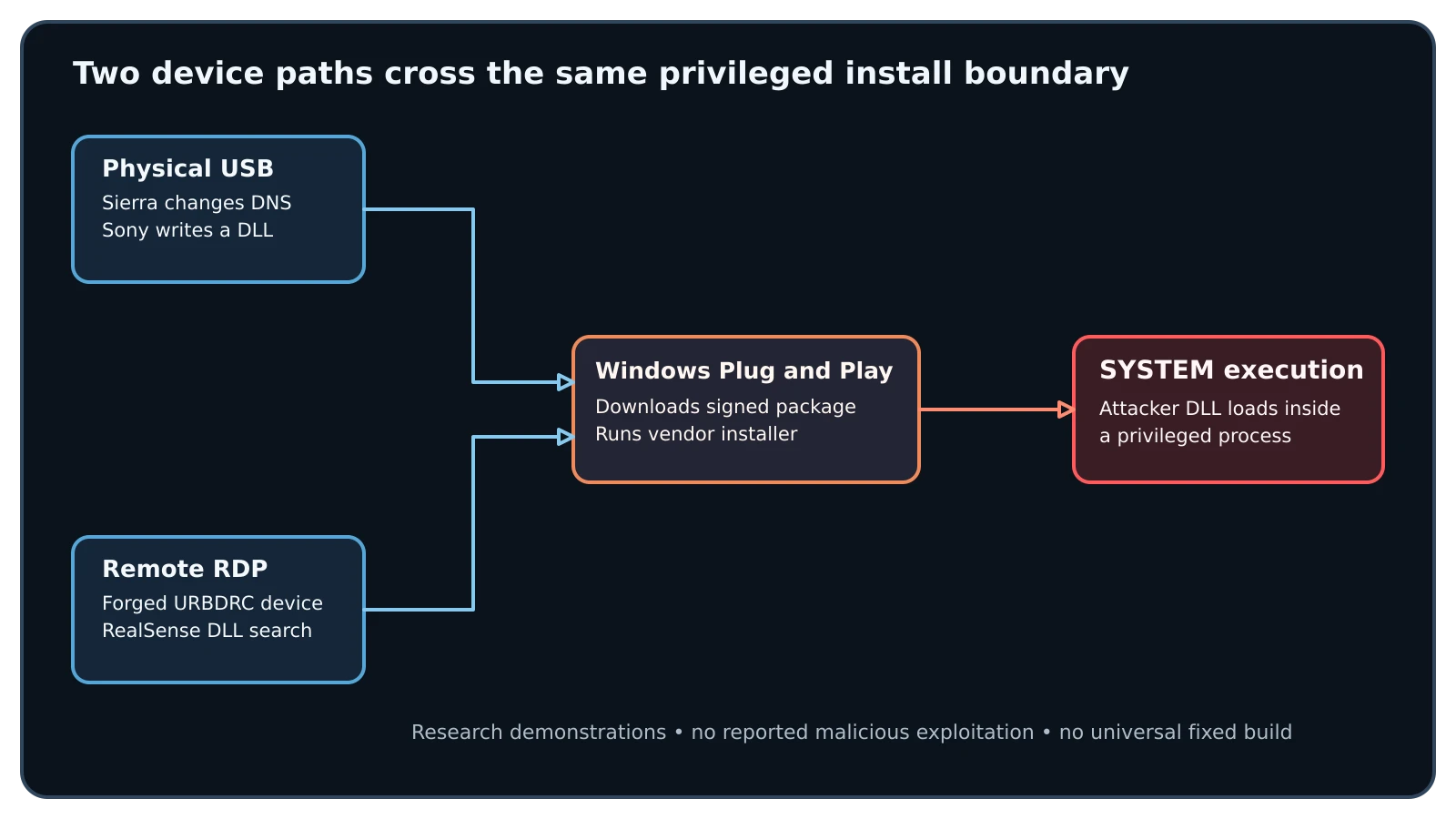
Figure details
The figure compares two paths into the same Windows Plug and Play boundary. In the physical path, an emulated Sierra device reaches a permissive SYSTEM named pipe and changes DNS. An emulated Sony device then makes its co-installer download files over plaintext HTTP and write an attacker-controlled DLL into System32. The Sierra component loads that DLL as SYSTEM. In the remote path, a standard RDP user sends forged Intel RealSense descriptors through URBDRC. Windows installs the signed package, and its co-installer searches the user-writable C:\Intel\RSDCM directory for CRYPTBASE.dll before System32, loading attacker code as SYSTEM. Both paths are research demonstrations; the source reports no malicious exploitation.
RDP removes the hardware requirement
RDP USB redirection lets a client describe a local device to a remote Windows session. The server builds a Plug and Play device node from the descriptors supplied through the URBDRC virtual channel. Hernando and Martínez wrote a Python client that authenticates as a normal user and announces a forged vendor ID and product ID without any matching hardware.
For the demonstration, the descriptors identify an Intel RealSense camera. Windows downloads the Microsoft-signed driver package. Its co-installer places an executable in the user-writable C:\Intel\RSDCM directory, runs it as SYSTEM, and searches that directory for CRYPTBASE.dll before checking System32. A standard user can stage the DLL and let the privileged installer load it.
This path is gated by server policy. The researchers traced termsrv.dll and umrdp.dll to the fDisablePNPRedir decision before the device is announced to Plug and Play. Managed VDI environments that intentionally redirect USB devices are the clearest exposed setting. Blocking physical ports alone leaves that remote route available.
The release kit does not identify one Windows build that fixes every demonstrated chain. It also does not give a complete fixed-version matrix for the Sierra Wireless, Sony FeliCa, Intel RealSense, Wacom, or Qualcomm Atheros packages discussed in the research. No universal superseding update can therefore be claimed from this source. Teams must evaluate the installed vendor packages and current vendor guidance separately.
Restrict device installs and verify
Start with RDP and VDI hosts because they remove the physical-access assumption. Enable the Group Policy settings that prohibit Plug and Play and USB device redirection where those features are unnecessary. Enable DisableCoInstallers, but pair it with device-installation restrictions or hardware-ID allow lists. In the researchers’ test, one package without a co-installer still installed and ran as SYSTEM; they do not claim universal behavior. Inventory vendor packages and services, remove unused device software, and apply package-specific updates identified by each vendor.
This PowerShell check reads the two Terminal Services policy values used to block those redirection paths:
$p = 'HKLM:\SOFTWARE\Policies\Microsoft\Windows NT\Terminal Services'
Get-ItemProperty $p -Name fDisablePNPRedir,fDisableUSBRedir -ErrorAction SilentlyContinue |
  Select-Object fDisablePNPRedir,fDisableUSBRedir
The expected result on a host where redirection is prohibited is 1 for both values after policy refresh. A missing value or 0 requires a policy review and a controlled RDP connection test; configuration records are expected-value claims until the server rejects a redirected test device at the actual session boundary.
Hunt for the behaviors the demonstrations require: an unexpected process calling the Sierra service’s named pipe followed by DNS changes; Sony installation traffic over HTTP; privileged writes from a co-installer into System32; creation or execution under C:\Intel\RSDCM; CRYPTBASE.dll appearing in that writable directory; and a SYSTEM process loading a DLL from a user-writable path. Preserve Windows device-install, process, module-load, DNS, proxy and RDP session telemetry around each event.
A disabled redirection policy removes the demonstrated remote delivery route. Device-installation restrictions or hardware-ID allow lists constrain package installation, while updated or removed vendor packages close their corresponding installer primitives. These results do not prove that an earlier installation did not already execute attacker-controlled code, so exposed hosts still need historical review.