
CISA on September 11 added CVE-2026-84869 to its Known Exploited Vulnerabilities catalog, confirming exploitation of a ScreenConnect client flaw that can let an attacker transfer and run files through an active remote session without authorization or host confirmation. The agency requires covered federal organizations to complete forensic triage and apply the vendor’s mitigation by September 14.
ConnectWise’s September 8 security bulletin says every ScreenConnect version before 26.6.5 is affected. Cloud servers have already been upgraded, while on-premises operators must install 26.6.5 or later. In both deployment paths, the vendor tells operators to reinstall host clients and update access agents after the upgrade.
Neither CISA’s exploitation entry nor ConnectWise identifies the attacker, victims, exploitation volume, or campaign indicators. CISA lists ransomware use as unknown. ConnectWise is withholding additional technical detail because it considers the vulnerability sensitive.
Active sessions bypass host consent
The published mechanism is a failure in ScreenConnect client and session handling for file-transfer and file-execution actions. ConnectWise says the condition “may allow files to be transferred and executed through an active remote session without authorization or Host confirmation.” The associated weakness classes are missing authorization and improper privilege management.
An attacker needs access to an active remote session; this is not a pre-authentication path into the ScreenConnect server. The vendor assigns the flaw a 9.9 CVSS v3.1 base score with low privileges required, no user interaction, and scope changed. In an affected session, the client can accept a transfer or execution action without the authorization and endpoint confirmation that should constrain it.
This client-server boundary narrows scoping. ConnectWise explicitly says ScreenConnect servers are not affected. The exposed component is the client participating in Support or Access sessions, and the security consequence lands on the endpoint where the transferred file can execute.
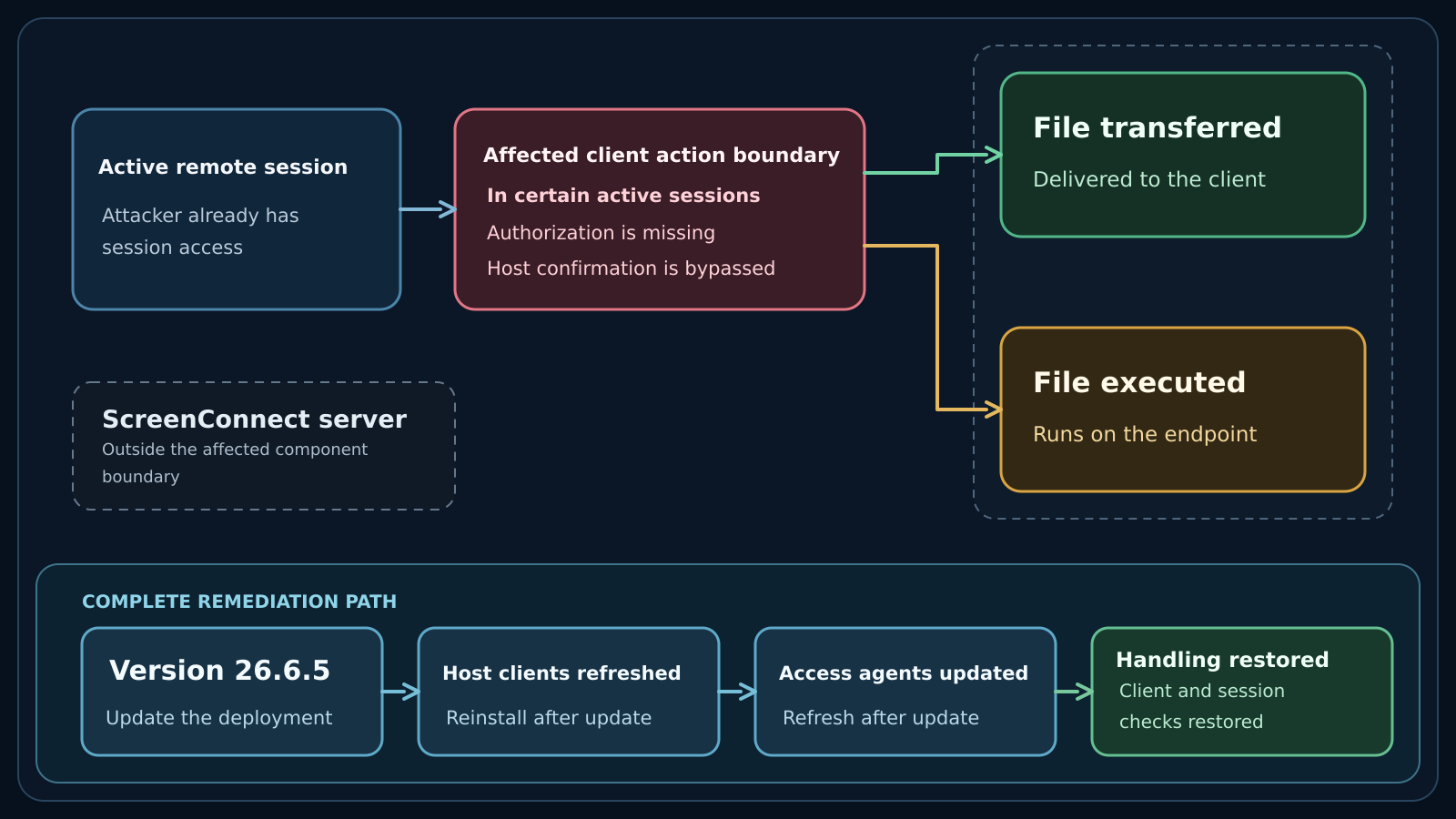
Figure details
An attacker with access to an active ScreenConnect remote session reaches the affected client action boundary. Missing authorization or host confirmation allows two published outcomes: transferring a file to the client or executing a file on that endpoint. ScreenConnect servers sit outside the affected component boundary. Updating the deployment to version 26.6.5 and refreshing host clients and access agents restores the client and session handling that ConnectWise changed.
Clients carry the exposure
Start with the version shown on the ScreenConnect Administration > Overview page. An on-premises server below 26.6.5 is within the vendor’s affected range. ConnectWise says an on-premises deployment must be on 25.4 or later before it can move directly to 26.6.5, and administrators should confirm that their license lists 26.6.5 as the latest eligible version.
Cloud instances have already received the server update. That status does not establish that every host client was reinstalled or every access agent updated. Inventory those endpoint components and compare their update state with the upgraded instance.
The public record does not name a vulnerable operating system, a network port, a malicious filename, a hash, a source address, or a request pattern. It also does not provide a reliable test for earlier exploitation. Version and agent state answer whether the published condition remains present; session and audit evidence answer whether someone used it.
Review roles and session evidence
For on-premises operators blocked by a maintenance window or change freeze, ConnectWise supplies one temporary mitigation: open Administration > Security > Roles, review every session group with assigned permissions, and deselect TransferFiles for each role. Older releases may call that permission TransferFilesInSession. The vendor states that this permission change is not a substitute for installing the security update.
Preserve ScreenConnect audit logs and active-session records before changing roles or forcing sessions closed. Review the exposure window for file transfers or execution actions that lack an approved technician, destination, or business purpose. Reconcile users with access, remove unrecognized accounts, review roles and scoped permissions, change passwords, enable MFA, and force technicians to sign in again where compromise is suspected.
ConnectWise advises suspected victims to isolate affected systems and retain backups for analysis. It says those systems should be investigated, rebuilt, and patched before returning to service. The vendor also warns that a compromised ScreenConnect system may not be the only entry point, so incident scoping needs to cover the wider environment reached through the remote-support deployment.
Verify the client update
Record the instance version from Administration > Overview and confirm it reports 26.6.5 or a later supported release. Then verify that host clients were reinstalled and access agents updated after the server change. For any deployment relying on the temporary control, inspect every role and scoped session group and confirm TransferFiles or TransferFilesInSession remains deselected until the upgrade is complete.
Treat the KEV listing as evidence of exploitation, not evidence that a particular deployment was compromised. A fixed server version and refreshed endpoint components remove the published client condition. They do not account for file actions that occurred while an affected client participated in active sessions.
The remediation record should therefore pair the running-version and agent checks with retained audit and session evidence. That evidence gives responders a defensible answer about earlier activity even though the public sources provide no campaign-specific indicator.