
A new Windows loader reached one user through a Microsoft Teams message from a fake IT help desk. The live operator later sent Expel’s emulated victim a counterfeit lock screen that collects entered text and an outbound tunnel that can relay traffic to internal services.
Expel’s August 20 investigation began with one client-network alert on August 18. The managed detection and response vendor named the malware SynkLoader and promotes its own services on the report page. Expel does not quantify other infections, stolen credentials, or losses, and it reports no response from Microsoft. The evidence shows abuse of Teams, Azure Blob Storage, Windows, and Python rather than a vulnerability in those products.
The initial compromise still required the target to trust an unsolicited message, download an MSI, and run it. Expel observed scheduled-task persistence on the client. It obtained the fake lock screen, tunnel, reverse shell, and later modules after its researchers emulated a large corporate network and interacted with the live command server. Those later modules are demonstrated operator-delivered capabilities; the report does not establish that every infected endpoint received or executed them.
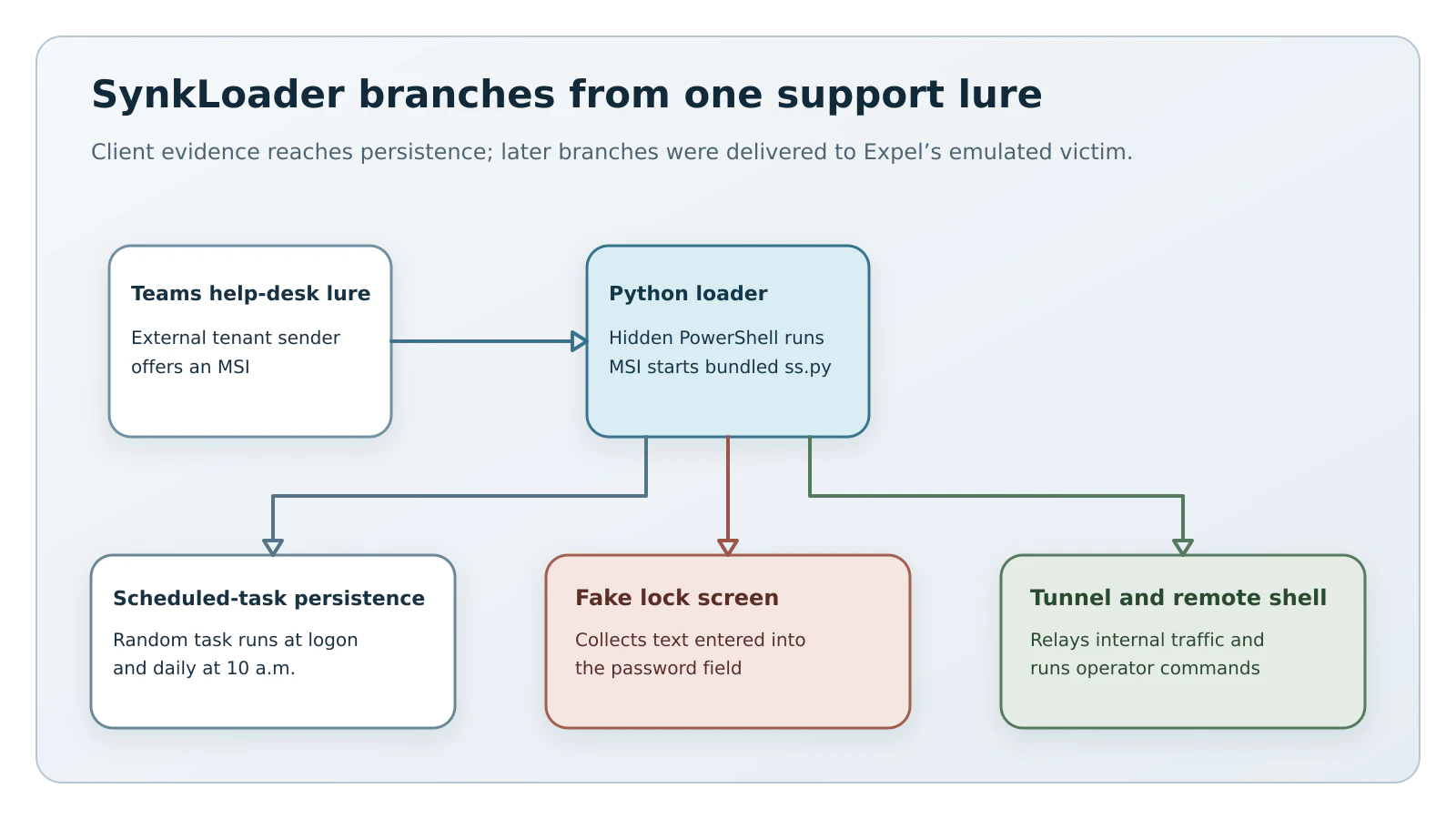
Figure details
The observed delivery starts with an external Teams sender impersonating a help desk and offering an MSI. The installer starts hidden PowerShell and a bundled Python loader. Scheduled-task persistence is tied to the original client evidence. The diagram then branches to three modules Expel received after presenting an emulated high-value network: a fake lock screen that collects text entered into its password field, a traffic tunnel that reaches internal services through the infected host, and an interactive shell for operator commands.
Teams Help-Desk Chat Starts It
Recovered Teams metadata showed an account at another organization’s default onmicrosoft.com domain using the display name “IT Service Desk.” The researchers could not recover the full conversation, but the sender persuaded the user to install an Azure Blob-hosted file named 331.msi, presented as a PowerShell cleaner. Nulltap is withholding the published download path because repeating an active malware-acquisition route would make the sample easier to obtain.
The MSI extracted archive6.zip and cleaner.ps1 beneath %LocalAppData%\PowershellCleaner\script. The first-stage script opened hidden PowerShell, reconstructed code with -join [char[]], invoked iex, and created an in-memory script block through [System.Management.Automation.ScriptBlock]::Create. It ultimately started the bundled loader with a command shape matching pythonw.exe ...\fl\ang\ss.py.
This sequence gives responders a recognition pattern before any malware-family label is available: an external help-desk contact, an unsolicited installer from cloud storage, a PowershellCleaner directory, hidden PowerShell, and a self-contained Python tree under %AppData%\<random>\fl\ang. Microsoft’s Teams hardening guidance recommends restricting external communication to approved domains where the business can support that policy.
The lure looks routine.
Python Hides The Module Chain
The main ss.py loader bundled its own Python runtime. A fake msvcp150.dll exposed RunPowerShell and RunPowerShellW functions for in-memory PowerShell execution. Another file, msvcp160.dll, manually mapped later DLLs into memory. The resulting mix of Python, C#, and native C++ reduced the number of later components written to disk.
The persistence module used the Task Scheduler COM interface rather than schtasks.exe. It created a random 12-character task that launched ss.py at user logon and every day at 10 a.m. local time. That random name limits name-based detection, while the paired triggers, executable path, and bundled Python directory provide a stronger behavioral match. A leaked debug path ended in schdtaks_atlg_dll.pdb under the Windows user genry.
To see what the operator would send next, Expel changed the emulated profiler output to claim membership in an Active Directory environment with thousands of computers. The researchers wrote that “we were able to lure the threat actors into attempting a hands-on-keyboard attack.” After more than 12 hours of quiet replies, the server delivered a burst of additional modules.
Fake Lock Screen Phishes for Passwords
The PhishLocker module rendered a full-screen borderless window using the current username and the normal Windows lock-screen background. On Expel’s Windows 10 test system, the fake lacked the background blur of the real prompt. Alt+Tab exposed the application switcher, although the window kept pulling focus back. The module accepted any entered value because it never checked the password through Windows authentication.
The submitted value was still useful to the operator when it was real. A TrafficRedirector module opened an outbound connection to its controller, then relayed traffic to internal or internet services selected by the attacker. That route could place later sign-ins behind the victim organization’s public IP address or inside its LAN. A separate reverse-shell module received PowerShell commands, and Expel later emulated that channel to confirm interactive profiling. A VNC module could stream the visible desktop and accept mouse and keyboard input, but it failed in the researcher’s emulated environment.
Expel could not identify the operator or final objective. Its low-medium-confidence assessment points to a ransomware operator or an initial access broker because the profiler counted Active Directory computers and the toolkit combined credential theft, internal tunneling, and interactive control. That assessment is attribution. Expel did not observe a ransomware deployment.
Hunt From Teams To Task
Microsoft’s Teams security-operations guide identifies MessageEvents, MessageUrlInfo, and UrlClickEvents as the tables for tracing external senders, message URLs, and user clicks. Correlate any matching conversation with endpoint creation of 331.msi, cleaner.ps1, archive6.zip, ss.py, msvcp150.dll, or msvcp160.dll; the two scheduled-task triggers; hidden PowerShell; and the %LocalAppData%\PowershellCleaner\script and %AppData%\<random>\fl\ang paths.
Search file telemetry for every reusable SHA-256 value Expel published:
| Artifact | SHA-256 |
|---|---|
331.msi | 151d2a7f52f047638ca8ad80c859c6bfe04d7510fb10933817fa0e3ba5d07a11 |
cleaner.ps1 | 80f08360ba768b152b71abb1cab557f552a13de18c83fe8e6396a197feec9185 |
archive6.zip | 209f69a6ca859f05c954096b30391a43fda33c9ed264dfdccf806697f04b06a8 |
ss.py | d150c70d2732df17aa77991b9ebf4c896f044445e900978581d9598dfa5dc98c |
msvcp150.dll | 61f961cfebdf9967844526649b4b75bba5b1b83210b70aa1bffe3f64e6ac3112 |
msvcp160.dll | 8207d8d949530ea063ffd5d47ee81b74bf718ec0a4755e2349e6af9b91e92dc1 |
| Profiler loader | c4acda412774c292f0db5d64467a2dd09282cdea43c41967e8bf90f6298accf3 |
| Persistence loader | 63622c1ddb3e2a9f11cac192e13ac7494f558516b19d5d8f140f6d0d4d38ea84 |
| Fake lock-screen loader | a335e75b78b601ebc5c258975d95fd79aa21f836fc6b79d82e9a22c596133f07 |
| Persistence DLL | 0428fbdefa8dda10ce8fc12b1b516641e83cd5088388168e3f1a0be1432b4077 |
| Fake lock-screen DLL | cb1c657f74b9e57f5e81126179128e8db949d1d4196be9dcb890341e222fd384 |
Search DNS and proxy records for the attacker-controlled domains neversoftmain[.]net, rootfarmapp[.]net, tripinupdate[.]net, dondermicapp[.]net, and aroclenetapp[.]net. Expel withheld hashes for some victim-specific modules because their embedded identifier changes per infection.
The verification test has two parts. First, the Teams-to-device timeline should return no unexplained external support contact followed by an installer, the listed paths or hashes, a paired logon-and-10-a.m. task, or traffic to the five domains. Second, every investigated endpoint should have no surviving task or loader files and every exposed account should have its sessions revoked and password reset from a known-clean system. Any remaining match means containment and credential recovery are incomplete.
SynkLoader turns a familiar support conversation into a bridge between identity and endpoint telemetry. The strongest defense is the joined timeline: who contacted the user, what they installed, what persisted, and which credentials could have crossed the fake screen. Treating each signal alone gives the operator room to hide inside legitimate collaboration and cloud services.