
An attacker posing as IT support in an external Microsoft Teams chat or call can ask an employee to approve screen control or read back a Quick Assist code. Microsoft Threat Intelligence observed operators use that access to install a malicious MSI, stage a portable Node.js runtime, and run a persistent JavaScript implant. The operators then surveyed Active Directory and initiated WinRM connections toward domain controllers and certificate authorities.
Microsoft did not quantify the campaign’s targets or organizations. It described theft, extortion, and ransomware as possible follow-on objectives rather than completed outcomes. The company also said the chain did not exploit a Teams vulnerability: users were persuaded to cross visible external-contact warnings and grant legitimate remote control.
The support call opens access
The first action is ordinary enough to resemble a helpdesk exchange. An external tenant starts a Teams chat or call under an IT-themed identity, sometimes adding voice phishing. The operator asks the employee to approve a Teams request-control prompt or launch remote-support software.
Once inside the session, the operator runs PowerShell to retrieve an MSI from cloud storage and installs it with msiexec /qn. Microsoft saw update-themed names such as devfix and Hotfix. The quiet-install switch suppresses the installer interface, so the employee who approved the session may never see the transition from support pretext to payload staging.
The sequence matters more than any single tool. The source’s clearest recognition point is immediate: “The urgency and interactivity are the signal.” A remote-assistance process followed on the same desktop by cmd.exe or powershell.exe connects the social contact to endpoint execution. A phone conversation can leave the malicious instructions outside Teams chat history, which makes endpoint and call metadata especially important.
A signed runtime carries malware
The MSI drops a script loader and an encrypted implant under the current user’s LocalAppData. Node.js becomes the execution host. It downloads the legitimate portable Node.js runtime from the official distribution when Node.js is absent. PowerShell, cmd.exe, or WScript starts hidden bootstrap code; Node.js then decrypts and executes the JavaScript implant from a user-writable directory.
Microsoft observed both in-memory execution and temporary JavaScript files. Loaders used extensions such as .tmp, .ini, .dat, .bin, and .cfg. The implant established per-user persistence through an EdgeUpdate Run value or Startup-folder shortcut. It polled its command server over randomized HTTPS, captured screenshots, enumerated hosts and accounts, queried security products, and accepted additional tasks. Later payloads ran through rundll32.
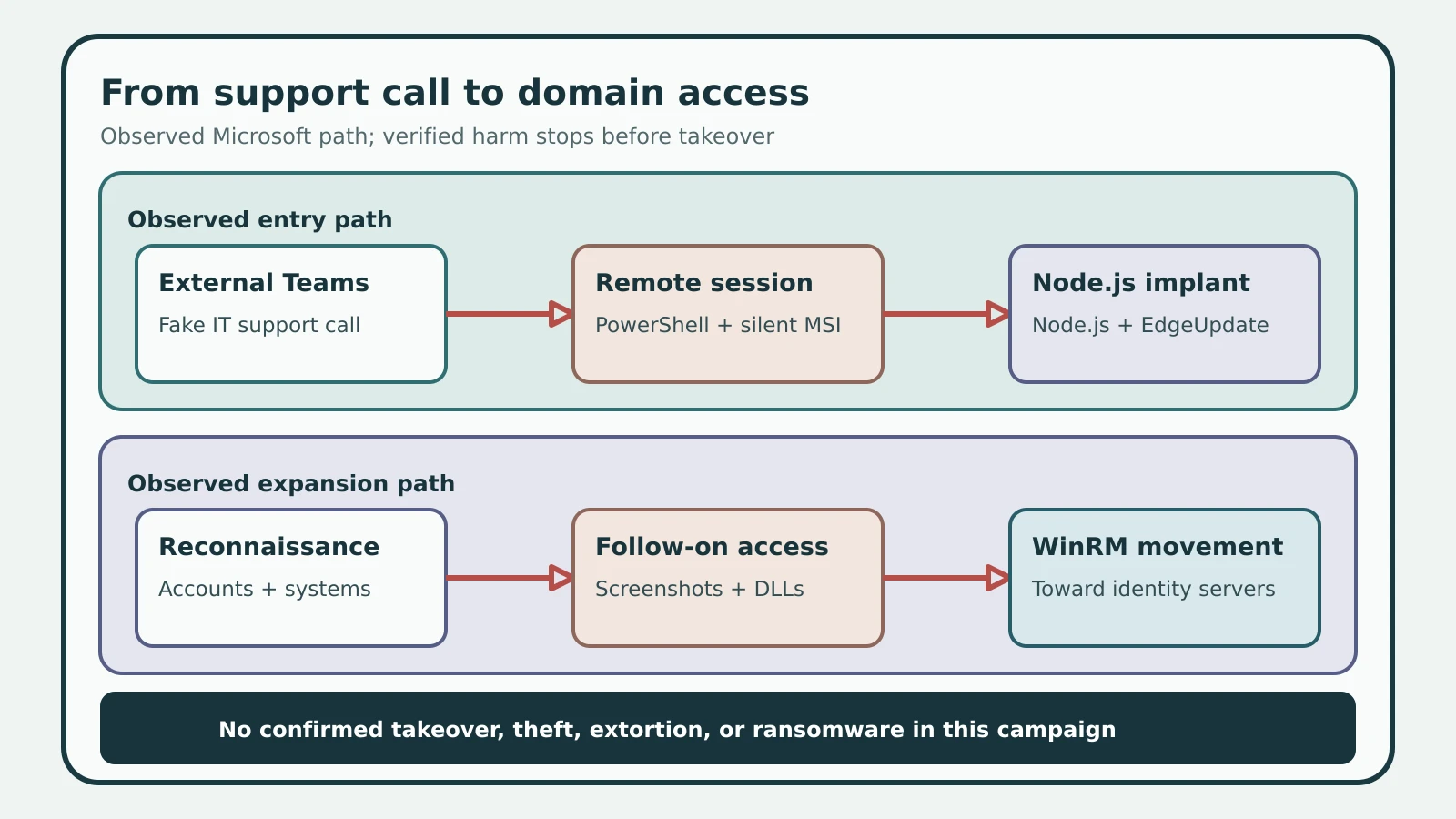
Figure details
An external Microsoft Teams contact impersonates the helpdesk and persuades a user to approve a remote session. During that session, PowerShell downloads an MSI and msiexec installs it quietly. The package stages a portable Node.js runtime, a loader, and an encrypted JavaScript implant in LocalAppData. EdgeUpdate persistence restarts the loader, while HTTPS tasking leads to reconnaissance, screen capture, follow-on DLL execution, and WinRM connections toward domain controllers and certificate authorities. The final movement was observed; completed ransomware, extortion, or data theft was not established.
This is a staged-artifact chain with several execution boundaries. An MSI saved to disk is delivery evidence. A node.exe process loading content from LocalAppData is execution evidence. EdgeUpdate persistence shows preparation for later execution, while WinRM traffic to :5985/wsman shows attempted lateral movement. Those observations should not be collapsed into a claim that every staged file ran or that a domain controller was compromised.
Behavior connects the chain
Microsoft supplied four practical hunts: external Teams chat creation, PowerShell writing an MSI to a user-writable path, Node.js launched by WScript from AppData\Local, and PowerShell reaching :5985/wsman. The strongest finding is their sequence around one user and device. Alert names include Suspicious Node.js process behavior, Suspicious JavaScript process, Suspicious process launch by Rundll32.exe, Suspicious Active Directory enumeration, and Suspicious WinRM activity was observed.
The Microsoft file indicators are:
-
MSI loaders:
4cfdcae6dd1d6d98b870c8f0654d504f2bf10479a117dc297de789c249dc389d,a4d145a6347e47d40b3ca48af5c6dba01bf019d0110e31a44bb70fc77d1d1676, andcc6d0f3f47afeba018173604e34f527e8413d3a54ffb35caed529bff49055ec5. -
Second-stage DLLs:
0d2fc28af246f62f27e49207d1f64e236ad9ea029412b27877d1ae6c098e86e3,69e10e0cb7bb2137ebea12971adb02c662cf5543a4f8c9530812bcbf7b183a23, anda135fe4df18c711097e69b4f27ea32a74a955160bf2fb12da841f21866d95d87. -
Attacker-controlled C2:
synctimes[.]australiaeast[.]cloudapp[.]azure[.]com,webwether[.]eastus[.]cloudapp[.]azure[.]com, anddssdfvsdfvsdfvsdgbfbdvdzv[.]org.
The operators also abused legitimate Azure Blob Storage at update1n5.blob.core.windows.net, update1n6.blob.core.windows.net, update1n7.blob.core.windows.net, update1n9.blob.core.windows.net, and updatetmp.blob.core.windows.net to host MSI loaders. These are specific Azure tenant hostnames, while blob.core.windows.net remains a shared Microsoft service. Block or investigate the listed tenant hostnames in context instead of treating the entire service as hostile.
Unit 42 separately documented related Spring Ring campaigns that approached more than 150 employees across at least 10 companies between January and April 2026. That record covers different payload paths and cannot supply a scale estimate for Microsoft’s later campaign. Its useful comparison is behavioral: spoofed external tenant names, a rapid chat-to-call transition, repeated approaches, and rare RMM execution. Unit 42 published san-sid[.]com and SHA-256 24ab9fe5d5be62d3bf055a0ca4508e8bca2996b6d78649dce8145d8a27bc1c5b for one separate PowerShell RAT path. Both Microsoft and Palo Alto Networks describe protections sold by their own companies, so their product-coverage claims carry that vendor interest.
Restrict support and verify scope
Containment starts with the affected endpoint. Require employees to authenticate unsolicited support through a known internal channel before granting screen control. Restrict Teams external access to trusted domains where business use permits it, inventory approved remote-support tools, and alert when other RMM software appears. Limit WinRM to authorized management systems and flag user-context PowerShell that reaches TCP 5985.
If the chain is detected, isolate the endpoint and preserve Teams thread and call identifiers, remote-session records, PowerShell and process telemetry, MSI files, user LocalAppData, Run keys, Startup shortcuts, and WinRM network events. Rotate credentials accessible from the host, including privileged domain credentials when the device was domain joined. Microsoft recommends treating the operator as having obtained network-level access through the affected machine.
Run Microsoft’s four hunts over the retained period and join the results by user, device, and time. The expected clean result is no unauthorized external support contact followed by remote control, no PowerShell-created MSI in a user-writable path, no WScript-launched Node.js loader under AppData\Local, no unexplained EdgeUpdate persistence, and no user-context WinRM movement to :5985/wsman. Any connected hit should expand the investigation through the account’s sessions and the destination systems until the observed chain is accounted for and the affected access has been revoked.