An updated ToxicPanda banking trojan targets 349 financial applications across 16 countries and automates a path to shell-level control on Android phones. Zimperium zLabs found 167 remote commands in the samples, including functions that capture banking PIN touches, steal device passcodes, install applications, and pair with Android Debug Bridge over Wi-Fi.
Zimperium, a mobile-security vendor evaluating its own products, says Accessibility access lets the malware read “every UI element on the screen.” Its report also promotes Zimperium defenses, so the product-performance claims are excluded here. The source does not quantify infections, stolen funds, or successful takeovers, and it reports no separate response from Google or affected financial institutions.
The permission chain leaves visible state changes that mobile defenders can correlate.
A Dropper Blocks Google Play
The first component presents a fake installation interface in a WebView and asks the user to grant VPN service access. With that permission, the dropper creates a local VPN interface and blocks communication to Google Play and Google Play Services. It then decrypts a payload stored in its own assets, installs it, and requests Accessibility Service access.
That sequence matters because the VPN block occurs before the dropper extracts and installs its payload and before the payload asks for broader access. The chain still depends on social engineering and visible Android permission screens. Zimperium did not describe an Android vulnerability that silently grants those privileges.
Collected samples used Amazon S3 buckets for delivery. Amazon Web Services is an abused legitimate service, so defenders should treat an unfamiliar S3-hosted APK as a lead and preserve the full URL from their own telemetry. Nulltap is withholding the published payload paths because repeating an active download route would improve access to the malware.
Accessibility Opens ADB Control
After Accessibility is active, ToxicPanda searches the Android settings interface for Build number and simulates seven taps to enable Developer Options. It opens Wireless debugging, turns the feature on, selects the pairing-code option, and reads the six-digit code and dynamic port from the resulting dialog. The malware then completes a SPAKE2 pairing exchange with the ADB daemon on 127.0.0.1.
That local pairing gives the application Android’s shell identity. Zimperium says the operator can use it to grant permissions, suppress background restrictions, enable components, take screenshots, simulate input, and execute arbitrary shell commands. The public command inventory names startAutoPair, adbShell, adbScreenshot, adbUiTree, installApk, and updateApk among the implemented functions. It also marks several entries as incomplete or unimplemented, including autoRequestPerm, reqScreenPermission, startWebRTC, stopScreenRelay, and releaseScreenCapture.
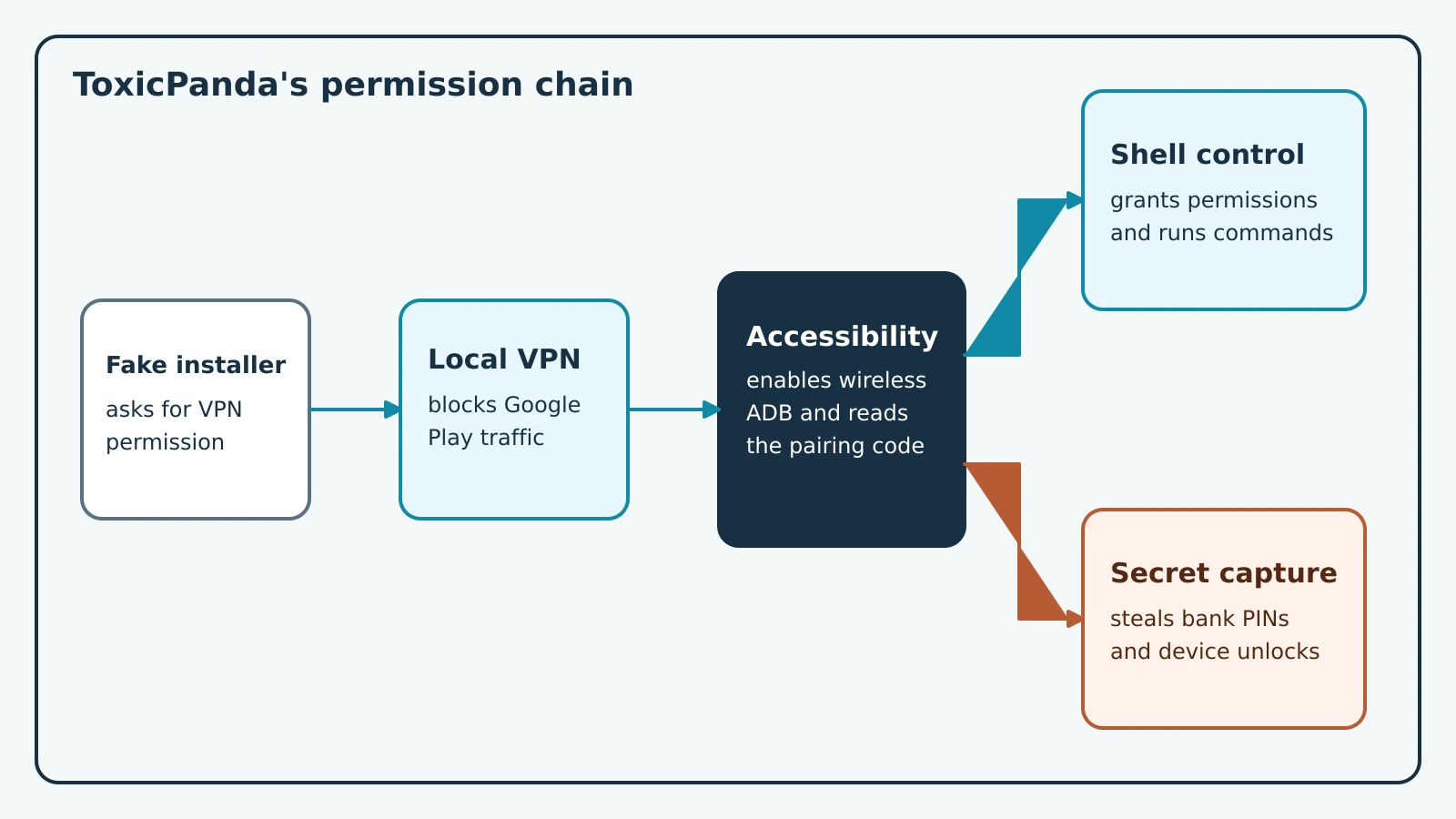
Figure description
The figure begins with a fake installer requesting VPN access. The dropper uses the local VPN to block Google Play traffic, extracts the embedded payload, and requests Accessibility. Accessibility automates seven taps on Build number, enables wireless debugging, reads the six-digit pairing code, and pairs with the local ADB daemon. The chain then splits. One path reaches shell commands and persistent device control. The other path uses overlays and captured touch coordinates to steal banking and device passcodes.
Overlays Capture Financial Secrets
The samples enumerate installed applications and send package names and icons to the command server. When a listed banking, payment, wallet, or cryptocurrency application opens, the malware can request a matching HTML overlay from its controller. Zimperium counted 349 configured targets across 16 countries, up from 16 banking applications in the earlier version. That number describes the target list rather than confirmed victims.
ToxicPanda also watches the foreground application and places a transparent layer over targeted financial screens. The layer records touch coordinates as a victim enters a PIN. Operator commands such as touchPinReplay, replacePinTargets, and updatePageRule let the malware replay touches or replace the active targeting rules. Separate fake lock-screen overlays collect device PINs, patterns, and passwords. With Device Administrator access, admPwd attempts to reset the device password, while fake update screens hide activity behind a full-screen maintenance message.
Zimperium published four command-server values. Hunt for the defanged strings cctvv2[.]com/panel, www[.]v17001[.]com/panel, www[.]w17907[.]com/panel, and g8688808[.]com. Its defensive IOC repository also carries the full SHA-256 sets for analyzed APKs and droppers. Preserve whether a matching file was downloaded, installed, or executed; those are different exposure states.
Hunt Permission Chains
Start with Android fleet inventory. Flag applications outside approved stores that request both VPN service and Accessibility, especially when the same device enables Developer Options or wireless debugging soon afterward. Correlate that state change with an unfamiliar APK download from Amazon S3, a persistent WebSocket session, or DNS and proxy telemetry for the four defanged command-server values. Review mobile threat telemetry for overlay creation, Device Administrator prompts, package installation, ADB pairing, and rapid navigation through APPLICATION_DEVELOPMENT_SETTINGS.
On a managed test device, establish a clean baseline with wireless debugging disabled and no unapproved accessibility services. Install the suspect package only in an isolated analysis environment, deny production credentials, and record every permission transition. The verification result is specific: the device remains compliant when wireless debugging stays off, the approved accessibility-service list is unchanged, and no traffic reaches the published command servers. Any unexplained ADB pairing, new accessibility service, or matched hash moves the phone into containment. Revoke active banking sessions from a separate clean device, preserve mobile and identity telemetry, then reset credentials used during the exposure window.