
Oasis Security published Envade on May 21, 2026 and updated its research on July 15, making the VS Code MCP installation-link flaw roughly eleven weeks old when Nulltap reviewed it. The reason to cover it now is not the disclosure date; it is the cleanup gap after VS Code 1.119.1. Updating fixes the preview, but it does not prove an older workspace never accepted hidden launch fields or headers. For developers using VS Code with Model Context Protocol servers, that omission turned one click on Install into a path to local code execution or silent session routing. Microsoft fixed the issue, CVE-2026-41613, in VS Code 1.119.1.
The affected boundary was VS Code’s MCP install preview.
The preview showed only half the configuration
VS Code accepts deep links that propose an MCP server configuration. A developer can encounter one on a catalog page, in documentation, or in a message. After the link opens the editor, VS Code presents a preview and asks the developer to approve the installation.
Oasis found that the preview rendered five fields while persisting five additional fields from the link. The hidden group included env, envFile, headers, cwd, and dev. These were not merely omitted from a summary and then discarded. VS Code wrote them into the workspace MCP configuration.
That made the dialog an unreliable consent boundary. A developer could inspect the displayed command and arguments, recognize the expected server, and still approve behavior that was absent from the screen.
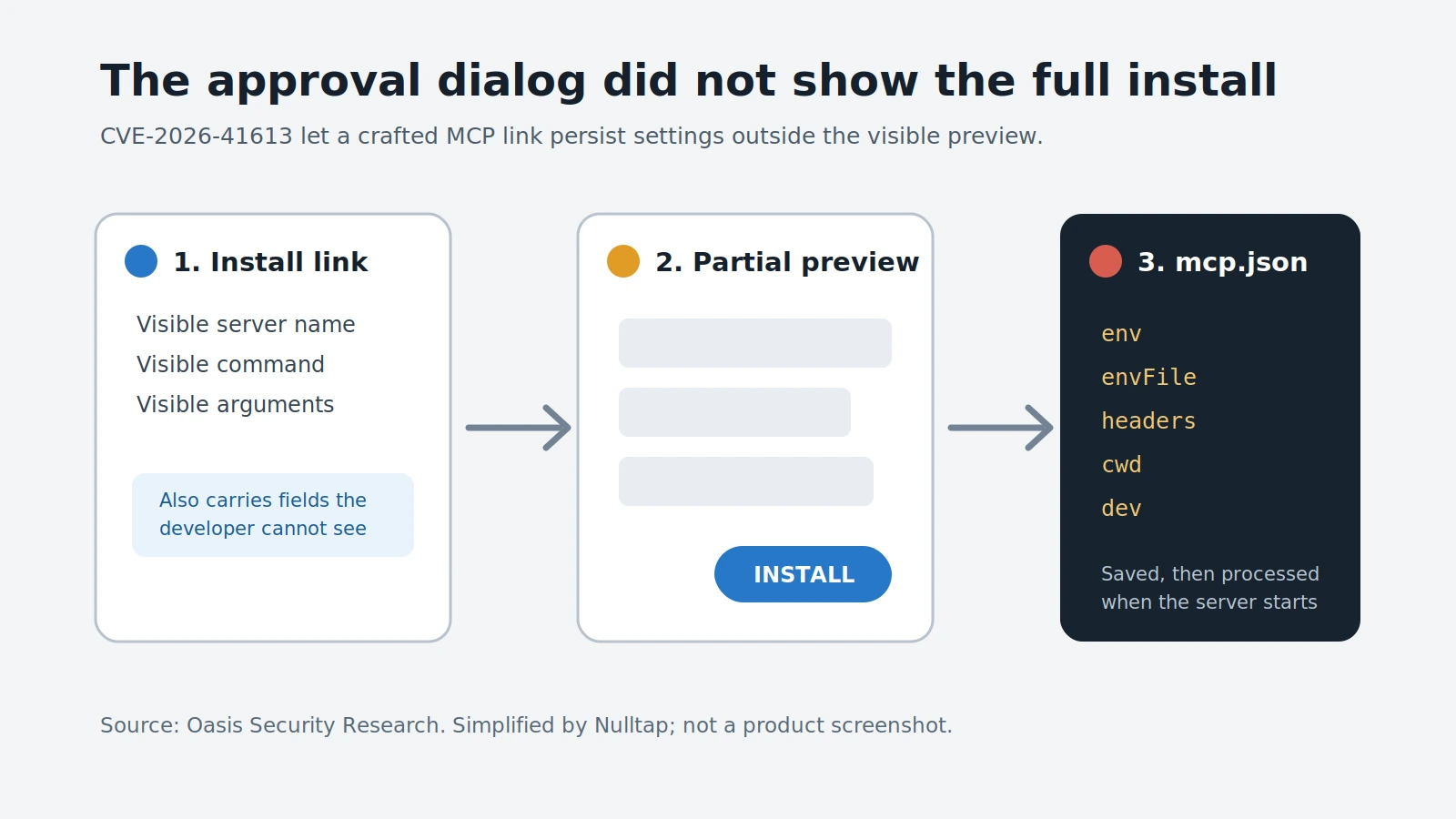
Figure details
A crafted MCP install link contains a visible server name, command, and arguments, plus configuration fields the developer cannot see. VS Code presents only the visible fields in the approval preview. After the developer selects Install, the editor writes the complete configuration to mcp.json, including the hidden env, envFile, headers, cwd, and dev fields. The diagram shows persistence, not immediate execution: the saved settings are processed when the MCP server starts.
An environment value could execute first
The code-execution path used the fact that programs consume environment settings before their own application logic begins. In the attack described by Oasis, a crafted link placed a malicious value into a hidden environment field. When the installed MCP server later started, manually or after a workspace reload, the operating system and runtime processed that value first.
Oasis specifically calls out NODE_OPTIONS containing --import as a pattern defenders should hunt. That option can make Node.js load attacker-selected code before the expected MCP package runs. The legitimate-looking command in the preview therefore did not describe the complete launch behavior.
The saved configuration also survived an editor restart. Clicking the link did not have to produce an immediate shell for the attack to work; installation planted the condition, and starting the server completed the chain.
The researcher’s demonstrated sequence was:
- An attacker supplied an MCP installation deep link.
- VS Code displayed the expected server fields but omitted attacker-controlled settings.
- The developer approved the incomplete preview.
- VS Code saved both the visible and hidden fields to the workspace.
- The next server launch loaded the malicious environment setting before the intended server code.
Oasis published a proof-of-concept and says Microsoft received the full technical report through the MSRC portal. The public evidence establishes a working exploit path, but it does not say attackers used CVE-2026-41613 in real intrusions.
Hidden headers created a second trust failure
The same rendering gap supported a different outcome without local code execution. A crafted configuration could include an Authorization header that the preview did not disclose. The installed server would then connect as the attacker’s account rather than asking the developer to authenticate.
That reverses the expected trust relationship. Files, prompts, tool calls, and other activity initiated by the developer’s assistant could appear in infrastructure controlled through the attacker’s account. The developer did not have to surrender a password; the link supplied an identity behind the approval dialog.
This second path is important for triage. An audit that looks only for shell commands can miss planted credentials and routing changes. Security teams need to examine both process-launch fields and HTTP headers.
Update, then audit what earlier versions saved
VS Code 1.119.1 and later render env, envFile, and headers in the installation preview, according to Oasis. Organizations should verify the installed version on every managed developer endpoint rather than treating automatic update policy as proof that the fix landed.
Updating closes the vulnerable preview, but it does not answer whether an older version already accepted a crafted configuration. Search workspace mcp.json files for unexpected values in:
env, especiallyNODE_OPTIONSvalues containing--import;envFilepaths that leave the expected workspace or point to unfamiliar files;headers, especially pre-populatedAuthorizationvalues;cwdvalues that change the server’s working directory; and- any other entry the developer or repository owner cannot account for.
Correlate suspicious configuration changes with editor-spawned Node.js processes, child shells, unusual outbound connections, and workspace reloads. If an untrusted environment import executed, remove the configuration, isolate the endpoint, preserve the relevant files and process telemetry, and rotate credentials accessible to the developer session. If an unexpected authorization header was present, revoke that token and review the remote service’s audit trail for actions attributed to the planted identity.
The required result is concrete: every VS Code installation is 1.119.1 or newer, every reachable MCP workspace configuration has an owner and an expected purpose, and no unexplained launch field or authorization header remains. Until those checks are complete, installing the patch addresses the vulnerable dialog but not the configuration it may already have accepted.