
SpecterOps researcher Beyviel David published a two-part WSUS investigation on August 5, 2026. The completed research includes public NotWSUSPicious and ludus_wsus tooling that lowers the reproduction threshold for the demonstrated chain. That path can turn some Windows Server Update Services deployments into targeted malware distributors when the WSUS database runs on a standalone Microsoft SQL Server instead of using Windows Internal Database on the update server itself.
The research does not describe exploitation in the wild, does not quantify how common the exposed standalone-database architecture is, and is not a remote attack against every WSUS server. An adversary must be positioned to coerce the WSUS server’s computer account, relay its NTLM authentication to the separate SQL server, and reach that database over the network. Where those conditions hold, the relayed machine account can use WSUS stored procedures to create and target an update without direct write access to the underlying tables. Database authentication and network boundaries therefore decide exposure more directly than the presence of WSUS alone.
A restricted role manufactures an update
In David’s lab, the WSUS computer account mapped to the webService database role. The role lacked direct select, update, and delete access to core SUSDB tables. It could still execute the stored procedures the WSUS service normally uses.
That distinction is the center of the chain. The attacker coerces an SMB authentication from the WSUS server, relays it to the standalone SQL server, then uses procedures including spImportUpdate, spSaveXMLFragment, spSetBatchURL, spCreateTargetGroup, and spDeployUpdate. Together, those calls can define parent and child update metadata, point WSUS at attacker-hosted content, create a target group, add chosen endpoints, and approve the forged update for installation.
The attacker never needs database-administrator rights. The service account’s ordinary stored-procedure permissions already provide enough authority to reconstruct the update workflow.
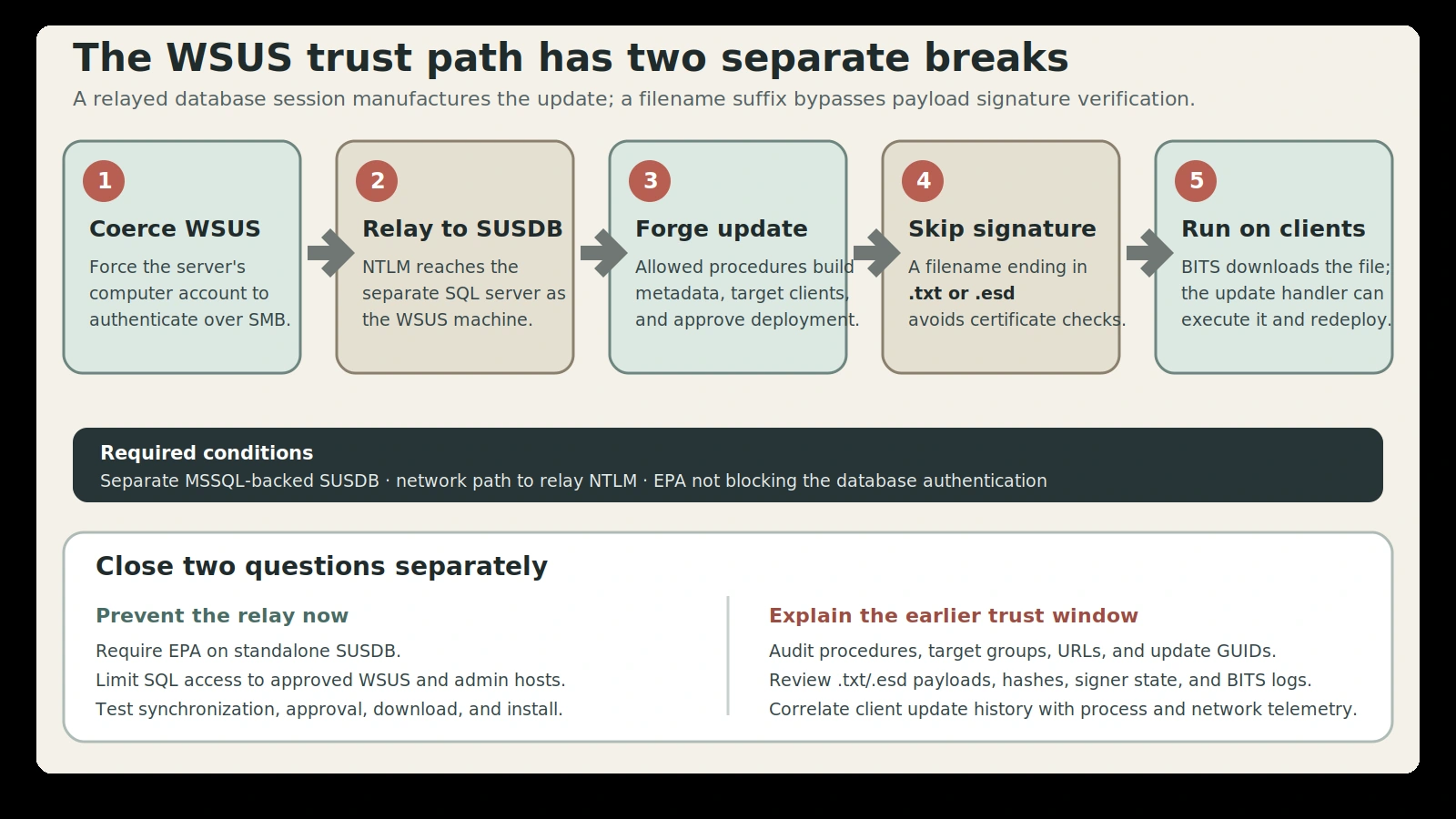
Figure details
An attacker on a reachable network coerces the WSUS server computer account to authenticate over SMB and relays that NTLM authentication to a separate Microsoft SQL Server hosting SUSDB. The resulting webService-role session cannot write tables directly, but permitted WSUS stored procedures can build and deploy a targeted update. A payload whose filename ends in .txt or .esd skips the normal certificate-signature check, allowing selected WSUS clients to download and execute an unsigned file.
File extensions skip signature checks
WSUS normally rejects an unsigned executable. David traced that decision into Microsoft.UpdateServices.ContentSyncAgent.dll and decompiled its VerifyFile logic. His conclusion is direct: “WSUS normally requires executables to be digitally signed, however this can be bypassed by appending the .esd or .txt file extensions.” When an update filename ends in .txt or .esd, the code does not call the certificate-signature check.
The extension changes only the verification path; the Windows command-line update handler retains its execution behavior. David renamed a test payload Ghost.txt, served it from an HTTP server that supported the range requests required by Background Intelligent Transfer Service, and installed the forged update on a lab workstation. The payload produced a command-and-control callback.
The lab also showed a persistence consequence. When the test process exited, WSUS redeployed the failed update. If Group Policy is set to Configure Automatic Updates, option 4: Auto download and schedule the install, the forged update can install without user interaction at the configured schedule. Those observations are research results, not evidence that a named attacker has used the chain.
Check architecture before artifacts
Architecture decides exposure.
First identify which WSUS servers use Windows Internal Database locally and which point to a standalone MSSQL-hosted SUSDB. For the second group, document the database host, the account mapping, allowed source networks, and whether the SQL listener accepts NTLM authentication without Extended Protection for Authentication.
On a Windows client, run reg query HKEY_LOCAL_MACHINE\SOFTWARE\Policies\Microsoft\Windows\WindowsUpdate and retain the exact WUServer and WUStatusServer values. Those markers identify the assigned update service and provide the starting point for mapping clients back to each WSUS and SUSDB architecture.
Require EPA on the SUSDB server and restrict database access to the exact WSUS servers and administrative locations that need it. Those controls break or narrow the demonstrated relay path. Review other services on the SQL host before enforcement, because authentication changes can have operational effects beyond WSUS.
The disclosures identify no Microsoft CVE, fixed WSUS version, fixed Windows Server build, superseding update, or Microsoft product fix for the .txt and .esd verification behavior. They also cite no Microsoft response. The documented preventative controls are EPA and SQL network restrictions.
Reconstruct delivered update history
Then inspect database and WSUS evidence across the exposure window. Audit calls to spCreateTargetGroup or its deployed equivalent, spSetBatchURL, and spDeployUpdate, especially unexpected invocations, unfamiliar update GUIDs, new target groups, unapproved administrators, or content URLs outside known Microsoft and internal repositories. Prioritize update filenames ending in .txt or .esd when they are paired with command-line installation metadata, because both extensions also have benign uses.
On the WSUS server, preserve C:\Program Files\Update Services\LogFiles and look for EventId=364, FileVerficationFailed, FileVerified, content downloads, deployment events, BITS failures, and unusual source URLs. Preserve C:\Program Files\Update Services\Services\Microsoft.UpdateServices.ContentSyncAgent.dll when the verification path itself needs examination. On clients, correlate Windows Update history and service activity with endpoint process telemetry. A text-like update file spawning a process, opening an outbound connection, or repeatedly reinstalling outside an approved change window warrants incident handling.
For unattended-install exposure, inspect Computer Configuration > Administrative Templates > Windows Components > Windows Update > Configure Automatic Updates and record whether option 4, auto download and scheduled install, was enabled during the exposure window.
Prevention is only one finding.
SpecterOps released NotWSUSPicious to automate the lab chain and ludus_wsus to reproduce the architecture. The reports do not identify a Microsoft CVE or product fix for the .txt and .esd signature-verification behavior. Public tooling increases the value of closing the relay path, but it does not prove prior compromise.
That is the line between prevention and retrospective clearance. EPA can stop the demonstrated relay going forward, while the older question depends on what WSUS approved, where clients downloaded content, and what endpoints executed during the plausible exposure window.
Verify relay and delivered content
Past delivery still needs evidence.
For the control state, classify every WSUS deployment by database architecture; require EPA on every standalone SUSDB server where compatible; limit SQL network access to authorized WSUS and management hosts; and test that update synchronization, approval, download, and deployment still work.
For incident reconstruction, explain unexpected stored-procedure calls, target groups, update metadata, content URLs, .txt and .esd payloads, deployment records, and client execution across the earliest plausible relay window. Preserve WSUS, SQL, BITS, Windows Update, and endpoint telemetry, and compare deployed file hashes and signer state with approved update records.
Requiring EPA today prevents the demonstrated relay from succeeding now; it does not establish what the trusted update channel delivered yesterday. The review has to follow the trust service into its clients. WSUS is a distribution system whose past decisions may already have been installed by clients that trusted it.