Attackers are exploiting an HTTP request-handling flaw that can remotely reload Cisco ASA and FTD firewalls when their remote-access services are exposed. The result is a denial of service at a network boundary that often carries employee VPN traffic.
Cisco’s August 11 advisory identifies the flaw as CVE-2026-20349 and says its Product Security Incident Response Team learned of active exploitation in August. CISA added it to the Known Exploited Vulnerabilities catalog the same day and set an August 14 deadline for federal agencies. Neither source quantifies the attacks or identifies their operators, targets, or successful disruptions.
Three configurations expose the path
A device is in scope only when it runs vulnerable Cisco Secure Firewall ASA or FTD software and has a configuration that enables an affected SSL listen socket. Cisco names three paths: IKEv2 Remote Access VPN with client services, SSL VPN, and Zero Trust Network Access.
Exposure depends on the listener and network path.
Administrators can find the relevant state in show running-config. The identifying forms are:
crypto ikev2 enable <interface_name> client-services port <port_numbers>

webvpn
 enable <interface_name>

zero-trust
 enable
The presence of one of these configurations establishes a potentially reachable listener. It does not by itself prove that the interface was internet-accessible or attacked, so the configuration check needs an interface and network-path inventory beside it.
One request forces a reload
Cisco attributes the vulnerability to insufficient error checking while the Remote Access SSL VPN service processes HTTP requests. An unauthenticated remote attacker can send a crafted request into the exposed service and reach the failure condition.
The vendor describes the successful outcome plainly: the attacker can “cause the affected device to reload, resulting in a DoS condition.” That is the full publicly established consequence. Cisco and CISA do not report remote code execution, persistent access, data theft, or configuration compromise from this flaw.
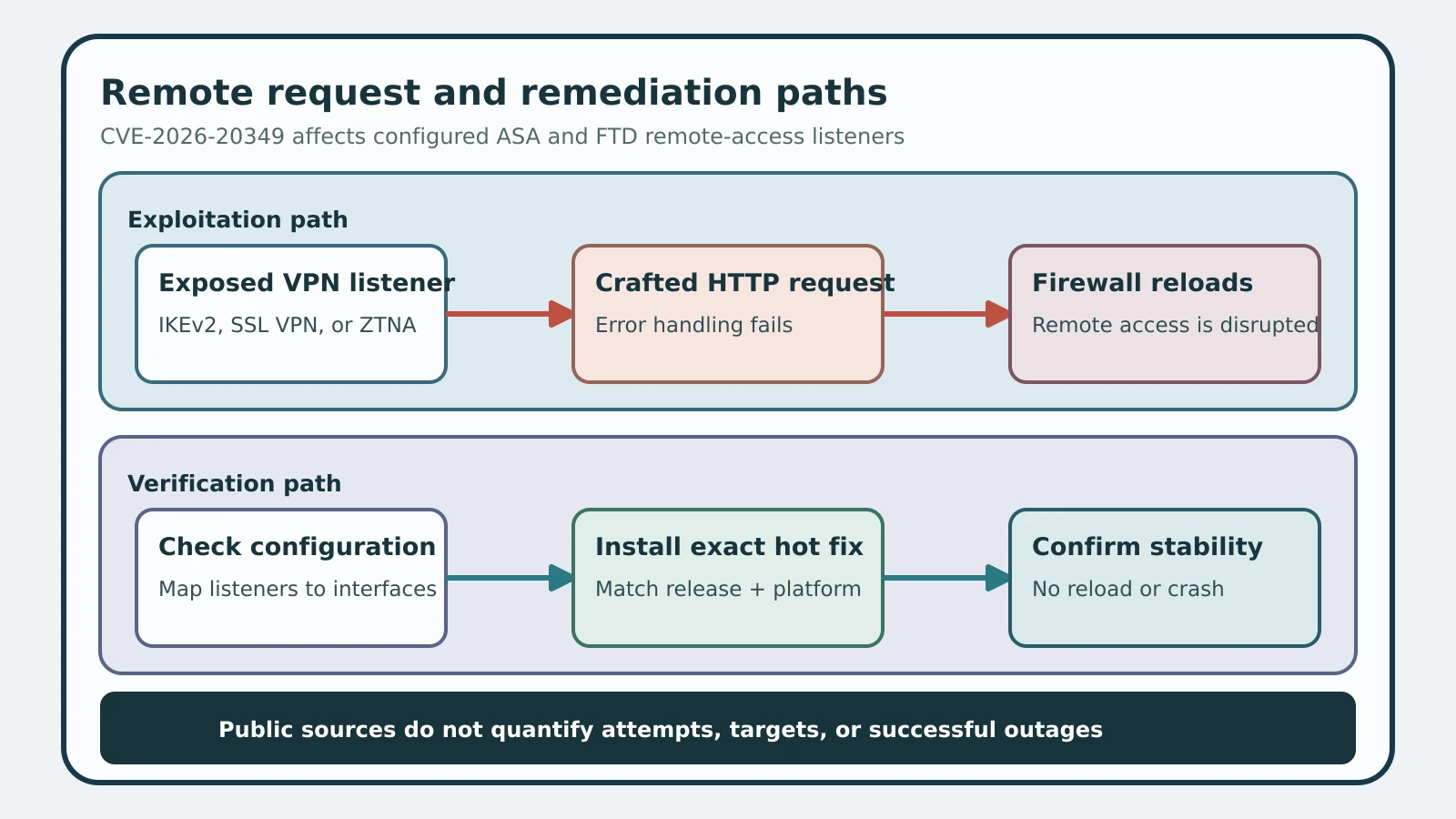
Figure details
The upper path starts with an ASA or FTD device whose IKEv2 client services, SSL VPN, or Zero Trust configuration enables an SSL listener. A crafted HTTP request reaches insufficient error checking and causes the device to reload, interrupting service. The lower path shows defenders checking the listener configuration, installing the exact release-specific hot fix, and confirming the running version and stable remote-access service.
Active exploitation raises the deadline
Cisco says its PSIRT became aware of exploitation in August 2026. CISA’s August 11 KEV alert turns that vendor report into a federal remediation requirement, with August 14 as the due date.
The sources publish no request signature or attacker infrastructure. They also do not say whether the observed activity caused sustained outages. Defenders should therefore treat unexpected reloads during the vulnerable interval as a useful investigative lead, while recognizing that an absence of known indicators cannot clear an exposed appliance.
Start with device uptime, reload reason, crash information, and remote-access availability alerts. Align those records with upstream firewall, load balancer, reverse-proxy, or flow telemetry that can show bursts or unusual connections to the affected listener. Preserve the relevant window before routine log rotation removes it.
Install the release-specific hot fix
Cisco says there is no workaround. The remediation is an upgrade or the exact hot fix for the running train.
For ASA, Cisco lists 89.16.4.50 for 9.16, 89.18.4.50 for 9.18, 9.20.4.235 for 9.20, 9.22.3.191 for 9.22, 9.23.1.211 for 9.23, and 9.24.1.221 for 9.24. The 89-prefixed packages also require ASDM 7.24.1.374 because earlier ASDM releases do not recognize that numbering format.
FTD uses platform-specific hot-fix packages. The shared package stems are GC-7.0.9.1-1 for 7.0, HM-7.2.11.1-2 for 7.2, HK-7.4.7.1-1 for 7.4, DD-7.6.4.1-2 for 7.6, AN-7.7.11.1-2 for 7.7, and S-10.0.0.1-2 for 10.0. Appliance-specific filenames vary across SSP and Secure Firewall hardware, so match the package to the exact platform in Cisco’s table instead of treating the stem as a downloadable filename.
These hot fixes supersede continued operation on the affected build for this vulnerability. Removing an unnecessary listener reduces exposure but does not replace Cisco’s fixed software boundary.
Prove the edge stays available
Inventory every ASA and FTD remote-access endpoint, capture show running-config, and map each enabled listener to its external reachability. Install the exact ASA or platform-specific FTD hot fix, then record the running release and installed package rather than relying on a completed deployment job.
After the change, repeat the configuration inventory and perform a controlled remote-access connection through every intended interface. The expected result is successful session establishment, stable device uptime, and no new reload or crash record. Where a vulnerable listener was previously reachable, retain its reload history and upstream connection telemetry as an incident record; the public sources do not supply enough indicators to prove that a quiet appliance was never tested.
The practical boundary is twofold: fixed software stops the published request path, and an evidence review accounts for unexplained availability events while the device was exposed. A clean version check without stable-service verification leaves the operational consequence untested.