
Unit 42 demonstrated three ways malware already running as a standard user on a Windows endpoint could misuse Google Password Manager’s synced-passkey machinery. The techniques can obtain a valid passkey assertion without local device verification, substitute an attacker-controlled user-verification key, or recover the 32-byte security domain secret, or SDS, protecting the account’s synced passkeys.
The affected scope in the research is Google Password Manager in Chrome on Windows systems with a Trusted Platform Module. Every path starts after malware has reached the endpoint. Unit 42 did not report exploitation in the wild, identify affected Chrome versions, assign CVEs, or say that every path is fully remediated. The work does not break WebAuthn cryptography; it attacks the device trust, recovery, and client-side key handling around it. The strongest path targets the SDS, and Google’s public user documentation does not define a self-service SDS rotation or revocation operation for a secret already copied by an attacker.
Chrome’s local records provide the target list
Chrome synchronizes passkey records through its profile database at %LocalAppData%\Google\Chrome\User Data\<Profile>\Sync Data\LevelDB. Unit 42 says a process running as the user can read records that identify relying-party domains, usernames, credential identifiers, and encrypted private-key material.
That database does not expose usable private keys by itself. It tells malware which accounts use synced passkeys and supplies the encrypted credential record needed in later exchanges. The attacker then targets the separate device state and recovery mechanisms that let Chrome ask Google’s Cloud Authenticator to operate on those records.
Unit 42’s earlier architecture analysis describes two device keys. An identity key represents possession of an enrolled device. A user-verification key is gated by Windows Hello and represents a local PIN or biometric check. The cloud service also uses a security domain secret, or SDS, to encrypt the private keys for all passkeys synchronized through the account.
One TPM-backed key can still sign silently
The first technique, Pass-ta-key, extracts Chrome’s wrapped device identity-key blob from the passkey_enclave_state file or browser memory. The private key remains bound to the same TPM, but malware on that computer can import the opaque blob with Windows Cryptography API: Next Generation calls and ask the TPM to sign an attacker-chosen Cloud Authenticator request.
The cloud service sees a request signed by an enrolled device and returns a valid WebAuthn assertion. Because the identity key is not gated by Windows Hello, this step produces no PIN or biometric prompt. The returned assertion has its User Verified, or UV, bit unset.
The WebAuthn specification requires a relying party that requested user verification to reject an assertion when UV is absent. Unit 42 says GitHub performed that check. It recorded eBay accepting the assertion before disclosure; eBay subsequently fixed its validation.
Re-enrollment creates two more paths
Silver Pass-ta-key forces Chrome back through device enrollment by removing or changing its local passkey state. Unit 42 found a period before Chrome creates the legitimate user-verification key in which the attacker could register a replacement key. The researchers say the Cloud Authenticator did not validate that the new key came from protected hardware.
An attacker holding that substituted key can later request assertions with the UV bit set from another environment. Unlike the first path, the victim endpoint does not need to remain online for every login. Unit 42 recommends attesting newly registered identity and verification keys, but its report does not state whether the production service now enforces that check.
Golden Pass-ta-key targets the SDS during the same recovery flow. Unit 42 found that Chrome receives the secret in a client-accessible form. Google removed an earlier exposure from Chrome’s FIDO logs after disclosure, but the researchers say the SDS still appears in Chrome process memory while a device joins or rejoins the security domain.
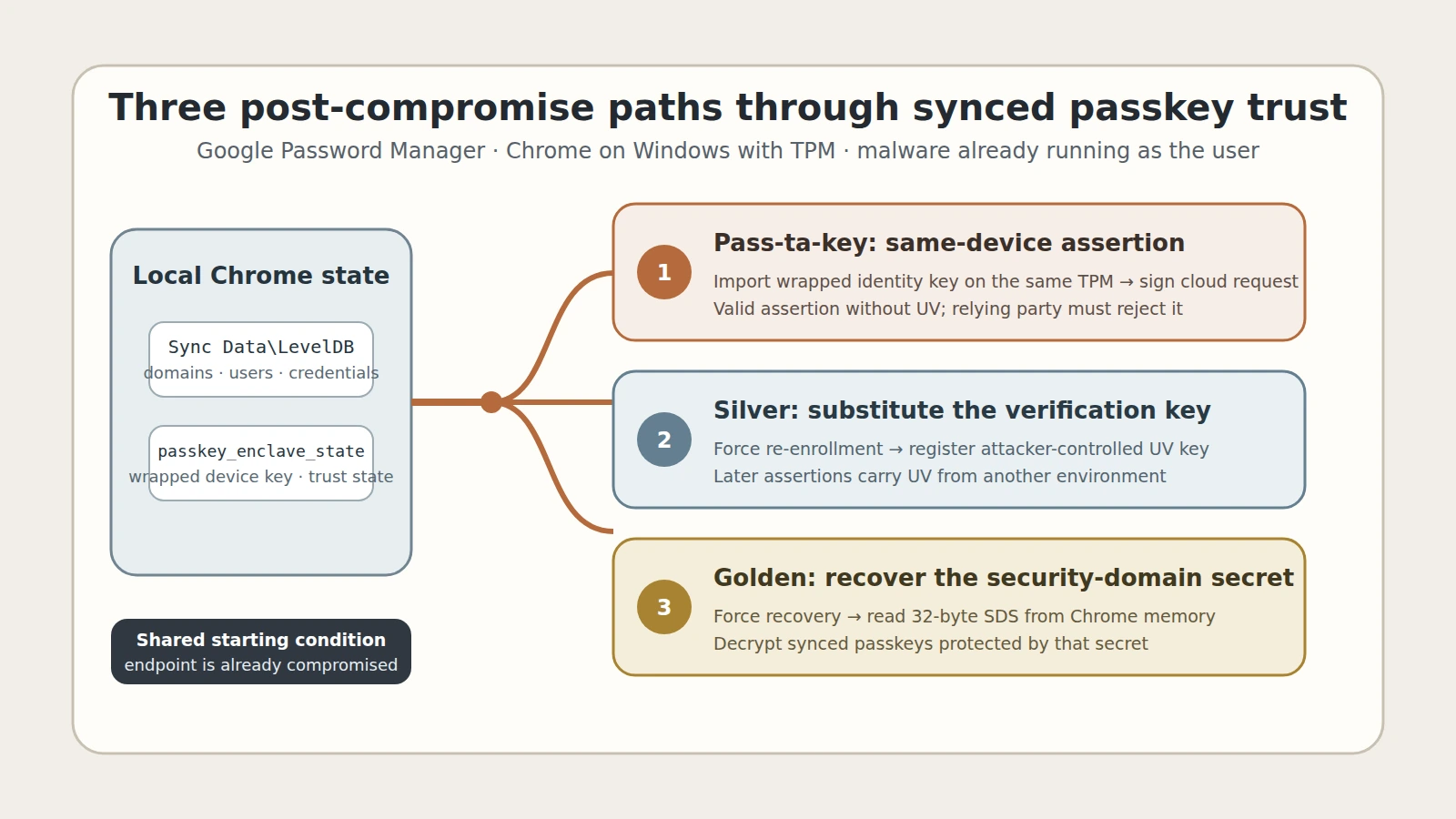
Figure details
Malware running as the Windows user first reads Chrome's synced-passkey records and local passkey state. In Pass-ta-key, it imports the wrapped identity-key blob on the same TPM and signs a Cloud Authenticator request, yielding an assertion without the UV bit. In Silver Pass-ta-key, forced re-enrollment lets an attacker-controlled verification key enter the device record, enabling later assertions with UV from another environment. In Golden Pass-ta-key, forced recovery exposes the security domain secret in Chrome memory, allowing synced passkey private keys to be decrypted. All paths require an already-compromised endpoint.
The SDS has the broadest consequence: it can decrypt existing synced passkeys and, according to Unit 42, future passkeys protected by the same secret. Google’s user documentation covers changing the Password Manager PIN and deleting Password Manager data, but it does not establish that either action invalidates an SDS already copied by an attacker.
The public fix state is incomplete
Two changes are confirmed in the research: eBay began validating UV, and Google removed the SDS from FIDO logging. The two changes leave some described techniques possible. UV validation blocks the first path at a compliant relying party, but it does not address a substituted verification key that can set UV. Removing a log entry does not stop a secret from entering process memory.
The report provides no vulnerable-version boundary or fixed Chrome release. An updated browser alone cannot establish that copied passkey material has been invalidated. It is also not safe to treat every Google-synced passkey on every platform as proven vulnerable: the demonstrations are specifically scoped to Chrome on Windows with a TPM.
Preserve state changes before rebuilding the endpoint
On a suspected Windows compromise, preserve the affected Chrome profile before cleanup, including Sync Data\LevelDB, passkey_enclave_state, Chrome process telemetry, and file-create, delete, or modification events for that state file. Correlate unexpected Google Password Manager PIN prompts or onboarding with browser launches, process access to Chrome memory, Windows CNG activity, and authentication from new devices or locations.
Relying-party teams should set userVerification to required for sensitive accounts and independently reject every assertion whose authenticator data lacks UV. Credential providers should require hardware-backed attestation for replacement identity and verification keys. Those controls address distinct paths; one cannot substitute for the other.
If malware ran on a device that held Google-synced passkeys, treat the associated accounts as potentially exposed. Revoke active sessions, remove unknown enrolled devices and credentials, and re-establish authentication from a clean endpoint. For privileged users, register fresh device-bound hardware credentials where policy permits and contact the provider when SDS exposure is plausible, because the reviewed public documentation does not define a reliable self-service SDS rotation.
Restore the endpoint to a trusted state and investigate unexpected enrollment or recovery changes. Review sessions and registered authenticators, confirm that relying parties enforce UV where required, and investigate unexplained post-recovery authentication. A Chrome update, a changed Password Manager PIN, or the absence of a biometric prompt does not by itself prove that copied passkey material or attacker-added device trust has been invalidated.