Entra ID researcher Dirk-jan Mollema published the Windows Hello key-borrowing research on August 5, 2026. The public ROADtools proof of concept gives defenders a concrete way to test the deviceless-sign-in audit gap. Code already running in a user’s signed-in Windows session can invoke that user’s Windows Hello for Business key without extracting it, knowing the PIN, or prompting for biometrics. The technique matters to organizations using Windows Hello for Business with Microsoft Entra ID because the resulting signature can become cloud authentication and, where tenant policy permits, persistent access from an attacker-controlled device.
This is a post-compromise technique, not a remote entry point. An attacker first needs code execution in the victim’s interactive session. The disclosure does not report active exploitation, victims, a CVE, or a Microsoft security advisory. It also does not provide a complete tested-build matrix. The new defensive fact is narrower: hardware binding does not stop malware inside an unlocked session from asking Windows to use the protected key.
Windows signs while keys stay sealed
Windows Hello for Business normally creates an asymmetric key pair and protects the private key with a Trusted Platform Module where available. That prevents an attacker from exporting the credential and replaying it on another machine. It does not make every signing operation require a new gesture.
Microsoft documents a ticketing system for PIN caching. Entra ID and Active Directory sign-in keys remain available for private-key operations while the user is interactively signed in. Mollema used the Windows cryptography interface from PowerShell to open the user’s Windows Hello key and sign data as a low-privilege user. The TPM still performed the operation; the private key never left it.
That distinction changes the threat model. The security boundary blocks key theft, but malware in the signed-in session can borrow the signing capability. The attacker obtains a valid assertion, not the underlying key material.
Deviceless assertions open persistence
Mollema’s earlier work used the borrowed signature to request a Primary Refresh Token, but it required another Entra-registered or joined device. The new technique removes that prerequisite by treating the Windows Hello for Business key as a FIDO2 passkey through WebAuthn.
The attacker requests a five-minute Entra challenge on another host. According to Mollema, that challenge is not bound to a session, user, or tenant. Code on the compromised Windows endpoint has the Hello key sign the challenge and returns a WebAuthn assertion. The published ROADtools proof of concept contains PowerShell scripts for producing both the original Hello assertion and the FIDO assertion.
The resulting sign-in token lacks a device ID claim. Mollema writes, “When I looked at the resulting tokens, I noticed that the device ID claim was not present.” He showed that the attacker can use this deviceless authentication to request tokens, register a new device, and obtain a Primary Refresh Token for that device. Microsoft says a PRT is valid for 90 days and is continuously renewed while the device is actively used. Because the borrowed Hello sign-in counts as fresh multi-factor authentication, an attacker may also be able to add another passkey or Windows Hello key if the tenant allows it.
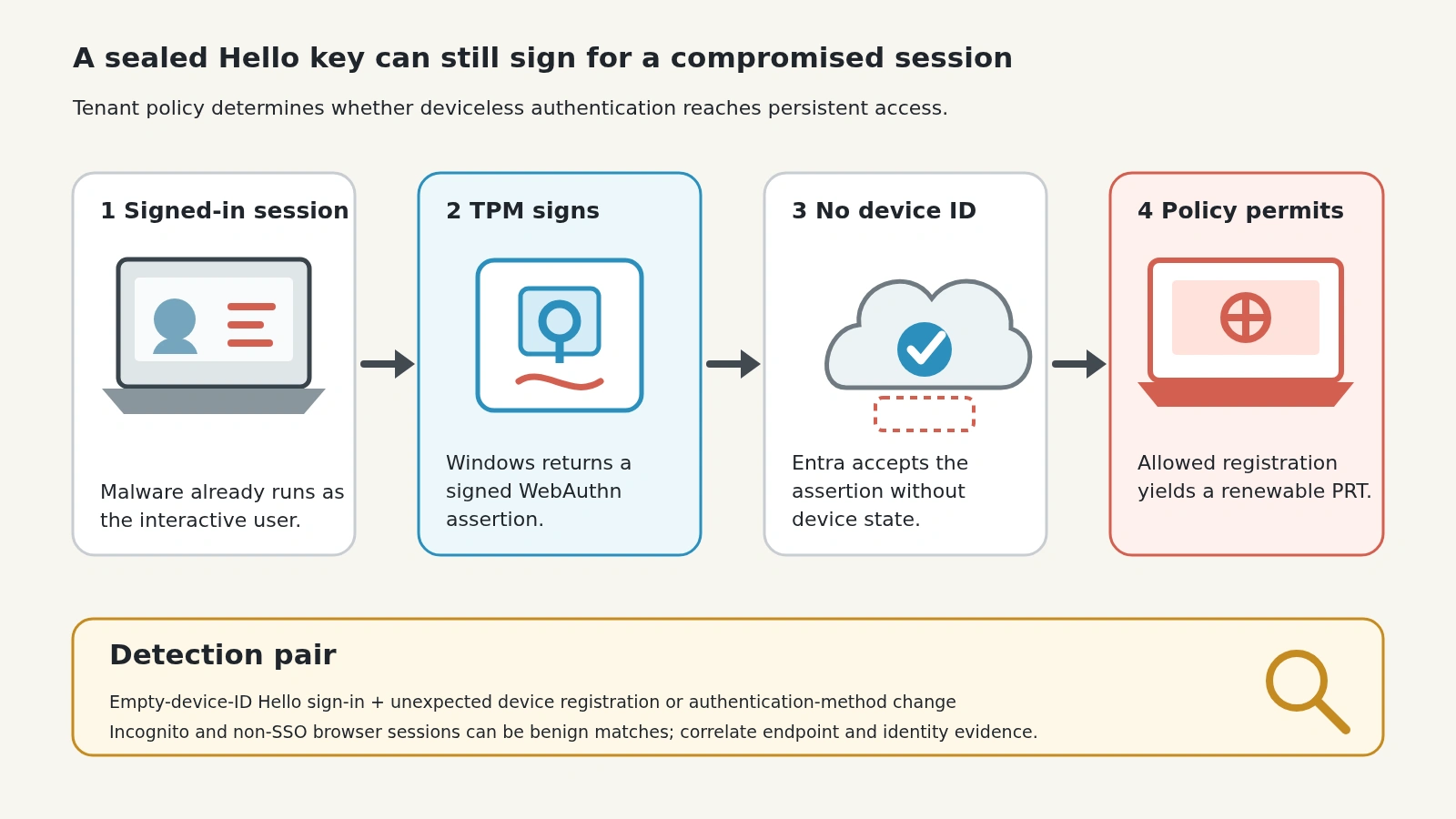
Figure details
Stage one is code running inside a user session already unlocked with Windows Hello for Business. Stage two shows Windows asking the TPM-backed private key to sign a WebAuthn challenge; only the signed assertion leaves the endpoint. Stage three shows cloud authentication accepting the assertion without a device ID claim. Stage four is conditional: where tenant device-state and compliance policy permit registration, the attacker can use that deviceless token to register a new device and obtain a long-lived refresh token. A detection lane highlights Windows Hello for Business sign-ins with an empty device ID and unexpected device registrations shortly afterward.
This full chain is conditional. Device-state or compliance requirements can block deviceless authentication or the later registration path. The researcher says the WebAuthn sign-in can satisfy a Conditional Access policy that asks only for phishing-resistant authentication, so authentication strength alone should not be treated as an endpoint-health check.
Related reporting: Google-synced passkey attacks show an adjacent post-compromise path in which malware already running in a Windows user session asks a different TPM-backed credential system to sign.
Hunt the missing device identity
The clearest published signal is a Windows Hello for Business sign-in with no device ID. Mollema proposes this Microsoft Entra sign-in log query:
SigninLogs
| where AuthenticationDetails has '"authenticationMethod":"Windows Hello for Business"'
| where DeviceDetail.deviceId == ""
That result is not proof of compromise. A legitimate incognito window or browser without single sign-on support can generate the same pattern. Treat it as a correlation point. For each hit, establish the user, source address, client, time, authentication strength, Conditional Access result, and endpoint session that could have produced the signature.
Then look forward from the sign-in. Review device audit records for a new Windows registration or join, authentication-method changes, new passkeys or Windows Hello keys, token activity from unfamiliar systems, and access that continues after the original endpoint should have gone quiet. On the endpoint, correlate the sign-in time with PowerShell, scripting, unusual child processes, implants, and access to Windows cryptography interfaces. The public proof of concept names fido_assertion.ps1 and hellopoc.ps1, but filename-only detection is fragile because an operator can rename or reimplement the code.
Contain endpoint and cloud identity
Both timelines belong together.
The demonstrated path makes endpoint cleanup and cloud-identity review inseparable. A password reset does not address a hardware-backed key that was used while the endpoint was compromised, and a repaired endpoint does not explain cloud changes already made by the account.
The strongest control lesson is that authentication strength and device trust are different facts. A Windows Hello assertion can be genuine even when malware controlled the local session that invoked the key. The public research does not give a CVE or affected-version boundary, so responders should anchor decisions in the endpoint timeline and the Entra activity it produced.
Link endpoint and Entra timelines
Start with the empty device ID.
Run an Entra sign-in hunt where AuthenticationDetails names Windows Hello for Business and DeviceDetail.deviceId is empty. Review each hit for source context, endpoint activity, new device registrations, authentication-method changes, passkey additions, and later token use. Separate benign incognito or non-SSO browser matches from unexplained cloud changes.
Isolate suspicious endpoints and preserve process and PowerShell evidence. Inventory every registered device and authentication method, remove entries that cannot be validated, invalidate suspicious sessions and tokens, and require the intended device state for sensitive access where possible.
A TPM that kept the private key sealed does not prove that malware never used it. Control over the signing context can substitute for possession. If the endpoint timeline and Entra changes do not line up cleanly, defenders should distrust the account state even when the key material never left the chip.