JSCeal contains a complete workflow for rebuilding a victim’s Google browser session, pairing recovered accounts with passwords from the same host, and obtaining a fresh OAuth token. Check Point Research’s August 31 analysis has drawn new September attention because its static deobfuscation of 23 payloads exposes what the compiled malware actually does after it lands.
The target is a Windows user reached through cryptocurrency-themed malvertising. The malware also steals browser passwords and cookies, cryptocurrency data, Telegram sessions, keystrokes, and screenshots, and it can intercept local HTTPS traffic. Check Point saw newer payload protection and a macOS sample, showing continued development, but did not quantify infections or successful Google-account takeovers.
V8 bytecode hides the payload
The Windows chain ends with two ZIP archives. node.zip supplies a bundled Node.js runtime. build.zip contains winpty-agent.exe, winpty.dll, native .node modules, preflight.js, and the Brotli-compressed app.jsc payload. The final PowerShell stage starts it with .\node.exe -r .\preflight.js .\app.jsc.
Before compilation, the JavaScript is processed with javascript-obfuscator. Attackers then ship V8 cached bytecode instead of source, tying analysis to a compatible V8 generation. The payload examined in depth used V8 10.2.154.26-node.25; later samples moved to V8 13.6.233.10-node.28 and added AES encryption whose key arrives through an environment variable from an earlier stage.
Check Point extended the View8 decompiler and built deterministic passes for string recovery, value propagation, control-flow unflattening, proxy resolution, and cleanup. The pipeline produced analyzable output for all 23 samples in its main evaluation. The researchers stress that the recovered pseudocode is not runnable source. As they put it, “The function body, strings, APIs, paths, and data flow remain the evidence.”
That caveat is important around LLM-assisted function naming. Suggested labels help analysts review a large recovered codebase, while the underlying calls and strings establish capability. The recovered modules include filesystem and process control, browser theft, Telegram collection, a local SSL proxy, keylogging, screenshots, terminal access, and system recovery functions.
Stolen profiles feed Google automation
JSCeal enumerates Chrome, Edge, Brave, Opera, Opera GX, Avast Secure Browser, Vivaldi, and Cốc Cốc profiles. In Chrome’s case, it starts at AppData\Local\Google\Chrome\User Data, reads Local State, enumerates profile.info_cache, and collects cookies, logins, sessions, tokens, history, bookmarks, and extensions. Recovered strings include iterInstalledBrowsers, getCookies, getPasswords, findInstalledBrowser, --user-data-dir=, and --profile-directory=.
The Google workflow launches Puppeteer in headless shell mode with stealth and cursor-emulation plugins. It creates a page, injects recovered cookies, and visits the legitimate shared service accounts.google.com at the Android authentication endpoint. JSCeal enumerates accounts shown in that session, correlates each email address with passwords taken from browser storage, and works through sign-in chooser, identifier, password, challenge-selection, and programmatic OAuth routes.
When a password challenge appears, the malware tries the candidate passwords associated with that account. After authentication, it reads the resulting cookies for user_id and oauth_token, returns the password that worked, and stores the token with an ANDROID scope. Stealth automation does not guarantee success. The recovered code still implements the complete sequence.
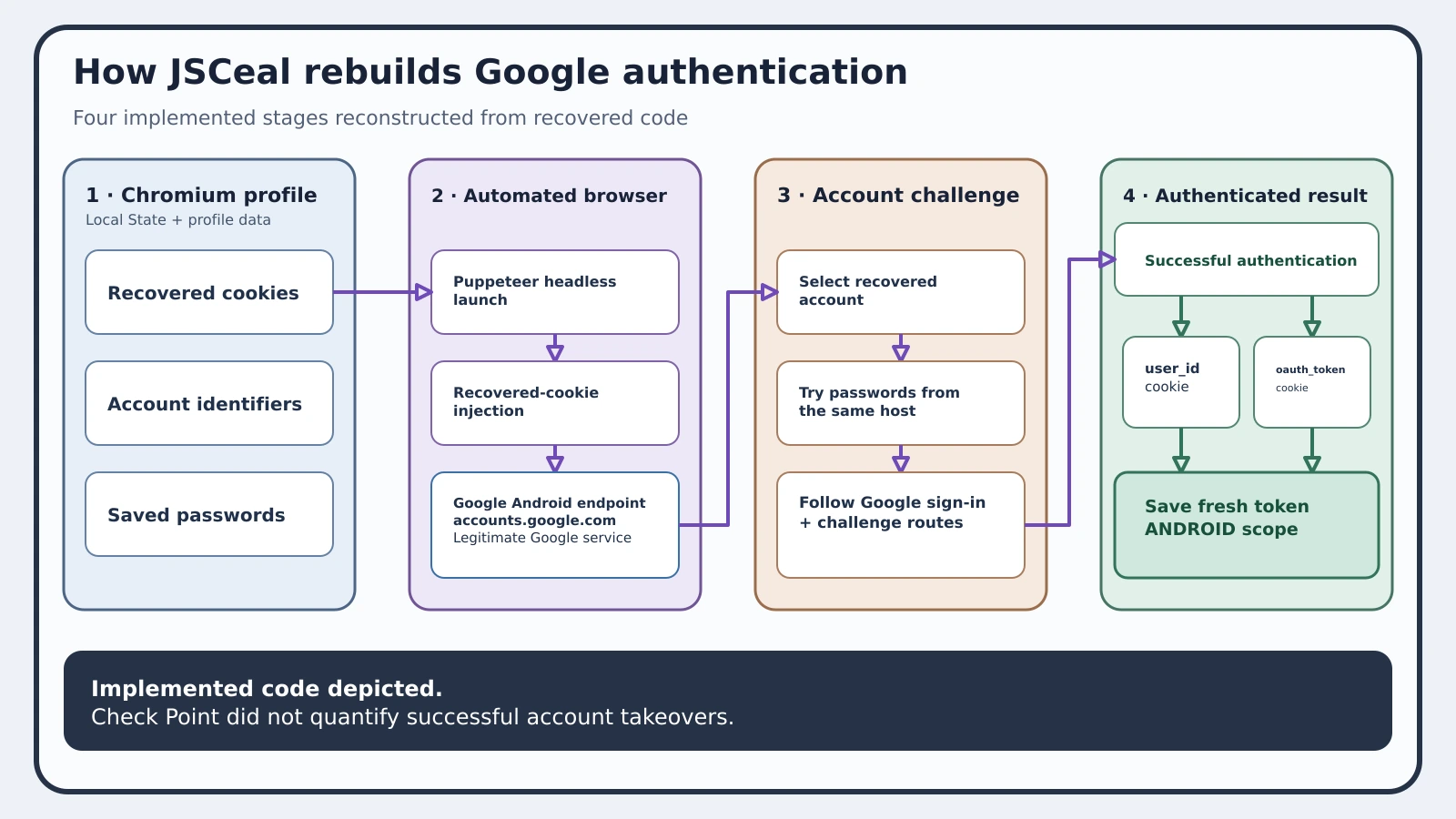
Figure details
JSCeal reads a Chromium profile's Local State file and profile data to recover cookies, account identifiers, and saved passwords. It launches a Puppeteer headless browser, injects the cookies, and opens Google's Android authentication endpoint on accounts.google.com. The automation selects a recovered account, tries passwords from the same host, and follows Google's sign-in and challenge routes. When authentication succeeds, JSCeal reads the user_id and oauth_token cookies and saves the fresh token with an ANDROID scope. The research confirms implemented code but does not quantify successful account takeovers.
Fresh tokens deepen the theft
Copying a cookie database gives an attacker captured state that may expire, be bound to device protections, or fail when replayed. JSCeal goes further: it reconstructs a browser context, combines stolen cookies with stored passwords, automates authentication, and collects a new token from the resulting session.
That sequence links endpoint compromise to identity compromise. Password rotation alone may leave live cookies or OAuth grants usable, while cookie invalidation alone does not address saved passwords, cryptocurrency secrets, or Telegram sessions collected from the same machine. Check Point did not publish one universal recovery condition that proves every captured secret has been revoked.
The browser module is one branch of a larger remote-control framework. A separate component creates a proxy on 127.0.0.1, generates its own certificate, and can install that certificate to intercept HTTPS locally. Other modules capture keyboard input and screenshots or launch additional processes. The sample hash de10c6b3dc4619f59bc9c80a0aa15e6a belongs to a newer macOS-targeting example, while the detailed Windows chain and its host artifacts remain the clearest recognition path in the report.
Trace the staged runtime
Start with endpoints that downloaded or executed the paired Node.js and JSC payload. Search file, archive, PowerShell, and process telemetry for node.zip, build.zip, app.jsc, preflight.js, winpty-agent.exe, winpty.dll, and the command signature .\node.exe -r .\preflight.js .\app.jsc.
Distinguish a downloaded archive from execution. The process chain and the -r preload command establish that the bytecode was actually launched.
On a suspected host, preserve Chromium Local State and profile metadata before cleanup. Look for unusual Node.js children, hidden PowerShell with Base64 decoding, Puppeteer activity, browser launches using --user-data-dir= or --profile-directory=, and a listener bound to 127.0.0.1 with locally generated certificate material. Account for access to accounts.google.com in context; it is a legitimate Google service abused by the malware, not attacker-controlled infrastructure.
Use the source’s 23-sample corpus and sample hashes to seed hunting, then pivot from any match to process ancestry, downloaded archives, browser profile access, token use, and follow-on network activity. A missed hash does not clear a system because the report documents multiple payload generations and an added encryption layer.
Revoke the captured identity state
Isolate a host once the staged runtime or its execution chain is confirmed. Revoke Google sessions and OAuth tokens, reset passwords from a trusted device, and review account security events for new tokens, sign-ins, or grants associated with the exposure window. Apply the same treatment to cryptocurrency wallets, Telegram sessions, and other browser-held secrets present on that endpoint.
Rebuild or restore the machine from a trusted state after preserving the malware, process tree, profile access, local certificate changes, and identity telemetry. Check Point’s report enables strong recognition and exposure scoping, but it does not provide a single source-backed test for complete recovery. Defenders therefore need separate evidence that the endpoint is clean and that each affected identity surface has been invalidated.
JSCeal’s most consequential move happens after the initial browser theft: it uses several weakly independent secrets from one host to mint new authentication state. Recovery has to break that chain at both ends. Cleaning the executable without revoking sessions leaves the identity incident open; revoking one Google token without accounting for the compromised endpoint leaves the source of theft intact.