On August 4, Microsoft reported that Defender isolated one compromised QNET workstation 128 seconds after two detections fired at 09:23:20 UTC. The host had executed attacker-controlled content through mshta[.]exe, contacted remote infrastructure, and shown RunMRU registry activity. Microsoft says isolation stopped further payload retrieval, persistence, command-and-control traffic, and lateral movement.
Eight days later, the report remains actionable because automatic device isolation is still a preview action limited to onboarded and managed Microsoft Defender for Endpoint end-user workstations. Microsoft evaluated its own product in this single-customer case study. The source URL says 129-seconds, while the displayed headline, attack-chain table, and total all say 128 seconds.
One workstation triggered two detections
One workstation triggered both engines.
Microsoft reports that a QNET user opened a malicious file, probably delivered through email or a browser download. The file started mshta[.]exe, a signed Windows utility that can run HTML Application and script content. The process contacted an attacker-controlled URL, retrieved a second stage, and executed it in the user’s context.
Defender also recorded suspicious commands and RunMRU registry interaction consistent with attempted user-level persistence preparation. Microsoft maps the observed chain to user execution, Mshta proxy execution, web protocols, command and scripting, registry modification, and process discovery.
Those observations establish code execution and outbound communication on one host. Microsoft did not report that ransomware encryption began. It described a multi-stage attack with ransomware potential and said isolation prevented the second stage from establishing persistence or spreading beyond the workstation.
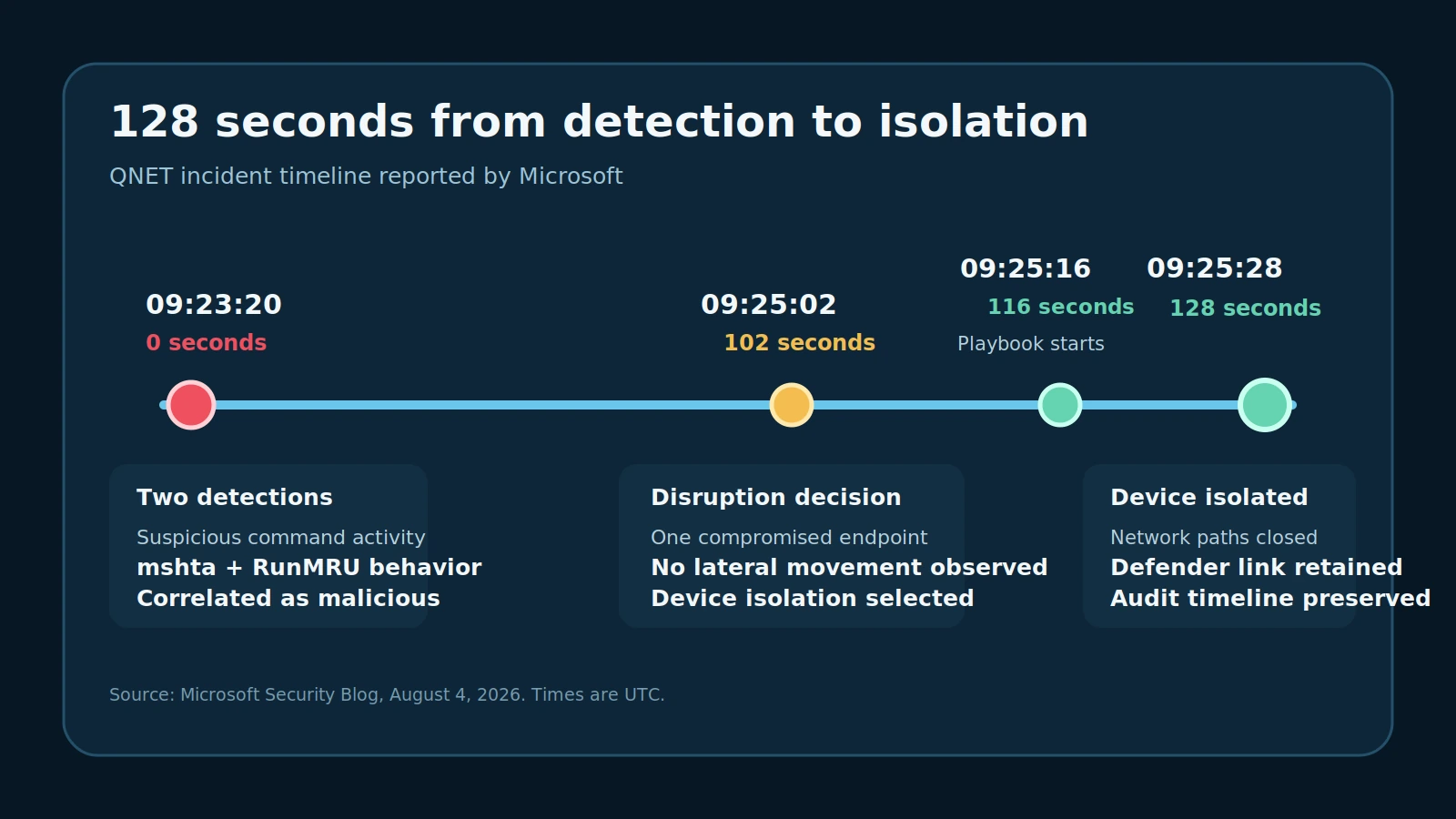
Figure details
At 09:23:20 UTC, Defender recorded two detections involving suspicious command activity, mshta, and RunMRU behavior. At 09:25:02, 102 seconds later, the disruption pipeline chose device isolation for the single compromised endpoint. The IsolateDevice playbook began at 09:25:16 and completed at 09:25:28. Total elapsed time was 128 seconds.
Defender finished isolation in 128 seconds
Most of the time went to correlation.
At 09:25:02, 102 seconds after detection, Defender assessed the incident as malicious code executing on one endpoint with no observed lateral movement. It selected device isolation. The IsolateDevice playbook began 14 seconds later and finished after another 12 seconds, at 09:25:28.
Isolation removed internal and external network connectivity while retaining the management connection Defender needed to monitor the host. Microsoft says communication with attacker infrastructure ended immediately. It observed no further payload download, outbound command-and-control traffic, persistence, or lateral movement.
Ben Bredenkamp, QI Group’s group CIO, said device isolation was “triggered almost immediately.” The QNET analyst inherited a contained endpoint and a complete action timeline instead of an active race to disconnect it.
One case sets no benchmark
The result is narrow.
Microsoft published no malicious filename, URL, hash, payload family, ransomware family, actor, or complete customer configuration. Its evidence covers one QNET workstation and one incident. The 128-second interval is a measured case result, not a response-time commitment for other environments.
Device isolation closes the host’s network paths. It does not remove malicious files, revoke a compromised identity, explain initial access, or establish that other devices are clean. Microsoft presents device and user containment as complementary controls.
Test isolation on eligible workstations
Test the enforcement path before an incident.
Inventory Microsoft Defender for Endpoint onboarding and management state across end-user workstations. Identify unsupported, unenrolled, excluded, or business-critical systems that need another containment path. Confirm that automatic attack disruption is enabled and that operators can see response actions in the incident Activity tab, Action center, and affected device page.
Review operational dependencies before relying on isolation. Microsoft says an isolated device keeps its Defender for Endpoint connection, and selective isolation exclusions can preserve specified processes and network destinations. Record who can approve release and which critical communications must remain available.
Use a safe, authorized representative workstation for a manual isolation-and-release exercise. Verify that ordinary internal and internet access stops, the device continues reporting to Defender, the action appears in Action center, and an authorized operator can restore service. This exercise checks endpoint enforcement and recovery; it does not reproduce Microsoft’s automatic high-confidence verdict.
Hunt the chain and finish scope
Start with process and registry behavior.
Hunt for unusual mshta[.]exe execution from user-delivered files, uncommon parent processes, email clients, browsers, archive utilities, or user-writable locations. Correlate it with new remote destinations, HTTP or HTTPS traffic, later command interpreters, downloaded content, suspicious commands, and RunMRU changes.
These observations are investigation leads. mshta[.]exe has legitimate administrative uses, and RunMRU records commands entered through the Windows Run dialog. An uncommon parent-child chain gains weight when it appears with a new destination, script execution, persistence preparation, or an alert cluster on the same device.
After an automatic isolation, preserve the incident Activity record, Action center history, initiating file, process tree, mshta[.]exe command line, remote destinations, downloaded content, and relevant registry changes. Scope the same artifacts across other endpoints and review the affected identity for token, credential, and sign-in abuse.
A passing exercise ends with ordinary network access blocked, Defender reporting intact, an audit record in Action center, and a successful authorized release. After a real isolation, restore normal connectivity after host, identity, initial access, and fleet scope are resolved.