
August 23, 2026. A full public exploit suite now demonstrates how, before KB38232642, a standard Active Directory domain user can reach SYSTEM on a Microsoft Configuration Manager primary site server. XM Cyber’s research chains a missing permission check with three downstream weaknesses, putting the management plane for an organization’s Windows fleet at risk.
The vendor fixed the first link through KB38232642, and the Microsoft advisory did not report exploitation when it was published. Neither Microsoft nor the cited researchers has since reported attacks in the wild. The cited record leaves the number of affected sites or deployments unquantified by Microsoft and XM Cyber. Public working code raises the urgency because an unpatched site no longer presents only a demonstrated research path.
Four links reach SYSTEM
Configuration Manager exposes an HTTPS administration service through the SMS Provider. Console extensions arrive as signed cabinet files, and the service offers both a single-upload method and a chunked method. XM Cyber researcher Omri Baso found that the single-upload route checked for Create permission on SMS_ConsoleExtensionData; UploadExtensionInChunks did not.
That omission is CVE-2026-47301. Before the update, any authenticated domain user who could reach the AdminService could post a cabinet through the chunked endpoint. XM Cyber summarized the consequence: “One HTTP POST from an unprivileged user, and within seconds an attacker has control over the site server.”
The accepted cabinet still has to cross three controls. Configuration Manager accepts any valid Authenticode signature that chains to a trusted root and disables certificate-revocation checking. Baso’s “CabSlip” technique then uses a cabinet destination directive to escape the extraction directory and gain arbitrary file write. Finally, SMS Executive validates adsysdis.dll but does not independently validate the adsource.dll dependency that it loads. Replacing that dependency puts attacker-controlled code inside a SYSTEM service.
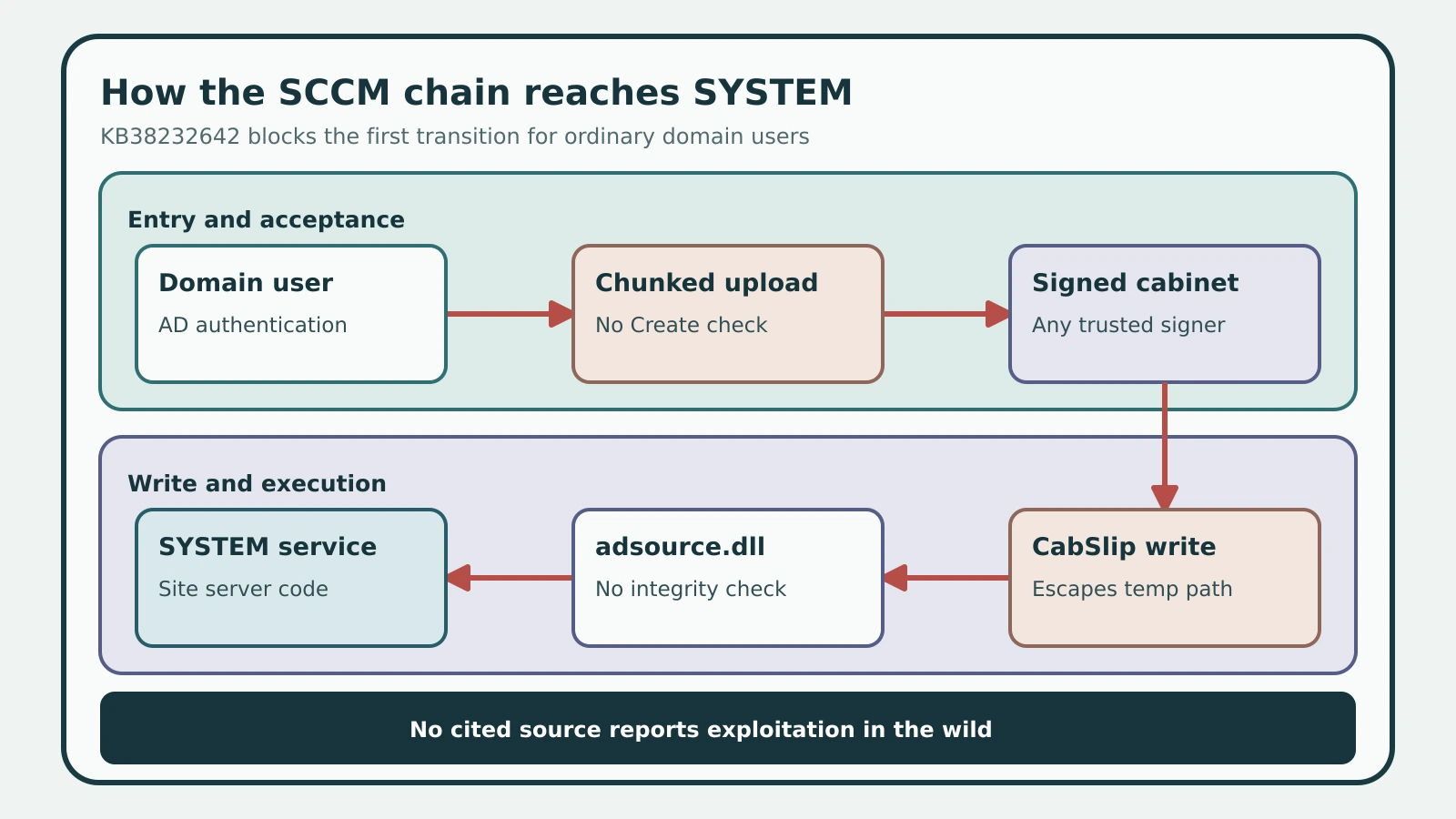
Figure details
A left-to-right chain starts with an authenticated domain user. The user reaches the chunked console-extension upload route, which lacked the Create permission check before KB38232642. A permissive Authenticode check accepts the cabinet, CabSlip writes files outside the extraction directory, and SMS Executive loads a replaced adsource.dll as SYSTEM. The Microsoft update blocks the first transition for ordinary domain users. Principals with console-extension Create permission can still reach the downstream links described by XM Cyber. The figure's footer labels exploitation in the wild as unreported by every cited source.
The update cuts one link
KB38232642 restores the missing authorization check. Microsoft delivers it directly through Updates and Servicing for Configuration Manager 2603. Version 2503 needs update rollup KB32851084 first, while version 2509 receives the fix in its second update rollup, KB37864969. Microsoft says installation requires neither a computer restart nor a site reset.
The fixed build floors are specific:
- 2503:
5.0.9135.1031 - 2509:
5.0.9141.1030 - 2603:
5.0.9146.1021
The update changes who can start the chain. XM Cyber says an account with Create permission on SMS_ConsoleExtensionData can use the checked upload route and continue through the remaining certificate, extraction, and DLL-load links. The built-in Operations Administrator role carries that permission. Microsoft planned broader work for Configuration Manager 2609, according to XM Cyber, but defenders should treat that as a vendor plan until the shipped release proves which behaviors changed.
Find attempts on both hosts
Recognition starts on the SMS Provider, where AdminService receives requests. Search <Configuration Manager installation directory>\Logs\AdminService.log for console-extension uploads, cleanup failures, and HTTP 500 responses. Extension imports are uncommon enough that the caller and change record should be explainable.
Run this locally on each SMS Provider after confirming its installation path:
$AdminServiceLog = 'C:\Program Files\Microsoft Configuration Manager\Logs\AdminService.log'

Select-String -Path $AdminServiceLog `
  -Pattern 'UploadExtension|DirectoryNotFoundException|response code \[500\]' |
  Select-Object LineNumber, Line
Baso observed System.IO.DirectoryNotFoundException when CabSlip redirected extracted files and cleanup later failed. One malformed legitimate import can produce noise. Repeated 500 responses with changing extraction identifiers, an unfamiliar User - value, or uploads outside an approved change window deserve investigation.
The SMS Provider and primary site server may be different computers. The published chain describes a topology where the provider-side upload and site-server DLL-load path line up. For split deployments, treat the end-to-end path as unproven and inspect both hosts. On the site server, inspect <Configuration Manager installation directory>\bin\x64 for unexpected changes to adsource.dll, especially a fresh unsigned replacement beside a renamed copy such as adsource_original.dll. adsysdis.dll is the signed parent library in the published load path. A third-party-signed DLL alone is not proof of compromise; compare signer, write time, extension inventory, and the site update window.
Verify the live site build
Forestall’s defensive analysis recommends reading the live SMS_Site.Version value because a deployment receipt is only a claim about what should have installed. The following read-only query resolves the local site and compares its reported build with the three fixed floors:
$loc = Get-CimInstance -Namespace 'root\SMS' -ClassName SMS_ProviderLocation |
  Where-Object ProviderForLocalSite | Select-Object -First 1
$ns = "root\SMS\site_$($loc.SiteCode)"
$fixed = @{ '9135' = 1031; '9141' = 1030; '9146' = 1021 }

Get-CimInstance -ComputerName $loc.Machine -Namespace $ns -ClassName SMS_Site |
  Select-Object SiteCode, ServerName, Version,
    @{ n='Status'; e={
      $p = $_.Version -split '\.'
      if (-not $fixed.ContainsKey($p[2])) { 'Unknown branch, check manually' }
      elseif ([int]$p[3] -ge $fixed[$p[2]]) { 'Fixed' }
      else { "AFFECTED (needs $($p[0]).$($p[1]).$($p[2]).$($fixed[$p[2]]))" }
    } }
The expected result is Fixed for every supported primary site in scope. An AFFECTED result requires the applicable update. An unknown branch needs manual comparison with Microsoft’s current Security Update Guide rather than an assumption that newer or older means safe.
Treat SCCM as control plane
After the version check passes, restrict HTTPS access to each SMS Provider to the console and approved automation estate. Audit Operations Administrator, Full Administrator, and custom roles for console-extension Create permission, including nested Active Directory groups. Baseline the Console Extensions inventory and the signature, hash, and write time of adsource.dll on every primary site server.
A Configuration Manager site can deploy applications, scripts, and task sequences across its assigned devices. Its true blast radius is the fleet it manages. A fixed build removes the low-privilege entry point; disciplined provider access, RBAC review, and site-server file integrity are the controls that contain the remaining published path while Microsoft finishes the downstream repairs.